


Tango MCP
Vendor MCP5 toolsAPI KeySearchAnalyticsConnect to Tango MCP by makegov to search federal contracts, opportunities, vehicles, organizations, and protests, and pull competitive...
Tango MCP connector
-
Install the SDK
Section titled “Install the SDK”Terminal window npm install @scalekit-sdk/nodeTerminal window pip install scalekit -
Set your credentials
Section titled “Set your credentials”Add your Scalekit credentials to your
.envfile. Find values in app.scalekit.com > Developers > API Credentials..env SCALEKIT_ENVIRONMENT_URL=<your-environment-url>SCALEKIT_CLIENT_ID=<your-client-id>SCALEKIT_CLIENT_SECRET=<your-client-secret> -
Set up the connector
Section titled “Set up the connector”Register your Tango MCP credentials with Scalekit so it can authenticate requests on your behalf. You do this once per environment.
Dashboard setup steps
Register your Tango API key with Scalekit so it can authenticate and proxy federal procurement data requests on behalf of your users. Tango MCP uses API key authentication — there is no redirect URI or OAuth flow.
-
Get a Tango API key
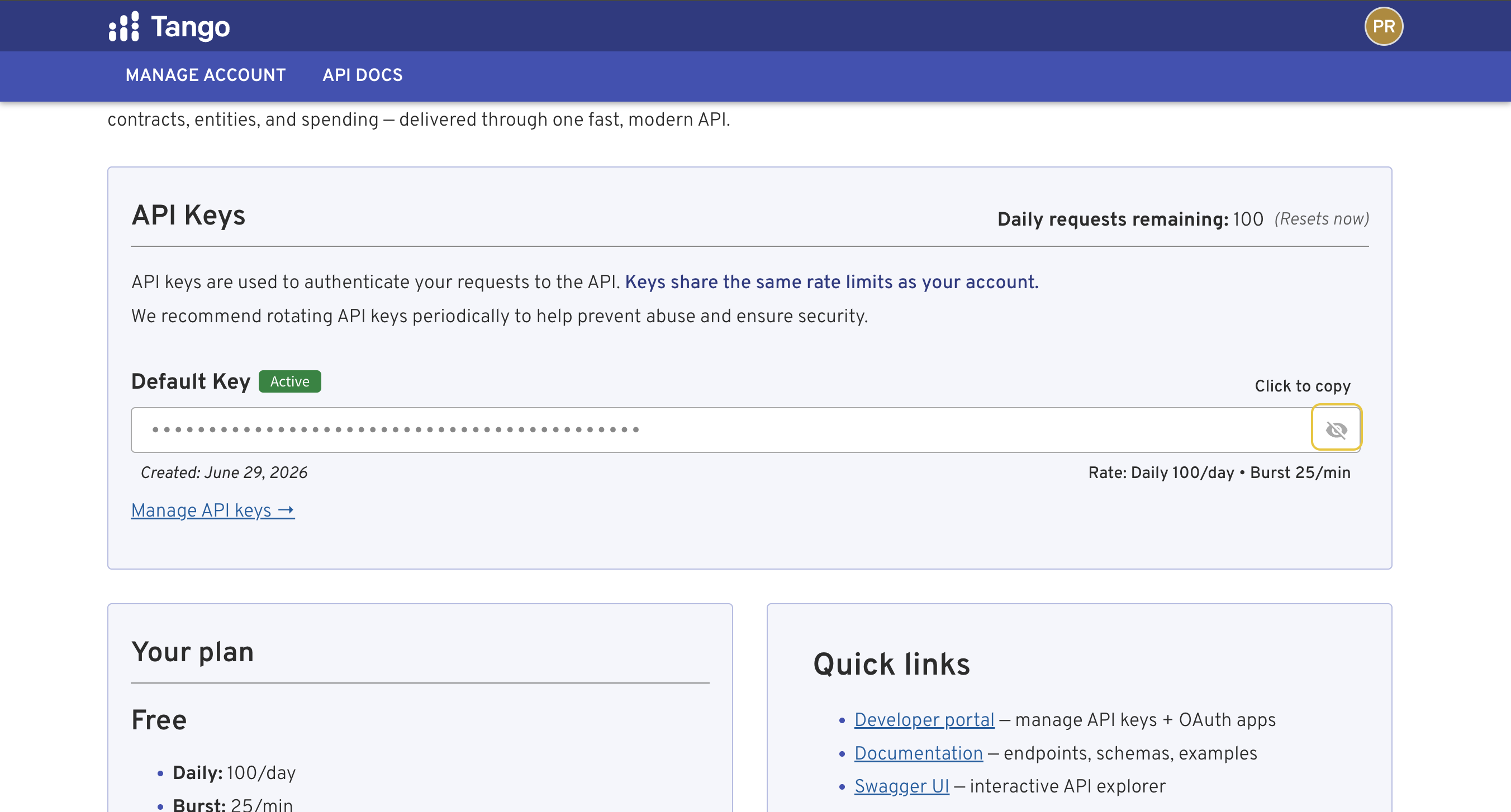
- Go to the Tango developer portal and sign in.
- Click Manage Account in the top navigation.
- Under API Keys, your Default Key is shown — click Click to copy to copy it.
- To create additional keys, click Manage API keys →.
-
Create a connection in Scalekit
- In the Scalekit dashboard, go to AgentKit → Connections → Create Connection.
- Search for Tango MCP and click Create.
- Note the Connection name — use this as
connection_namein your code (e.g.,tangomcp).
-
Add a connected account
Connected accounts link a specific user identifier in your system to a Tango API key. Add them via the dashboard for testing, or via the Scalekit API in production.
Via dashboard (for testing)
- Open the connection and click the Connected Accounts tab → Add account.
- Fill in Your User’s ID and API Key, then click Save.
Via API (for production)
await scalekit.connect.upsertConnectedAccount({connectionName: 'tangomcp',identifier: 'user@example.com',credentials: { apiKey: 'your-tango-api-key' },})scalekit_client.connect.upsert_connected_account(connection_name="tangomcp",identifier="user@example.com",credentials={"api_key": "your-tango-api-key"},)
-
-
Make your first call
Section titled “Make your first call”quickstart.ts import { ScalekitClient } from '@scalekit-sdk/node'import 'dotenv/config'const scalekit = new ScalekitClient(process.env.SCALEKIT_ENV_URL,process.env.SCALEKIT_CLIENT_ID,process.env.SCALEKIT_CLIENT_SECRET,)const actions = scalekit.actionsconst connector = 'tangomcp'const identifier = 'user_123'// Make your first callconst result = await actions.executeTool({connector,identifier,toolName: 'tangomcp_search',toolInput: {},})console.log(result)quickstart.py import osfrom scalekit.client import ScalekitClientfrom dotenv import load_dotenvload_dotenv()scalekit_client = ScalekitClient(env_url=os.getenv("SCALEKIT_ENV_URL"),client_id=os.getenv("SCALEKIT_CLIENT_ID"),client_secret=os.getenv("SCALEKIT_CLIENT_SECRET"),)actions = scalekit_client.actionsconnection_name = "tangomcp"identifier = "user_123"# Make your first callresult = actions.execute_tool(tool_input={},tool_name="tangomcp_search",connection_name=connection_name,identifier=identifier,)print(result)
What you can do
Section titled “What you can do”Connect this agent connector to let your agent:
- Search opportunities — Search open federal pre-award procurement records — SAM.gov opportunities, procurement forecasts, DLA DIBBS RFQs/RFPs, and SBIR/STTR topics and solicitations
- Resolve records — Find entities, vehicles, NAICS/PSC codes, GSA MAS SINs, contracts, opportunities, IDVs, OTAs, subawards, organizations, and GAO bid protests matching a search query
- Get details — Get detailed information about a single item — entity, contract, IDV, vehicle, opportunity, OTA, OTIDV, organization, protest, SIN, GSA eLibrary contract, IT investment, NAICS/PSC code, budget account, DIBBS RFQ/RFP/award, SAM exclusion, or SBIR topic/solicitation
- Fetch api docs — Fetch detailed Tango API documentation for a specific section
Tool list
Section titled “Tool list”Use the exact tool names from the Tool list below when you call execute_tool. If you’re not sure which name to use, list the tools available for the current user first.
tangomcp_fetch_api_docs#Fetch detailed Tango API documentation for a specific section. Use when you need the full list of filtering parameters, valid enum values, ordering options, response shaping syntax, or advanced query patterns beyond what the tool descriptions provide.1 param
Fetch detailed Tango API documentation for a specific section. Use when you need the full list of filtering parameters, valid enum values, ordering options, response shaping syntax, or advanced query patterns beyond what the tool descriptions provide.
sectionstringrequiredDocumentation section to retrieve. Valid values: 'budget_accounts', 'contracts', 'entities', 'forecasts', 'gsa-elibrary', 'idvs', 'itdashboard', 'lcats', 'metrics', 'opportunities', 'otas', 'otidvs', 'protests', 'resolve', 'response-shaping', 'subawards', 'vehicles'.tangomcp_get_details#Get detailed information about a single item — entity, contract, IDV, vehicle, opportunity, OTA, OTIDV, organization, protest, SIN, GSA eLibrary contract, IT investment, NAICS/PSC code, budget account, DIBBS RFQ/RFP/award, SAM exclusion, or SBIR topic/solicitation. Use after search or resolve to drill into a specific record, optionally enriched with related data.9 params
Get detailed information about a single item — entity, contract, IDV, vehicle, opportunity, OTA, OTIDV, organization, protest, SIN, GSA eLibrary contract, IT investment, NAICS/PSC code, budget account, DIBBS RFQ/RFP/award, SAM exclusion, or SBIR topic/solicitation. Use after search or resolve to drill into a specific record, optionally enriched with related data.
idstringrequiredThe identifier for the item — UEI, contract key, IDV key, vehicle UUID, opportunity ID, OTA key, OTIDV key, organization FH key, SIN code, GSA eLibrary contract UUID, IT investment UII, NAICS code, PSC code, or budget account id.typestringrequiredThe item type to retrieve details for. Note: 'subaward' is not supported here — use the search tool with type='subaward' and award_key filter instead.attachment_idsstringoptionalOpportunity only. Comma-separated attachment resource_ids (or exact filenames) to pull full extracted text for — the targeted alternative to include_attachment_text when you only need specific documents (Pro-tier).attachment_offsetintegeroptionalOpportunity only, used with attachment_ids. Character offset into each selected document's extracted text — pass the next_offset reported under attachment_text.partial[] to continue reading a document larger than the per-call budget. Ignored without attachment_ids.fieldsstringoptionalResponse shape for the primary item — comma-separated field names with optional nesting syntax (same as the search tool). Omit for comprehensive defaults.include_attachment_textbooleanoptionalOpportunity only. When true, pulls the full extracted text of ALL file attachments inline (Pro-tier), capped by a per-call character budget.include_relatedbooleanoptionalWhen true, enriches the response with related data from multiple endpoints (e.g. child awards for IDVs, socioeconomic status for entities, related opportunities for protests).monthsintegeroptionalTrailing window in months for spending-trend metrics (applies to entity, naics, and psc types). Default 24.periodstringoptionalMetric bucketing period for time-series data — 'year', 'quarter', or 'month'. Default 'year'.tangomcp_resolve#Find entities, vehicles, NAICS/PSC codes, GSA MAS SINs, contracts, opportunities, IDVs, OTAs, subawards, organizations, and GAO bid protests matching a search query. Use this tool first when you have a name or keyword and need to discover what's in the data — returns identifiers (UEI, organization key, etc.) you can use with other tools.3 params
Find entities, vehicles, NAICS/PSC codes, GSA MAS SINs, contracts, opportunities, IDVs, OTAs, subawards, organizations, and GAO bid protests matching a search query. Use this tool first when you have a name or keyword and need to discover what's in the data — returns identifiers (UEI, organization key, etc.) you can use with other tools.
querystringrequiredFree text search — company name, organization name, vehicle name, NAICS code or keyword, PSC code, SIN code, etc.limitintegeroptionalMaximum number of results to return per entity type. Defaults to 5.typestringoptionalOptional filter to restrict search to a specific entity type. When omitted, searches all types except itdashboard.tangomcp_search#Search contracts, IDVs, vehicles, GSA eLibrary Schedule holders, CALC labor rates, OTAs, OTIDVs, subawards, organizations, GAO bid protests, federal grants, federal budget accounts, DIBBS awards, SAM exclusions (debarments), and SAM entity registrations (vendors). This is the primary data retrieval tool — use it to find records by vendor, organization, NAICS/PSC code, date range, or type-specific filters. Set include_summary=true to get aggregate statistics computed across a hard-capped sample of matching records. For appropriations data use type='budget_account'; for labor rate benchmarking use type='lcat'; for GSA Schedule holder lookups use type='gsa_elibrary'; for vendor debarment checks use type='exclusion'; for DLA parts spending use type='dibbs_award'; for vendor population/attribute queries use type='entity'.119 params
Search contracts, IDVs, vehicles, GSA eLibrary Schedule holders, CALC labor rates, OTAs, OTIDVs, subawards, organizations, GAO bid protests, federal grants, federal budget accounts, DIBBS awards, SAM exclusions (debarments), and SAM entity registrations (vendors). This is the primary data retrieval tool — use it to find records by vendor, organization, NAICS/PSC code, date range, or type-specific filters. Set include_summary=true to get aggregate statistics computed across a hard-capped sample of matching records. For appropriations data use type='budget_account'; for labor rate benchmarking use type='lcat'; for GSA Schedule holder lookups use type='gsa_elibrary'; for vendor debarment checks use type='exclusion'; for DLA parts spending use type='dibbs_award'; for vendor population/attribute queries use type='entity'.
account_titlestringoptionalAccount title contains filter for budget account searches.activate_date_afterstringoptionalActivation date lower bound, YYYY-MM-DD (exclusion type only).activate_date_beforestringoptionalActivation date upper bound, YYYY-MM-DD (exclusion type only).activestringoptionalWhen true, restrict to exclusions in force today, derived at query time from the activate/termination dates (exclusion type only). A lapsed exclusion is not a change to the record.agency_codestringoptionalInteger CGAC agency code for itdashboard filter (itdashboard type only; Pro+ tier). Use keyword for free-tier text search.agency_namestringoptionalText match on itdashboard agency name (itdashboard type only; Business+ tier).award_date_endstringoptionalAward date range end (YYYY-MM-DD).award_date_startstringoptionalAward date range start (YYYY-MM-DD).award_keystringoptionalFilter subawards by parent contract key (subaward type only).award_numberstringoptionalDIBBS award number, exact (dibbs_award type only). Use '|' for OR.award_typestringoptionalAward type code to filter by (e.g. 'A' for BPA Call, 'B' for Purchase Order, 'C' for Delivery Order, 'D' for Definitive Contract).awardee_cagestringoptionalAwardee CAGE code (dibbs_award type only).awarding_orgstringoptionalFilter by awarding organization — accepts a CGAC code (e.g. '7530' for CMS, '9700' for DOD), name, or abbreviation. Department codes roll up all agencies within that department.bea_categorystringoptionalBEA (Bureau of Economic Analysis) category filter for budget account searches (e.g. 'Discretionary', 'Mandatory').bureau_namestringoptionalBureau name filter for budget account searches.business_sizestringoptionalFilter by business size code (lcat type only).cage_codestringoptionalCAGE code filter (exclusion type only).cfda_numberstringoptionalAssistance Listing (CFDA) number filter for grant searches.cgacstringoptionalFilter organizations by CGAC (Common Government-wide Accounting Classification) code (organization type only).cio_ratingstringoptionalExact CIO risk rating filter: 1=high risk, 5=low risk (itdashboard type only; Business+ tier).cio_rating_maxstringoptionalMaximum CIO rating threshold — returns investments at or below this rating (itdashboard type only; Business+ tier).classification_typestringoptionalExclusion classification type (exclusion type only).contract_numberstringoptionalFilter by GSA contract number (gsa_elibrary type only).decision_date_endstringoptionalProtest decision date range end, YYYY-MM-DD (protest type only).decision_date_startstringoptionalProtest decision date range start, YYYY-MM-DD (protest type only).delistedstringoptionalFilter by delisted status (exclusion type only).delivery_order_numberstringoptionalDIBBS delivery order number (dibbs_award type only).docket_numberstringoptionalFilter protests by GAO docket number (protest type only).education_levelstringoptionalFilter labor rates by education level requirement (lcat type only).entity_statestringoptionalUS state filter for entity registrations (entity type only).entity_ueistringoptionalEntity UEI for labor rate lookup (lcat type only). Either idv_key or entity_uei is required for lcat searches.excluding_agency_codestringoptionalExcluding agency code (exclusion type only).excluding_agency_namestringoptionalExcluding agency name (exclusion type only).exclusion_programstringoptionalExclusion program filter (exclusion type only).exclusion_typestringoptionalExclusion type filter (exclusion type only).expiring_endstringoptionalExpiration date range end (YYYY-MM-DD). Filter contracts or IDVs expiring on or before this date.expiring_startstringoptionalExpiration date range start (YYYY-MM-DD). Filter contracts or IDVs expiring on or after this date.federal_account_symbolstringoptionalExact federal account symbol (budget_account type). Format: CGAC-MAIN-SUB.fieldsstringoptionalResponse shape — comma-separated field names with optional nesting to control which fields are returned per record. Example: 'key,piid,recipient(display_name),obligated'.filed_date_endstringoptionalProtest filing date range end, YYYY-MM-DD (protest type only).filed_date_startstringoptionalProtest filing date range start, YYYY-MM-DD (protest type only).fiscal_yearstringoptionalExact fiscal year match (e.g. 2024).fiscal_year_endstringoptionalFiscal year range end (inclusive).fiscal_year_startstringoptionalFiscal year range start (inclusive).funding_instrumentsstringoptionalFunding instrument filter for grant searches (e.g. 'Grant', 'Cooperative Agreement').funding_orgstringoptionalFilter by funding organization (code, name, or abbreviation). More reliable than awarding_org for finding contracts that serve a particular mission organization.grant_idstringoptionalExact grant identifier for grant searches.idv_count_maxstringoptionalMaximum number of award IDVs under the vehicle (vehicle type only).idv_count_minstringoptionalMinimum number of award IDVs under the vehicle (vehicle type only).idv_keystringoptionalIDV contract key for labor rate lookup (lcat type only). Either idv_key or entity_uei is required for lcat searches.idv_typestringoptionalIDV type filter (idv type only). Examples: 'IDC' (Indefinite Delivery Contract), 'BPA' (Blanket Purchase Agreement), 'BOA' (Basic Ordering Agreement), 'FSS' (Federal Supply Schedule), 'GWAC' (Government-Wide Acquisition Contract).include_inactivestringoptionalInclude inactive organizations in results (organization type only). Defaults to false.include_summarybooleanoptionalWhen true, computes aggregate stats across up to 500 matching records: total obligated, vendor count, set-aside distribution, NAICS distribution, and organization distribution.investment_typestringoptionalFilter itdashboard records by investment type string, e.g. 'Major Investments' (itdashboard type only; Pro+ tier).keywordstringoptionalFull-text search across descriptions and other text fields.labor_categorystringoptionalFilter labor rates by category name (lcat type only).last_date_to_order_endstringoptionalLast date to order range end (YYYY-MM-DD). Applies to IDV and vehicle searches.last_date_to_order_startstringoptionalLast date to order range start (YYYY-MM-DD). Applies to IDV and vehicle searches.levelstringoptionalFilter organizations by hierarchy level (organization type only). 1=department, 2=agency, 3=bureau, etc.limitintegeroptionalMaximum number of results to return. Defaults to 25.min_years_experience_gtestringoptionalMinimum experience floor — filter labor rates requiring at least this many years of experience (lcat type only).min_years_experience_ltestringoptionalMaximum experience ceiling — filter labor rates requiring at most this many years of experience (lcat type only).naics_codestringoptionalFilter by NAICS (North American Industry Classification System) code.npistringoptionalNational Provider Identifier filter (exclusion type only).nsnstringoptionalNational Stock Number, exact (dibbs_award type only). Use '|' for OR.obligated_gtestringoptionalObligated amount in USD — greater than or equal to. Filter for contracts with at least this obligation.obligated_ltestringoptionalObligated amount in USD — less than or equal to. Filter for contracts with at most this obligation.on_off_budgetstringoptionalOn/off-budget flag filter for budget account searches.opportunity_numberstringoptionalGrant opportunity number filter.orderstringoptionalSort direction — 'asc' or 'desc'. Defaults to 'desc' (most recent/largest first).order_count_maxstringoptionalMaximum number of task orders under the vehicle (vehicle type only).order_count_minstringoptionalMinimum number of task orders under the vehicle (vehicle type only).org_typestringoptionalFilter organizations by type string (organization type only).organizationstringoptionalFederal-hierarchy key of the buying organization (dibbs_award type only). Always DLA.outcomestringoptionalFilter protests by outcome (protest type only). Valid values: 'Denied', 'Dismissed', 'Withdrawn', 'Sustained'.parentstringoptionalFilter organizations by parent organization key (organization type only).part_numberstringoptionalManufacturer part number, exact (dibbs_award type only).performance_riskstringoptionalWhen true, return only itdashboard investments with at-risk performance metrics (itdashboard type only; Business+ tier).piidstringoptionalProcurement Instrument Identifier — the contract number.pop_end_date_endstringoptionalPeriod of performance end date range — upper bound (YYYY-MM-DD).pop_end_date_startstringoptionalPeriod of performance end date range — lower bound (YYYY-MM-DD).pop_start_date_endstringoptionalPeriod of performance start date range — upper bound (YYYY-MM-DD).pop_start_date_startstringoptionalPeriod of performance start date range — lower bound (YYYY-MM-DD).posted_date_afterstringoptionalPosted date lower bound, YYYY-MM-DD (dibbs_award type only).posted_date_beforestringoptionalPosted date upper bound, YYYY-MM-DD (dibbs_award type only).posted_date_endstringoptionalPosted date upper bound (YYYY-MM-DD; grant type).posted_date_startstringoptionalPosted date lower bound (YYYY-MM-DD; grant type).price_gtestringoptionalMinimum hourly rate in USD (lcat type only).price_ltestringoptionalMaximum hourly rate in USD (lcat type only).prime_ueistringoptionalFilter subawards by prime contractor UEI (subaward type only).program_acronymstringoptionalFilter by vehicle program acronym, e.g. 'OASIS+', 'SEWP', 'STARS' (vehicle type only).protester_namestringoptionalFilter protests by protester company name (protest type only).psc_codestringoptionalFilter by PSC (Product Service Code).purchase_requeststringoptionalPurchase request number (dibbs_award type only).recipient_namestringoptionalFilter by vendor name. Requires near-exact match including suffixes like ', INC.'. If 0 results, the tool automatically retries using the name as a keyword.recipient_ueistringoptionalFilter by vendor UEI (Unique Entity Identifier). Preferred over recipient_name for precise filtering; use the resolve tool to find the correct UEI.schedulestringoptionalFilter by GSA Schedule name, e.g. 'MAS' (gsa_elibrary type only).security_clearancestringoptionalFilter by security clearance requirement (lcat type only).set_aside_typestringoptionalFilter by set-aside type code (e.g. 'SBA' for small business, '8AN' for 8(a)). See tango://reference/set-asides for valid codes.sinstringoptionalFilter by SIN (Special Item Number) code (gsa_elibrary and lcat types). Not valid for contract-type searches — use type='gsa_elibrary' with sin= to find MAS Schedule holders.socioeconomicstringoptionalSAM business-type code(s), pipe-OR supported, e.g. 'OY|A2' (entity type only). NOT set-aside codes. Call fetch_api_docs("entities") for the full table.solicitation_identifierstringoptionalSolicitation identifier to filter by. Also usable for protest searches to filter by the associated solicitation.sortstringoptionalField to sort results by. For contracts: 'award_date', 'obligated'. For grants: 'posted_date'. For budget accounts: 'obligated_total' or 'enacted_ba'.statusstringoptionalStatus filter for grant searches (e.g. 'posted', 'forecasted', 'closed').sub_ueistringoptionalFilter subawards by subcontractor UEI (subaward type only).termination_date_afterstringoptionalTermination date lower bound, YYYY-MM-DD (exclusion type only).termination_date_beforestringoptionalTermination date upper bound, YYYY-MM-DD (exclusion type only).total_contract_price_maxstringoptionalMaximum order total in USD (dibbs_award type only).total_contract_price_minstringoptionalMinimum order total in USD (dibbs_award type only). The whole ORDER's total, repeated on every line item.total_obligated_maxstringoptionalMaximum total dollars obligated under the vehicle (vehicle type only).total_obligated_minstringoptionalMinimum total dollars obligated under the vehicle (vehicle type only).typestringoptionalWhat record type to search. Options: contract (default), idv, vehicle, all (contracts+IDVs), ota, otidv, subaward, organization, protest, gsa_elibrary, lcat, itdashboard, grant, budget_account.update_date_afterstringoptionalLast-updated date lower bound, YYYY-MM-DD (exclusion type only).update_date_beforestringoptionalLast-updated date upper bound, YYYY-MM-DD (exclusion type only).updated_afterstringoptionalOnly include itdashboard records updated on or after this date, YYYY-MM-DD (itdashboard type only; Pro+ tier).updated_beforestringoptionalOnly include itdashboard records updated on or before this date, YYYY-MM-DD (itdashboard type only; Pro+ tier).vehicle_typestringoptionalFilter by vehicle type, e.g. 'GWAC', 'BPA', 'MAS', 'MAC' (vehicle type only).who_can_usestringoptionalFilter by eligible user pool, e.g. 'Government-wide', 'Agency-specific' (vehicle type only).worksitestringoptionalFilter by work location type (lcat type only).tangomcp_search_opportunities#Search open federal pre-award procurement records — SAM.gov opportunities, procurement forecasts, DLA DIBBS RFQs/RFPs, and SBIR/STTR topics and solicitations. Filter by organization, NAICS/PSC code, set-aside type, notice type, place of performance, response deadline, and family-specific filters (nsn/part_number for DIBBS, topic_number/program for SBIR). Returns a list of matching records with total count.48 params
Search open federal pre-award procurement records — SAM.gov opportunities, procurement forecasts, DLA DIBBS RFQs/RFPs, and SBIR/STTR topics and solicitations. Filter by organization, NAICS/PSC code, set-aside type, notice type, place of performance, response deadline, and family-specific filters (nsn/part_number for DIBBS, topic_number/program for SBIR). Returns a list of matching records with total count.
activestringoptionalFilter active or inactive opportunities.activitystringoptionalSBIR lifecycle, derived at query time — 'open', 'closed', or (topics only) 'unknown' for topics with no usable date roster (SBIR only). Prefer this over active for SBIR.award_date_afterstringoptionalAnticipated award date lower bound (YYYY-MM-DD, forecasts only).award_date_beforestringoptionalAnticipated award date upper bound (YYYY-MM-DD, forecasts only).buyer_codestringoptionalDLA buyer code (dibbs_rfp only).cycle_namestringoptionalSolicitation cycle name (sbir_solicitation only).doc_sourcestringoptionalSource document collection (sbir_topic only).fieldsstringoptionalResponse shape — specify which fields to return. Valid top-level fields: opportunity_id, title, description, solicitation_number, naics_code, psc_code, set_aside, response_deadline, first_notice_date, last_notice_date, active, award_number, notice_history, office, place_of_performance, primary_contact, attachments, meta, sam_url. Use "office(*)" to get agency, department, and office details. Omit for sensible defaults.first_notice_date_afterstringoptionalFirst notice date lower bound (YYYY-MM-DD).first_notice_date_beforestringoptionalFirst notice date upper bound (YYYY-MM-DD).fiscal_yearstringoptionalExact fiscal year match (forecasts only).fiscal_year_endstringoptionalFiscal year range end (forecasts only).fiscal_year_startstringoptionalFiscal year range start (forecasts only).keywordstringoptionalSearch text across titles and descriptions of opportunities.last_notice_date_afterstringoptionalLast notice date lower bound (YYYY-MM-DD).last_notice_date_beforestringoptionalLast notice date upper bound (YYYY-MM-DD).limitintegeroptionalMax results to return (default 25).modified_afterstringoptionalModified date lower bound (YYYY-MM-DD, forecasts only).modified_beforestringoptionalModified date upper bound (YYYY-MM-DD, forecasts only).naics_codesstringoptionalList of NAICS codes to filter by.naics_starts_withstringoptionalNAICS code prefix filter (forecasts only).notice_typestringoptionalFilter by notice type. Accepts a single-letter code or human-readable name. Codes: p (Pre solicitation), k (Combined Synopsis/Solicitation), o (Solicitation), a (Award Notice), m (Modification/Amendment/Cancel), r (Sources Sought), s (Special Notice), u (Justification), i (Intent to Bundle), g (Sale of Surplus Property).nsnstringoptionalNational Stock Number, exact (dibbs_rfq/dibbs_rfp only). Use '|' for OR.orderingstringoptionalOrdering field (for example: last_notice_date or -response_deadline).orgstringoptionalOrganization filter — accepts a code, name, or abbreviation (e.g. "VA", "CMS", "7500").organizationstringoptionalFederal-hierarchy key of the DLA buying organization (DIBBS only). Not the same as org — DIBBS is always DLA, so this narrows within DLA.out_of_cyclestringoptionalWhether the solicitation is out of cycle (sbir_solicitation only).part_numberstringoptionalManufacturer part number, exact (dibbs_rfq/dibbs_rfp only).place_of_performancestringoptionalPlace of performance text filter.programstringoptional'SBIR' or 'STTR' (sbir_solicitation only). Topics have no program filter; filter topics via solicitation_number instead.psc_codesstringoptionalList of PSC codes to filter by.purchase_requeststringoptionalPurchase request number (dibbs_rfq only).quantity_maxstringoptionalMaximum quantity requested (dibbs_rfq only).quantity_minstringoptionalMinimum quantity requested (dibbs_rfq only).release_date_afterstringoptionalRelease-date lower bound (sbir_topic only). A topic is released, then opens, then closes — this is the earliest of the three, distinct from first_notice_date_*.release_date_beforestringoptionalRelease-date upper bound (sbir_topic only).response_deadline_afterstringoptionalOnly include opportunities due after this date (YYYY-MM-DD).response_deadline_beforestringoptionalInclude opportunities due before this date (YYYY-MM-DD).set_aside_flagstringoptionalDIBBS set-aside flag — 'Y' or 'N' (dibbs_rfq only). A yes/no flag, not a set-aside program type; use set_aside_types for 8(a)/SDVOSB/etc. on opportunities.set_aside_typesstringoptionalList of set-aside type codes to filter by (e.g. ["SBA", "8AN"]). See tango://reference/set-asides for valid codes.solicitation_numberstringoptionalSolicitation number filter.solicitation_statusstringoptionalsbir.gov's own raw Open/Closed string (SBIR only). Source data, distinct from the derived activity field — they can disagree.source_systemstringoptionalSource system filter (forecasts only).statusstringoptionalStatus filter (forecasts only). Examples: "Draft", "Final".status_codestringoptional11-character composite DIBBS status code, e.g. 'DLK00L1N000' (dibbs_rfq only). Unrelated to status and solicitation_status.topic_numberstringoptionalSBIR topic number, exact (sbir_topic only).typestringoptionalWhat to search — "opportunity" (default), "forecast", "dibbs_rfq", "dibbs_rfp", "sbir_topic", or "sbir_solicitation".yearstringoptionalSolicitation year, exact (SBIR only). Not a fiscal year — use fiscal_year for forecasts.