


Dropbox MCP
Vendor MCP25 toolsOAuth 2.1Files & DocumentsProductivityConnect to Dropbox. Manage files and folders, create shared links, search content, and handle file requests from your AI workflows.
Dropbox MCP connector
-
Install the SDK
Section titled “Install the SDK”Terminal window npm install @scalekit-sdk/nodeTerminal window pip install scalekit -
Set your credentials
Section titled “Set your credentials”Add your Scalekit credentials to your
.envfile. Find values in app.scalekit.com > Developers > API Credentials..env SCALEKIT_ENVIRONMENT_URL=<your-environment-url>SCALEKIT_CLIENT_ID=<your-client-id>SCALEKIT_CLIENT_SECRET=<your-client-secret> -
Set up the connector
Section titled “Set up the connector”Register your Dropbox MCP credentials with Scalekit so it handles the token lifecycle. You do this once per environment.
Dashboard setup steps
Create a Dropbox OAuth app to get a client ID and secret, then register your Scalekit redirect URI so Dropbox can redirect users back after authorization.
-
Create a Dropbox developer app
- Go to dropbox.com/developers and sign in.
- Click Create apps.

-
Configure the app
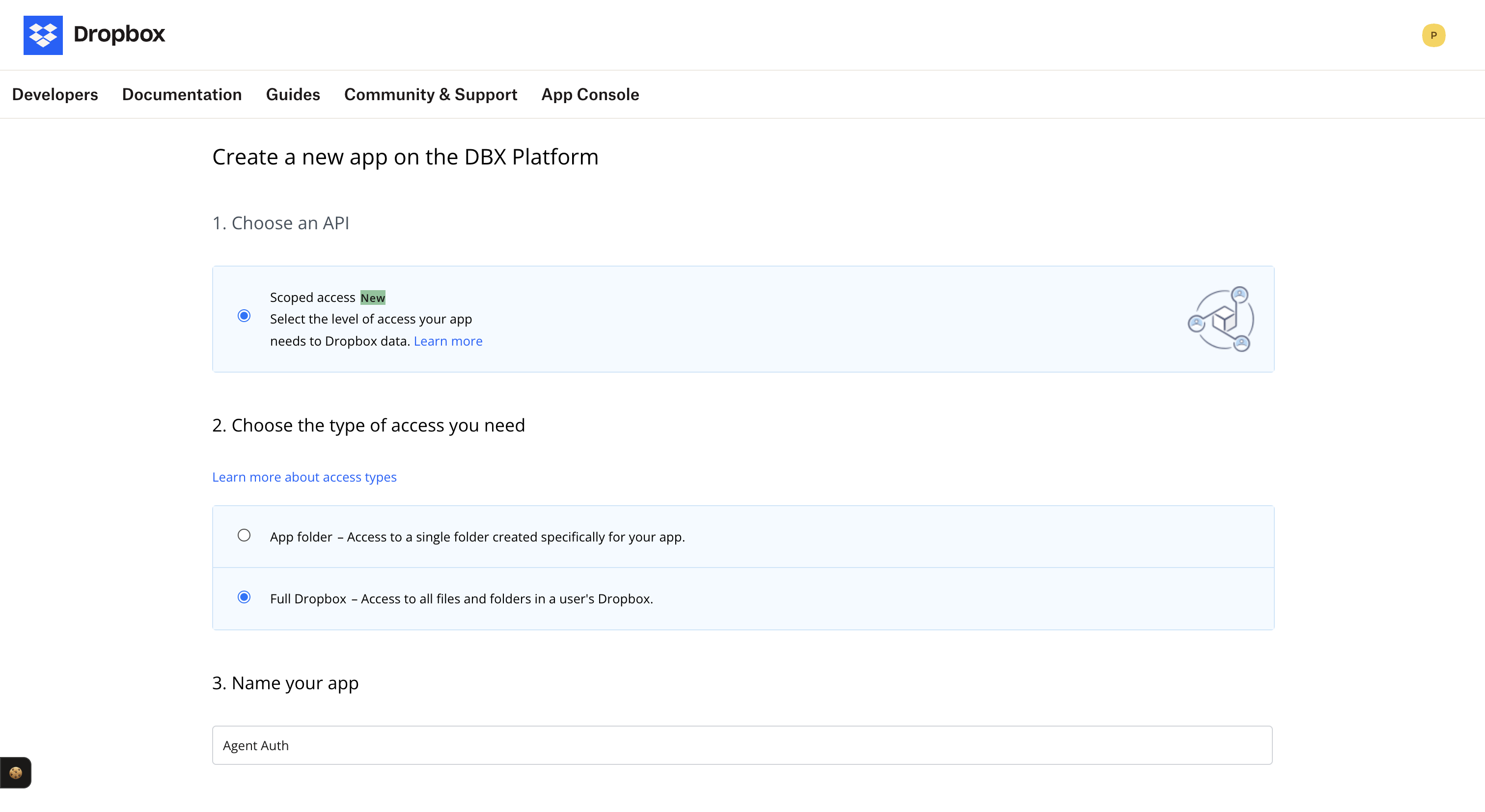
On the app creation form:
- Choose an API: Select Scoped access.
- Choose the type of access: Select Full Dropbox — Access to all files and folders in a user’s Dropbox.
- Name your app: Enter a name (e.g.
Agent Auth). - Click Create app.
-
Copy your credentials and add the redirect URI
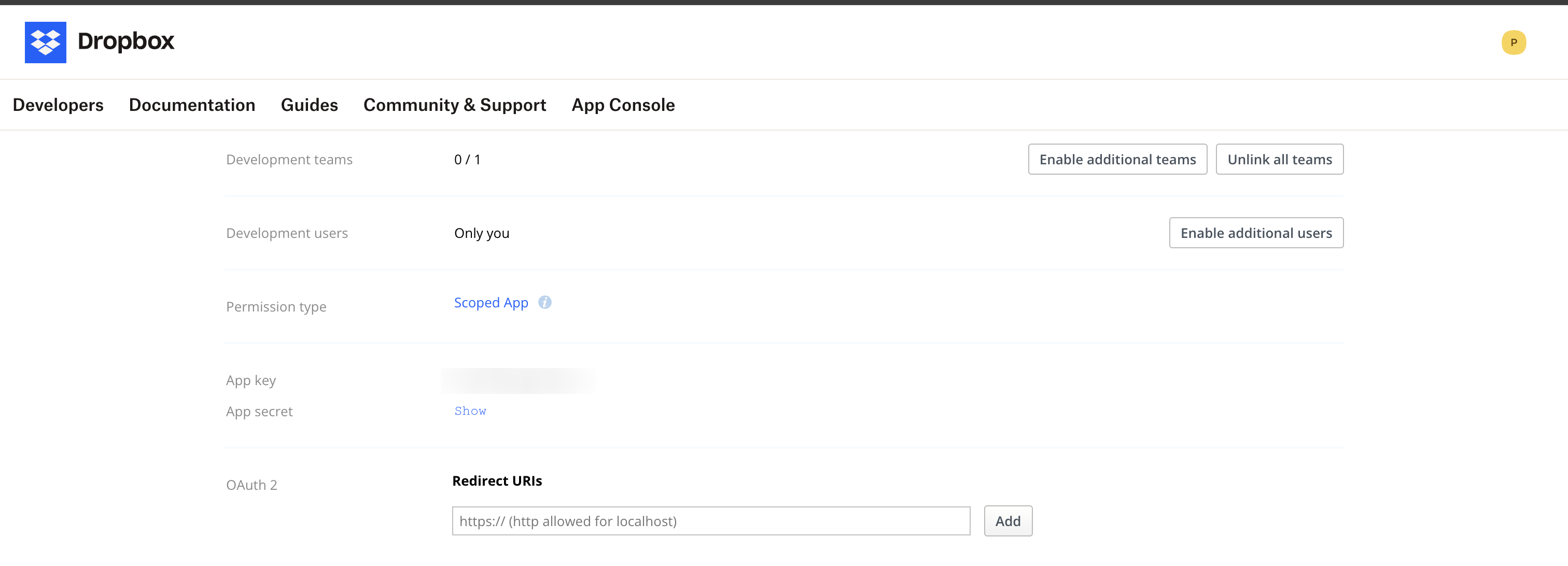
On your app’s settings page:
- Copy the App key (this is your client ID) and App secret (click Show to reveal).
- Under OAuth 2 → Redirect URIs, add your Scalekit redirect URI and click Add.
-
Create a connection in Scalekit
- In the Scalekit dashboard, go to AgentKit → Connections → Create Connection.
- Search for Dropbox MCP and click Create.
- Enter the App key as the client ID and App secret as the client secret.
- Note the Connection name — use this as
connection_namein your code (e.g.,dropboxmcp).
-
-
Authorize and make your first call
Section titled “Authorize and make your first call”quickstart.ts import { ScalekitClient } from '@scalekit-sdk/node'import 'dotenv/config'const scalekit = new ScalekitClient(process.env.SCALEKIT_ENV_URL,process.env.SCALEKIT_CLIENT_ID,process.env.SCALEKIT_CLIENT_SECRET,)const actions = scalekit.actionsconst connector = 'dropboxmcp'const identifier = 'user_123'// Generate an authorization link for the userconst { link } = await actions.getAuthorizationLink({ connectionName: connector, identifier })console.log('Authorize Dropbox MCP:', link)process.stdout.write('Press Enter after authorizing...')await new Promise(r => process.stdin.once('data', r))// Make your first callconst result = await actions.executeTool({connector,identifier,toolName: 'dropboxmcp_check_job_status',toolInput: {},})console.log(result)quickstart.py import osfrom scalekit.client import ScalekitClientfrom dotenv import load_dotenvload_dotenv()scalekit_client = ScalekitClient(env_url=os.getenv("SCALEKIT_ENV_URL"),client_id=os.getenv("SCALEKIT_CLIENT_ID"),client_secret=os.getenv("SCALEKIT_CLIENT_SECRET"),)actions = scalekit_client.actionsconnection_name = "dropboxmcp"identifier = "user_123"# Generate an authorization link for the userlink_response = actions.get_authorization_link(connection_name=connection_name,identifier=identifier,)print("Authorize Dropbox MCP:", link_response.link)input("Press Enter after authorizing...")# Make your first callresult = actions.execute_tool(tool_input={},tool_name="dropboxmcp_check_job_status",connection_name=connection_name,identifier=identifier,)print(result)
What you can do
Section titled “What you can do”Connect this agent connector to let your agent:
- Folder restore — Restore a folder to a previous point in time in Dropbox
- Revision restore file — Restore a file to a previous revision in Dropbox
- List restore events, file revisions, shared links — List restorable file and folder history events in Dropbox, optionally scoped to a path
- Get transcript, markdown, usage and quota — Transcribe a Dropbox audio or video file, optionally polling an in-progress async transcription job
- I who am — Retrieve the current Dropbox account profile information
- Search records — Search for files and folders in Dropbox by query with optional filters
Tool list
Section titled “Tool list”Use the exact tool names from the Tool list below when you call execute_tool. If you’re not sure which name to use, list the tools available for the current user first.
dropboxmcp_check_job_status#Check the status of an async Dropbox operation by its job ID.2 params
Check the status of an async Dropbox operation by its job ID.
operation_idstringoptionalThe async job ID returned from a previous Dropbox operation.wait_msintegeroptionalMilliseconds to wait for the job to complete before returning.dropboxmcp_copy#Copy one or more files or folders to a new location in Dropbox.2 params
Copy one or more files or folders to a new location in Dropbox.
entriesarrayrequiredList of file or folder paths to operate on.autorenamebooleanoptionalIf true, renames the destination if a conflict exists.dropboxmcp_create_file#Create a new file at the specified path with the given content.2 params
Create a new file at the specified path with the given content.
contentstringrequiredThe text content to write to the new file.pathstringrequiredThe Dropbox path to the file or folder (e.g. /Documents/report.pdf).dropboxmcp_create_file_request#Create a file request so others can upload files to your Dropbox.7 params
Create a file request so others can upload files to your Dropbox.
destinationstringrequiredThe Dropbox folder path where uploaded files will be saved.titlestringrequiredThe title of the file request shown to uploaders.closedbooleanoptionalIf true, the file request is closed and no longer accepts uploads.deadlinestringoptionalThe deadline for the file request in ISO 8601 format.deadline_allow_late_uploadsstringoptionalNo description.descriptionstringoptionalAn optional description shown to uploaders.video_project_idstringoptionalNo description.dropboxmcp_create_folder#Create a new folder at the specified path in Dropbox.1 param
Create a new folder at the specified path in Dropbox.
pathstringrequiredThe Dropbox path to the file or folder (e.g. /Documents/report.pdf).dropboxmcp_delete#Permanently delete one or more files or folders from Dropbox.1 param
Permanently delete one or more files or folders from Dropbox.
entriesarrayrequiredList of file or folder paths to operate on.dropboxmcp_download_link#Get temporary download URLs for one or more files.2 params
Get temporary download URLs for one or more files.
entriesarrayrequiredList of file or folder paths to operate on.expiration_in_secintegeroptionalSeconds until the temporary download URL expires. Must be 0 (no expiry) or between 60 and 900.dropboxmcp_get_file_content#Retrieve the raw content of a file by path or file ID.1 param
Retrieve the raw content of a file by path or file ID.
path_or_file_idstringrequiredThe Dropbox path or file ID of the file or folder.dropboxmcp_get_file_metadata#Retrieve metadata for a file or folder by path or file ID.1 param
Retrieve metadata for a file or folder by path or file ID.
path_or_file_idstringrequiredThe Dropbox path or file ID of the file or folder.dropboxmcp_get_file_request#Retrieve details of a specific file request by its ID.1 param
Retrieve details of a specific file request by its ID.
idstringrequiredThe unique ID of the file request.dropboxmcp_get_markdown#Convert a Dropbox document to markdown, optionally polling an in-progress async conversion job.4 params
Convert a Dropbox document to markdown, optionally polling an in-progress async conversion job.
async_job_idstringoptionalOpaque token from a previous in_progress get_markdown response. Send this alone to poll for completion.embed_imagesbooleanoptionalEmbed images as base64 data URIs in the markdown output. Can significantly increase output size. Omit to disable.enable_ocrbooleanoptionalRun OCR on PDF documents. Processing is slower when enabled. Omit to disable.path_or_file_idstringoptionalDocument to convert to markdown. Required on a new request; omit when polling with async_job_id.dropboxmcp_get_transcript#Transcribe a Dropbox audio or video file, optionally polling an in-progress async transcription job.4 params
Transcribe a Dropbox audio or video file, optionally polling an in-progress async transcription job.
async_job_idstringoptionalOpaque token from a previous in_progress get_transcript response. Send this alone to poll for completion.audio_languagestringoptionalISO 639-1 two-letter language code such as "en". Omit for auto-detection.path_or_file_idstringoptionalAudio or video file to transcribe. Required on a new request; omit when polling with async_job_id.timestamp_levelstringoptionalGranularity of segment timestamps. Omit for the default of "sentence".dropboxmcp_get_usage_and_quota#Retrieve the current storage usage and quota for the Dropbox account.0 params
Retrieve the current storage usage and quota for the Dropbox account.
dropboxmcp_list_file_requests#List all file requests for the Dropbox account with optional pagination.2 params
List all file requests for the Dropbox account with optional pagination.
cursorstringoptionalPagination cursor from the previous response to fetch the next page.limitintegeroptionalMaximum number of results to return per page.dropboxmcp_list_file_revisions#List the revision history of a file in Dropbox.2 params
List the revision history of a file in Dropbox.
path_or_file_idstringrequiredThe Dropbox path or file ID of the file or folder.limitintegeroptionalMaximum number of revisions to return. Valid range is 1-100. Omit to use the default of 10.dropboxmcp_list_folder#List the contents of a Dropbox folder with optional pagination and filters.5 params
List the contents of a Dropbox folder with optional pagination and filters.
cursorstringoptionalPagination cursor from the previous response to fetch the next page.max_resultsintegeroptionalMaximum number of results to return.object_typesarrayoptionalOptional object type filters for the first list_folder call. Valid values: "file" and "folder".pathstringoptionalThe Dropbox path to the file or folder (e.g. /Documents/report.pdf).recursivebooleanoptionalIf true, include the contents of all subdirectories.dropboxmcp_list_restore_events#List restorable file and folder history events in Dropbox, optionally scoped to a path.5 params
List restorable file and folder history events in Dropbox, optionally scoped to a path.
cursorstringoptionalOpaque cursor from a previous list_restore_events response. Reuse only with list_restore_events pagination; send cursor only.directionstringoptionalTime direction to traverse. Empty or omitted defaults to "PAST".only_rewindablebooleanoptionalIf true, only include events that can still be rewound.pathstringoptionalOptional folder path to scope history. Accepts "" or "/" for root.timestampintegeroptionalStarting point in time, in seconds since epoch UTC.dropboxmcp_move#Move one or more files or folders to a new location in Dropbox.2 params
Move one or more files or folders to a new location in Dropbox.
entriesarrayrequiredList of file or folder paths to operate on.autorenamebooleanoptionalIf true, renames the destination if a conflict exists.dropboxmcp_restore_file_revision#Restore a file to a previous revision in Dropbox.2 params
Restore a file to a previous revision in Dropbox.
destination_pathstringrequiredDestination path to restore. Accepts fq_path such as "/Documents/file.txt" or ns_path such as "ns:123//Documents/file.txt".revstringrequiredRevision hash to restore.dropboxmcp_restore_folder#Restore a folder to a previous point in time in Dropbox.3 params
Restore a folder to a previous point in time in Dropbox.
pathstringrequiredFolder path to restore.target_ts_microsecondsintegerrequiredTarget timestamp to restore to, in microseconds since epoch UTC.is_teambooleanoptionalIf true, restore the folder as a team-owned resource.dropboxmcp_search#Search for files and folders in Dropbox by query with optional filters.12 params
Search for files and folders in Dropbox by query with optional filters.
cursorstringoptionalPagination cursor from the previous response to fetch the next page.file_categoriesarrayoptionalNo description.file_extensionsarrayoptionalNo description.file_statusstringoptionalFilter search results by file status (active or deleted).filename_onlybooleanoptionalIf true, restricts the search to file and folder names only.last_modified_afterstringoptionalNo description.last_modified_beforestringoptionalNo description.max_resultsintegeroptionalMaximum number of results to return.order_bystringoptionalField to sort search results by.pathstringoptionalThe Dropbox path to the file or folder (e.g. /Documents/report.pdf).querystringoptionalThe search query string to match against file and folder names.reverse_orderbooleanoptionalIf true, returns results in reverse order.dropboxmcp_who_am_i#Retrieve the current Dropbox account profile information.0 params
Retrieve the current Dropbox account profile information.