


Nimble MCP
Vendor MCP31 toolsBearer TokenAISearchConnect to Nimble MCP. Search the web across multiple engines, extract content from any URL, crawl websites at scale, discover all URLs on a site, and run...
Nimble MCP connector
-
Install the SDK
Section titled “Install the SDK”Terminal window npm install @scalekit-sdk/nodeTerminal window pip install scalekit -
Set your credentials
Section titled “Set your credentials”Add your Scalekit credentials to your
.envfile. Find values in app.scalekit.com > Developers > API Credentials..env SCALEKIT_ENVIRONMENT_URL=<your-environment-url>SCALEKIT_CLIENT_ID=<your-client-id>SCALEKIT_CLIENT_SECRET=<your-client-secret> -
Set up the connector
Section titled “Set up the connector”Register your Nimble MCP credentials with Scalekit so it can authenticate requests on your behalf. You do this once per environment.
Dashboard setup steps
Generate an API key from your Nimble account so Scalekit can authenticate your users’ web intelligence requests.
-
Create an API key in Nimble
- Sign in to app.nimbleway.com.
- In the left sidebar, click API Playground or look for the Create API Key item in the onboarding checklist at the bottom left.
- Click Create API Key.
In the Create API Key dialog:
- Enter a Key name that identifies this integration, for example
Agent Auth. - Click Create key.
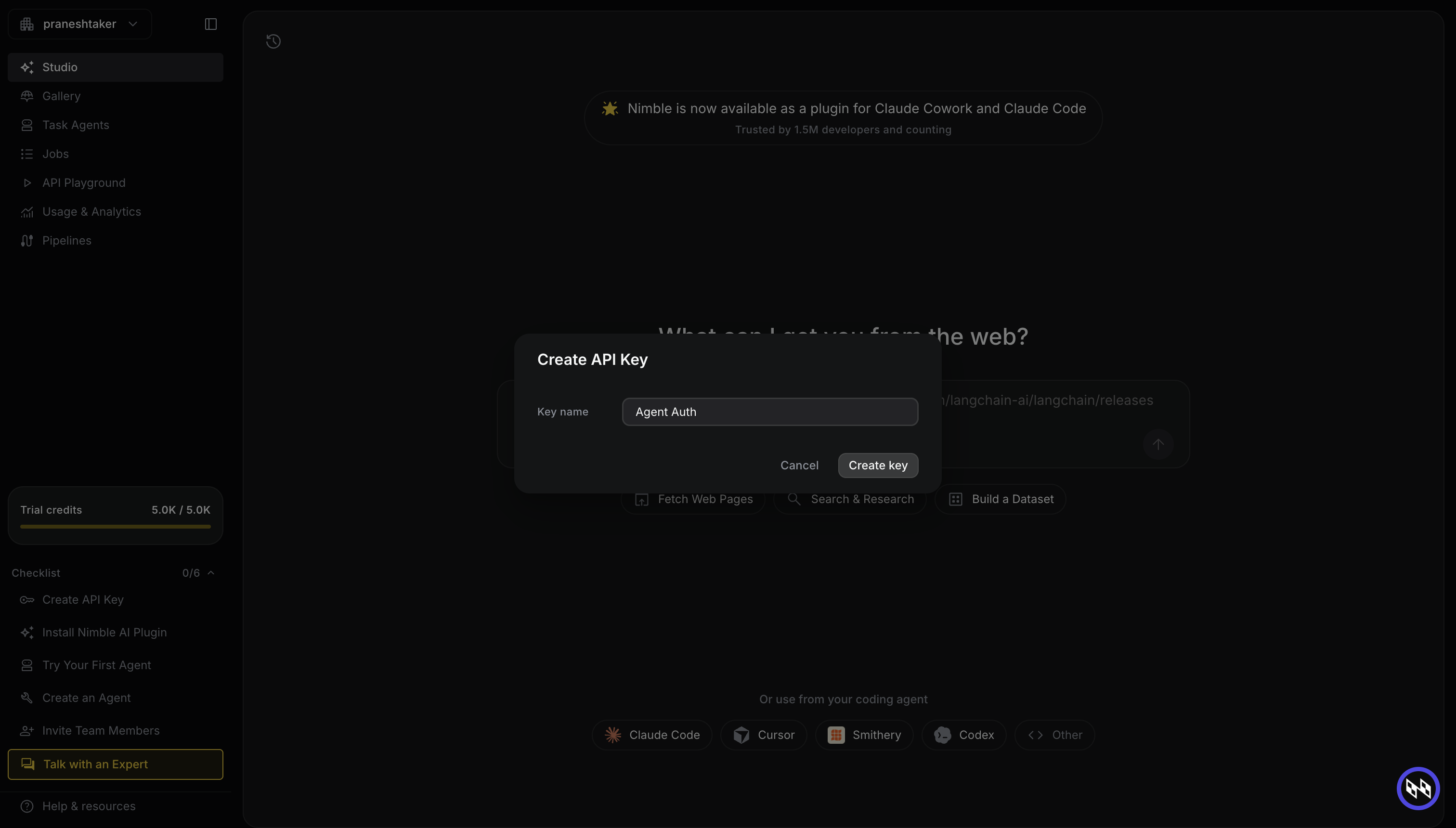
Nimble displays your new API key. Copy it immediately — it is only shown once.
-
Add the API key to Scalekit
- In the Scalekit dashboard, go to AgentKit > Connections > Create Connection.
- Search for Nimble MCP and click Create.
- In the API Key field, paste the key you copied.
- Click Save.
Scalekit validates the key and marks the connection as active. Your users can now execute Nimble tools through their own connected accounts.
-
-
Make your first call
Section titled “Make your first call”quickstart.ts import { ScalekitClient } from '@scalekit-sdk/node'import 'dotenv/config'const scalekit = new ScalekitClient(process.env.SCALEKIT_ENV_URL,process.env.SCALEKIT_CLIENT_ID,process.env.SCALEKIT_CLIENT_SECRET,)const actions = scalekit.actionsconst connector = 'nimblemcp'const identifier = 'user_123'// Make your first callconst result = await actions.executeTool({connector,identifier,toolName: 'nimblemcp_nimble_agent_templates_list',toolInput: {},})console.log(result)quickstart.py import osfrom scalekit.client import ScalekitClientfrom dotenv import load_dotenvload_dotenv()scalekit_client = ScalekitClient(env_url=os.getenv("SCALEKIT_ENV_URL"),client_id=os.getenv("SCALEKIT_CLIENT_ID"),client_secret=os.getenv("SCALEKIT_CLIENT_SECRET"),)actions = scalekit_client.actionsconnection_name = "nimblemcp"identifier = "user_123"# Make your first callresult = actions.execute_tool(tool_input={},tool_name="nimblemcp_nimble_agent_templates_list",connection_name=connection_name,identifier=identifier,)print(result)
What you can do
Section titled “What you can do”Connect this agent connector to let your agent:
- Update nimble extract templates, nimble agents — Create a refinement generation that starts from an existing extract template
- Run nimble extract templates, nimble agents — Start an asynchronous extract template run
- List nimble extract templates, nimble agents runs, nimble agent templates — Browse the catalog of extract templates
- Get nimble extract templates, nimble agent templates, nimble agents — Get full details of a specific extract template including its input/output schema
- Status nimble extract templates generation, nimble crawl, nimble agents — Check the current status of an extract template generation
- Generate nimble extract templates, nimble agents — Kick off generation of a new custom extract template
Tool list
Section titled “Tool list”Use the exact tool names from the Tool list below when you call execute_tool. If you’re not sure which name to use, list the tools available for the current user first.
nimblemcp_nimble_agent_run_async#Start an asynchronous agent run. Returns immediately with a task ID.
Use this for long-running extractions using a pre-built or custom agent. Poll results with `nimblemcp_nimble_task_results`.
When to use:
- You want to run a specific Nimble agent asynchronously without blocking.
- You have a long-running agent job where you will poll for results.
When NOT to use:
- You want a synchronous agent result — use `nimblemcp_nimble_agents_run` instead.5 params
Start an asynchronous agent run. Returns immediately with a task ID. Use this for long-running extractions using a pre-built or custom agent. Poll results with `nimblemcp_nimble_task_results`. When to use: - You want to run a specific Nimble agent asynchronously without blocking. - You have a long-running agent job where you will poll for results. When NOT to use: - You want a synchronous agent result — use `nimblemcp_nimble_agents_run` instead.
agentstringrequiredName of the agent to run (from `nimblemcp_nimble_agents_list`).paramsobjectrequiredRuntime input parameters for the agent.callback_urlstringoptionalOptional webhook URL to receive results when the job completes.tool_descriptionstringoptionalNo description.tool_reasoningstringoptionalNo description.nimblemcp_nimble_agent_templates_get#Get full details of a pre-built agent template.
When to use:
- You have a template name from `nimblemcp_nimble_agent_templates_list` and want its full definition before basing a new agent on it.
When NOT to use:
- You don't know the template name — use `nimblemcp_nimble_agent_templates_list` first.3 params
Get full details of a pre-built agent template. When to use: - You have a template name from `nimblemcp_nimble_agent_templates_list` and want its full definition before basing a new agent on it. When NOT to use: - You don't know the template name — use `nimblemcp_nimble_agent_templates_list` first.
template_namestringrequiredTemplate name as returned by `nimblemcp_nimble_agent_templates_list`.tool_descriptionstringoptionalNo description.tool_reasoningstringoptionalNo description.nimblemcp_nimble_agent_templates_list#List pre-built agent templates that can seed `nimblemcp_nimble_agents_create` via its `template` field.
When to use:
- You want to see what pre-built agent templates exist before creating a custom agent.
When NOT to use:
- You already have a template name — use `nimblemcp_nimble_agent_templates_get` to inspect it.4 params
List pre-built agent templates that can seed `nimblemcp_nimble_agents_create` via its `template` field. When to use: - You want to see what pre-built agent templates exist before creating a custom agent. When NOT to use: - You already have a template name — use `nimblemcp_nimble_agent_templates_get` to inspect it.
limitintegeroptionalMaximum number of templates to return (1-100).offsetintegeroptionalOffset for pagination. Use 0 for the first page.tool_descriptionstringoptionalNo description.tool_reasoningstringoptionalNo description.nimblemcp_nimble_agents_create#Create a new web search agent.
All parameters are optional; pass `template` to start from a pre-built agent template (see `nimblemcp_nimble_agent_templates_list`), or describe the agent via name/goals/sources.
When to use:
- You want a persistent, reusable agent configured with specific goals, sources, and output schema.
When NOT to use:
- You just need a one-off custom extraction from a prompt and URL — use `nimblemcp_nimble_extract_templates_generate` instead.13 params
Create a new web search agent. All parameters are optional; pass `template` to start from a pre-built agent template (see `nimblemcp_nimble_agent_templates_list`), or describe the agent via name/goals/sources. When to use: - You want a persistent, reusable agent configured with specific goals, sources, and output schema. When NOT to use: - You just need a one-off custom extraction from a prompt and URL — use `nimblemcp_nimble_extract_templates_generate` instead.
agent_namestringoptionalUnique name for the agent.descriptionstringoptionalWhat the agent does.display_namestringoptionalHuman-friendly display name.effortstringoptionalDefault effort level: 'low', 'medium', 'high', 'x-high', or 'max'.goalsstringoptionalGoals guiding the agent's research.output_schemastringoptionalOptional JSON Schema for structured outputs.skillstringoptionalSkill/domain the agent specializes in.sourcesstringoptionalSource preferences: {allow: [...], block: [...], prioritize: str, avoid: str}.suggested_questionsstringoptionalExample questions for the agent.templatestringoptionalOptional agent template name to base the agent on (see `nimblemcp_nimble_agent_templates_list`).tool_descriptionstringoptionalNo description.tool_reasoningstringoptionalNo description.use_casestringoptionalOne of: 'research', 'enrichment', 'dataset_building'.nimblemcp_nimble_agents_delete#Delete an agent permanently.
When to use:
- You no longer need an agent and want to remove it from the account.
When NOT to use:
- You just want to stop a specific run — this deletes the agent configuration itself, not a run.3 params
Delete an agent permanently. When to use: - You no longer need an agent and want to remove it from the account. When NOT to use: - You just want to stop a specific run — this deletes the agent configuration itself, not a run.
agent_idstringrequiredAgent id to delete.tool_descriptionstringoptionalNo description.tool_reasoningstringoptionalNo description.nimblemcp_nimble_agents_generate#Kick off generation of a new custom agent.
Returns a `generation_id`; poll it with `nimblemcp_nimble_agents_status` to get the generated agent name.
When to use:
- You need a custom extraction agent for a site that isn't covered by the pre-built catalog.
- You want to generate an agent from a natural-language prompt and an example URL.
When NOT to use:
- A pre-built agent already covers the site — use `nimblemcp_nimble_agents_run` instead.7 params
Kick off generation of a new custom agent. Returns a `generation_id`; poll it with `nimblemcp_nimble_agents_status` to get the generated agent name. When to use: - You need a custom extraction agent for a site that isn't covered by the pre-built catalog. - You want to generate an agent from a natural-language prompt and an example URL. When NOT to use: - A pre-built agent already covers the site — use `nimblemcp_nimble_agents_run` instead.
promptstringrequiredNatural-language instruction describing what the agent should collect (e.g. 'Collect product name, price, and rating from Amazon product pages').urlstringrequiredExample target URL that helps the generator understand page structure.agent_namestringoptionalOptional desired name for the generated agent.input_schemastringoptionalOptional JSON Schema object describing runtime input parameters.output_schemastringoptionalOptional JSON Schema object describing desired output fields.tool_descriptionstringoptionalNo description.tool_reasoningstringoptionalNo description.nimblemcp_nimble_agents_get#Get full details of a specific agent including its input/output schema.
Use after `nimblemcp_nimble_agents_list` to inspect an agent before running it.
When to use:
- You have an agent name and need to see its full schema before running it.
When NOT to use:
- You don't know the agent name — use `nimblemcp_nimble_agents_list` first.3 params
Get full details of a specific agent including its input/output schema. Use after `nimblemcp_nimble_agents_list` to inspect an agent before running it. When to use: - You have an agent name and need to see its full schema before running it. When NOT to use: - You don't know the agent name — use `nimblemcp_nimble_agents_list` first.
agent_idstringrequiredExact agent name as returned by `nimblemcp_nimble_agents_list`.tool_descriptionstringoptionalNo description.tool_reasoningstringoptionalNo description.nimblemcp_nimble_agents_list#Browse the catalog of pre-built Nimble agents.
Use this as the first step when you want to run a structured extraction on a known site or data source.
When to use:
- You want to discover available agents for a specific domain or data source.
- You want to paginate through all agents in the catalog.5 params
Browse the catalog of pre-built Nimble agents. Use this as the first step when you want to run a structured extraction on a known site or data source. When to use: - You want to discover available agents for a specific domain or data source. - You want to paginate through all agents in the catalog.
limitintegeroptionalMaximum number of agents to return in one page (1-100).offsetintegeroptionalOffset for pagination. Use 0 for the first page.querystringoptionalShort keyword to filter agents by name or domain (e.g. 'amazon', 'linkedin'). Use 1-2 words for best results.tool_descriptionstringoptionalNo description.tool_reasoningstringoptionalNo description.nimblemcp_nimble_agents_run#Start an asynchronous agent run.
Returns immediately with a run `id` and `status`. Poll `nimblemcp_nimble_agents_run_status` until the status is terminal, then fetch the output via `nimblemcp_nimble_agents_run_result`.
When to use:
- You want to run a pre-built or custom agent (existing or create-or-reuse by name) against a research question.
When NOT to use:
- You want a synchronous, one-off custom extraction from a URL and prompt — use `nimblemcp_nimble_extract_templates_run` instead.11 params
Start an asynchronous agent run. Returns immediately with a run `id` and `status`. Poll `nimblemcp_nimble_agents_run_status` until the status is terminal, then fetch the output via `nimblemcp_nimble_agents_run_result`. When to use: - You want to run a pre-built or custom agent (existing or create-or-reuse by name) against a research question. When NOT to use: - You want a synchronous, one-off custom extraction from a URL and prompt — use `nimblemcp_nimble_extract_templates_run` instead.
inputstringrequiredNatural-language research question or task for the agent.agent_idstringoptionalExisting agent id to run. Provide this or `agent_name`, not both.agent_namestringoptionalStable agent name for create-or-reuse: an unseen name creates a new agent, an existing name reuses it and returns the same agent id across calls. Ignored if `agent_id` is set.effortstringoptionalEffort override for this run: 'low', 'medium', 'high', 'x-high', or 'max'.input_datastringoptionalOptional structured input rows for enrichment runs.output_schemastringoptionalOptional JSON Schema override for this run's structured output.skillstringoptionalSkill override for this run. One-time only against an existing agent; becomes the new agent's stored skill if this call creates it via `agent_name`.sourcesstringoptionalSource preferences override: {allow: [...], block: [...], prioritize: str, avoid: str}.tool_descriptionstringoptionalNo description.tool_reasoningstringoptionalNo description.use_casestringoptionalOne of: 'research', 'enrichment', 'dataset_building'. Only settable when this run creates a new agent (via `agent_name`); against an existing agent it must match the agent's stored use_case.nimblemcp_nimble_agents_run_result#Fetch the output of a completed agent run.
Returns the run's output (text or structured JSON with trust/citation metadata). Call after `nimblemcp_nimble_agents_run_status` reports a terminal status.
When to use:
- An agent run has completed and you need its final output.
When NOT to use:
- The run may still be in progress — check `nimblemcp_nimble_agents_run_status` first.4 params
Fetch the output of a completed agent run. Returns the run's output (text or structured JSON with trust/citation metadata). Call after `nimblemcp_nimble_agents_run_status` reports a terminal status. When to use: - An agent run has completed and you need its final output. When NOT to use: - The run may still be in progress — check `nimblemcp_nimble_agents_run_status` first.
agent_idstringrequiredAgent id the run belongs to.run_idstringrequiredRun id returned by `nimblemcp_nimble_agents_run`.tool_descriptionstringoptionalNo description.tool_reasoningstringoptionalNo description.nimblemcp_nimble_agents_run_status#Check the status of an agent run.
While the status is not terminal (e.g. still pending/running), poll again after ~15-30 seconds. Once completed, fetch the output via `nimblemcp_nimble_agents_run_result`.
When to use:
- You started a run with `nimblemcp_nimble_agents_run` and want to check whether it has finished.
When NOT to use:
- You want crawl status — use `nimblemcp_nimble_crawl_status`.
- You want extract template generation status — use `nimblemcp_nimble_extract_templates_generation_status`.4 params
Check the status of an agent run. While the status is not terminal (e.g. still pending/running), poll again after ~15-30 seconds. Once completed, fetch the output via `nimblemcp_nimble_agents_run_result`. When to use: - You started a run with `nimblemcp_nimble_agents_run` and want to check whether it has finished. When NOT to use: - You want crawl status — use `nimblemcp_nimble_crawl_status`. - You want extract template generation status — use `nimblemcp_nimble_extract_templates_generation_status`.
agent_idstringrequiredAgent id the run belongs to.run_idstringrequiredRun id returned by `nimblemcp_nimble_agents_run`.tool_descriptionstringoptionalNo description.tool_reasoningstringoptionalNo description.nimblemcp_nimble_agents_runs_list#List past and in-progress runs of an agent.
When to use:
- You want to see run history for a specific agent, including in-progress runs.
When NOT to use:
- You want details of one specific run — use `nimblemcp_nimble_agents_run_status` or `nimblemcp_nimble_agents_run_result`.5 params
List past and in-progress runs of an agent. When to use: - You want to see run history for a specific agent, including in-progress runs. When NOT to use: - You want details of one specific run — use `nimblemcp_nimble_agents_run_status` or `nimblemcp_nimble_agents_run_result`.
agent_idstringrequiredAgent id whose runs to list.limitintegeroptionalMaximum number of runs to return (1-100).offsetintegeroptionalOffset for pagination.tool_descriptionstringoptionalNo description.tool_reasoningstringoptionalNo description.nimblemcp_nimble_agents_status#Check the current status of an agent generation.
Status flow: in-progress → succeeded or failed.
When to use:
- You started a generation with `nimblemcp_nimble_agents_generate` or `nimblemcp_nimble_agents_update_from_agent` and want to check if it completed.
When NOT to use:
- You want crawl job status — use `nimblemcp_nimble_crawl_status`.
- You want async task results — use `nimblemcp_nimble_task_results`.3 params
Check the current status of an agent generation. Status flow: in-progress → succeeded or failed. When to use: - You started a generation with `nimblemcp_nimble_agents_generate` or `nimblemcp_nimble_agents_update_from_agent` and want to check if it completed. When NOT to use: - You want crawl job status — use `nimblemcp_nimble_crawl_status`. - You want async task results — use `nimblemcp_nimble_task_results`.
generation_idstringrequiredServer-assigned generation ID returned by `nimblemcp_nimble_agents_generate` or `nimblemcp_nimble_agents_update_from_agent`.tool_descriptionstringoptionalNo description.tool_reasoningstringoptionalNo description.nimblemcp_nimble_agents_update#Update an existing agent via JSON Patch operations.
When to use:
- You need to change specific fields on an existing agent (e.g. its description, goals, or sources) without regenerating it.
When NOT to use:
- You want to refine an extract template's behavior with natural language — use `nimblemcp_nimble_extract_templates_update_from_template` instead.4 params
Update an existing agent via JSON Patch operations. When to use: - You need to change specific fields on an existing agent (e.g. its description, goals, or sources) without regenerating it. When NOT to use: - You want to refine an extract template's behavior with natural language — use `nimblemcp_nimble_extract_templates_update_from_template` instead.
agent_idstringrequiredAgent id to update.operationsarrayrequiredJSON Patch operations to apply. Each item: {op: 'add'|'remove'|'replace'|'move'|'copy'|'test', path: "/field", value: ...}. Example: [{"op": "replace", "path": "/description", "value": "New"}]tool_descriptionstringoptionalNo description.tool_reasoningstringoptionalNo description.nimblemcp_nimble_agents_update_from_agent#Create a refinement generation that starts from an existing agent.
Returns a `generation_id`; poll with `nimblemcp_nimble_agents_status` to get the updated agent.
When to use:
- You want to modify an existing agent's behavior using natural-language instructions.
- You want to extend an agent's output schema without rebuilding from scratch.
When NOT to use:
- You want to build a brand-new agent — use `nimblemcp_nimble_agents_generate`.4 params
Create a refinement generation that starts from an existing agent. Returns a `generation_id`; poll with `nimblemcp_nimble_agents_status` to get the updated agent. When to use: - You want to modify an existing agent's behavior using natural-language instructions. - You want to extend an agent's output schema without rebuilding from scratch. When NOT to use: - You want to build a brand-new agent — use `nimblemcp_nimble_agents_generate`.
from_agentstringrequiredAgent name to refine. A new generation is created from this agent.promptstringrequiredNatural-language refinement instruction (e.g. 'add a ratings field to the output').tool_descriptionstringoptionalNo description.tool_reasoningstringoptionalNo description.nimblemcp_nimble_crawl_list#List crawl jobs, optionally filtered by status.
When to use:
- You want to see all active or past crawl jobs in the account.
- You want to filter crawls by their current status.4 params
List crawl jobs, optionally filtered by status. When to use: - You want to see all active or past crawl jobs in the account. - You want to filter crawls by their current status.
limitintegeroptionalMaximum number of crawl jobs to return. Default is 20.statusstringoptionalOptional status filter (e.g. "queued", "running", "succeeded", "failed", "canceled").tool_descriptionstringoptionalNo description.tool_reasoningstringoptionalNo description.nimblemcp_nimble_crawl_run#Start a web crawl to extract content from multiple pages on a website.
The crawl discovers and visits pages starting from a given URL, following links up to the specified limit. Results are retrieved via `nimblemcp_nimble_crawl_status`.
When to use:
- You need to extract content from multiple pages on a site automatically.
- You want link-following or sitemap-based URL discovery.
When NOT to use:
- You need content from a single known URL — use `nimblemcp_nimble_extract` instead.
- You need results immediately — this is async; first pages complete ~1-2 min after dispatch.10 params
Start a web crawl to extract content from multiple pages on a website. The crawl discovers and visits pages starting from a given URL, following links up to the specified limit. Results are retrieved via `nimblemcp_nimble_crawl_status`. When to use: - You need to extract content from multiple pages on a site automatically. - You want link-following or sitemap-based URL discovery. When NOT to use: - You need content from a single known URL — use `nimblemcp_nimble_extract` instead. - You need results immediately — this is async; first pages complete ~1-2 min after dispatch.
urlstringrequiredStarting URL for the crawl. The crawler discovers and visits linked pages from this entry point.allow_external_linksbooleanoptionalWhether to follow links to external domains. Default is false.allow_subdomainsbooleanoptionalWhether to follow links to subdomains of the starting URL. Default is false.exclude_pathsstringoptionalOptional regex patterns. URLs matching any pattern will be skipped.include_pathsstringoptionalOptional regex patterns. Only URLs matching at least one pattern will be crawled.limitintegeroptionalMaximum number of pages to crawl (default: 100). Higher limits take longer but provide more coverage.namestringoptionalOptional human-readable name for this crawl job.sitemapstringoptionalHow to use the site's sitemap: "include" (default), "skip", or "only".tool_descriptionstringoptionalOptional description of the tool's purpose.tool_reasoningstringoptionalOptional reasoning about why this tool was selected.nimblemcp_nimble_crawl_status#Check the status and progress of a running or completed crawl job.
When to use:
- You started a crawl with `nimblemcp_nimble_crawl_run` and want to check its progress or retrieve results.
When NOT to use:
- You want async task results from `nimble_extract_async` or `nimble_agent_run_async` — use `nimblemcp_nimble_task_results` for those.3 params
Check the status and progress of a running or completed crawl job. When to use: - You started a crawl with `nimblemcp_nimble_crawl_run` and want to check its progress or retrieve results. When NOT to use: - You want async task results from `nimble_extract_async` or `nimble_agent_run_async` — use `nimblemcp_nimble_task_results` for those.
crawl_idstringrequiredThe unique crawl identifier returned by `nimblemcp_nimble_crawl_run`.tool_descriptionstringoptionalOptional description of the tool's purpose.tool_reasoningstringoptionalOptional reasoning about why this tool was selected.nimblemcp_nimble_crawl_terminate#Cancel a running or queued crawl job.
When to use:
- You want to stop a crawl that is no longer needed before it completes.
When NOT to use:
- The crawl has already succeeded or failed — it cannot be cancelled in a terminal state.3 params
Cancel a running or queued crawl job. When to use: - You want to stop a crawl that is no longer needed before it completes. When NOT to use: - The crawl has already succeeded or failed — it cannot be cancelled in a terminal state.
crawl_idstringrequiredThe unique crawl identifier to cancel.tool_descriptionstringoptionalNo description.tool_reasoningstringoptionalNo description.nimblemcp_nimble_extract#Extract and parse content from a specific URL using Nimble's Extract API.
This is a synchronous call — it waits for extraction to complete before returning.
When to use:
- You have a specific URL and need its content immediately.
- You want structured content (markdown, text) from a single page.
When NOT to use:
- You need to extract many pages — use `nimblemcp_nimble_crawl_run` instead.
- The page loads slowly — use `nimblemcp_nimble_extract_async` for async extraction.8 params
Extract and parse content from a specific URL using Nimble's Extract API. This is a synchronous call — it waits for extraction to complete before returning. When to use: - You have a specific URL and need its content immediately. - You want structured content (markdown, text) from a single page. When NOT to use: - You need to extract many pages — use `nimblemcp_nimble_crawl_run` instead. - The page loads slowly — use `nimblemcp_nimble_extract_async` for async extraction.
urlstringrequiredThe URL to extract content from.countrystringoptionalCountry code for geo-targeted rendering (e.g. "us").driverstringoptionalOptional browser driver tier for web extraction: "vx6" (fast HTTP, no JS), "vx8" (headless browser with JS rendering), "vx8-pro" (headful browser, complex interactions), "vx10" (stealth headless, strict bot mitigation), or "vx10-pro" (stealth headful, heavily bot-protected sites). If omitted, the backend selects. Escalate to vx8/vx8-pro for JavaScript-heavy pages, or vx10/vx10-pro for sites with strict bot mitigation, when a default extraction returns empty or truncated content.localestringoptionalLocale code for localized rendering (e.g. "en-US").output_formatstringoptionalOutput format: "markdown" (default) or "text".tool_descriptionstringoptionalNo description.tool_reasoningstringoptionalNo description.waitstringoptionalExtra milliseconds to wait for dynamic content to load before extraction.nimblemcp_nimble_extract_async#Start an asynchronous URL extraction. Returns immediately with a task ID.
Poll `nimblemcp_nimble_task_results` to retrieve the extracted content when ready.
When to use:
- You want to extract a URL without blocking while it renders.
- The page is complex or slow to load.
When NOT to use:
- You need the result inline — use `nimblemcp_nimble_extract` for synchronous extraction.9 params
Start an asynchronous URL extraction. Returns immediately with a task ID. Poll `nimblemcp_nimble_task_results` to retrieve the extracted content when ready. When to use: - You want to extract a URL without blocking while it renders. - The page is complex or slow to load. When NOT to use: - You need the result inline — use `nimblemcp_nimble_extract` for synchronous extraction.
urlstringrequiredThe URL to extract content from.callback_urlstringoptionalOptional webhook URL to receive results when extraction completes.countrystringoptionalNo description.driverstringoptionalOptional browser driver tier for web extraction: "vx6" (fast HTTP, no JS), "vx8" (headless browser with JS rendering), "vx8-pro" (headful browser, complex interactions), "vx10" (stealth headless, strict bot mitigation), or "vx10-pro" (stealth headful, heavily bot-protected sites). If omitted, the backend selects. Escalate to vx8/vx8-pro for JavaScript-heavy pages, or vx10/vx10-pro for sites with strict bot mitigation, when a default extraction returns empty or truncated content.localestringoptionalNo description.output_formatstringoptionalOutput format: "markdown" (default) or "text".tool_descriptionstringoptionalNo description.tool_reasoningstringoptionalNo description.waitstringoptionalExtra milliseconds to wait for dynamic content.nimblemcp_nimble_extract_templates_generate#Kick off generation of a new custom extract template.
Returns a `generation_id`; poll it with `nimblemcp_nimble_extract_templates_generation_status` to get the generated template. On completion the result carries the new `template_name` and `version_id`; use `template_name` with `nimblemcp_nimble_extract_templates_run` to execute it.
When to use:
- You need a custom extraction template for a site that isn't covered by the pre-built catalog.
- You want to generate a template from a natural-language prompt and an example URL.
When NOT to use:
- A pre-built template already covers the site — use `nimblemcp_nimble_extract_templates_run` instead.7 params
Kick off generation of a new custom extract template. Returns a `generation_id`; poll it with `nimblemcp_nimble_extract_templates_generation_status` to get the generated template. On completion the result carries the new `template_name` and `version_id`; use `template_name` with `nimblemcp_nimble_extract_templates_run` to execute it. When to use: - You need a custom extraction template for a site that isn't covered by the pre-built catalog. - You want to generate a template from a natural-language prompt and an example URL. When NOT to use: - A pre-built template already covers the site — use `nimblemcp_nimble_extract_templates_run` instead.
promptstringrequiredNatural-language instruction describing what the template should collect (e.g. 'Collect product name, price, and rating from Amazon product pages').urlstringrequiredExample target URL that helps the generator understand page structure.input_schemastringoptionalOptional JSON Schema object describing runtime input parameters.namestringoptionalOptional desired name for the generated template.output_schemastringoptionalOptional JSON Schema object describing desired output fields.tool_descriptionstringoptionalNo description.tool_reasoningstringoptionalNo description.nimblemcp_nimble_extract_templates_generation_status#Check the current status of an extract template generation.
Status flow: in-progress (pending/processing) → completed or failed. On completion, `template_name` and `version_id` are set and you can proceed to run the template. On failure, inspect `error` for diagnostics.
When to use:
- You started a generation with `nimblemcp_nimble_extract_templates_generate` or `nimblemcp_nimble_extract_templates_update_from_template` and want to check if it completed.
When NOT to use:
- You want crawl job status — use `nimblemcp_nimble_crawl_status`.
- You want async task results — use `nimblemcp_nimble_task_results`.3 params
Check the current status of an extract template generation. Status flow: in-progress (pending/processing) → completed or failed. On completion, `template_name` and `version_id` are set and you can proceed to run the template. On failure, inspect `error` for diagnostics. When to use: - You started a generation with `nimblemcp_nimble_extract_templates_generate` or `nimblemcp_nimble_extract_templates_update_from_template` and want to check if it completed. When NOT to use: - You want crawl job status — use `nimblemcp_nimble_crawl_status`. - You want async task results — use `nimblemcp_nimble_task_results`.
generation_idstringrequiredServer-assigned generation ID returned by `nimblemcp_nimble_extract_templates_generate` or `nimblemcp_nimble_extract_templates_update_from_template`.tool_descriptionstringoptionalNo description.tool_reasoningstringoptionalNo description.nimblemcp_nimble_extract_templates_get#Get full details of a specific extract template including its input/output schema.
Use after `nimblemcp_nimble_extract_templates_list` to inspect a template before running it. The response includes the template's input_schema / output_schema, description, and metadata.
When to use:
- You have a template name and need to see its full schema before running it.
When NOT to use:
- You don't know the template name — use `nimblemcp_nimble_extract_templates_list` first.3 params
Get full details of a specific extract template including its input/output schema. Use after `nimblemcp_nimble_extract_templates_list` to inspect a template before running it. The response includes the template's input_schema / output_schema, description, and metadata. When to use: - You have a template name and need to see its full schema before running it. When NOT to use: - You don't know the template name — use `nimblemcp_nimble_extract_templates_list` first.
template_namestringrequiredExact template name as returned by `nimblemcp_nimble_extract_templates_list`.tool_descriptionstringoptionalNo description.tool_reasoningstringoptionalNo description.nimblemcp_nimble_extract_templates_list#Browse the catalog of extract templates.
Use this tool as the first step to find an existing template for a data collection task. Each template is purpose-built for a specific website or data type (e.g. Amazon products, LinkedIn profiles, Google Maps reviews).
Typical workflow: list → get (inspect details) → run (collect data).
When to use:
- You want to discover available extract templates for a specific domain or data source.
- You want to paginate through all templates in the catalog.5 params
Browse the catalog of extract templates. Use this tool as the first step to find an existing template for a data collection task. Each template is purpose-built for a specific website or data type (e.g. Amazon products, LinkedIn profiles, Google Maps reviews). Typical workflow: list → get (inspect details) → run (collect data). When to use: - You want to discover available extract templates for a specific domain or data source. - You want to paginate through all templates in the catalog.
limitintegeroptionalMaximum number of templates to return in one page (1-100).querystringoptionalShort keyword to filter templates by name or domain (e.g. 'amazon', 'linkedin'). Use 1-2 words for best results.skipintegeroptionalOffset for pagination. Use 0 for the first page.tool_descriptionstringoptionalNo description.tool_reasoningstringoptionalNo description.nimblemcp_nimble_extract_templates_run#Execute an extract template against a target URL or set of parameters.
Returns structured data collected from the target page. The params dict must match the template's input_schema — use `nimblemcp_nimble_extract_templates_get` to inspect required fields.
Possible issues if no results are returned:
- The target URL may be unreachable or behind a login wall.
- The page structure may have changed since the template was created.
- Required params may be missing or malformed — check the template's input_schema.
When to use:
- You know the template name and want its structured output inline.
When NOT to use:
- You want an async run — use `nimblemcp_nimble_extract_templates_run_async` instead.4 params
Execute an extract template against a target URL or set of parameters. Returns structured data collected from the target page. The params dict must match the template's input_schema — use `nimblemcp_nimble_extract_templates_get` to inspect required fields. Possible issues if no results are returned: - The target URL may be unreachable or behind a login wall. - The page structure may have changed since the template was created. - Required params may be missing or malformed — check the template's input_schema. When to use: - You know the template name and want its structured output inline. When NOT to use: - You want an async run — use `nimblemcp_nimble_extract_templates_run_async` instead.
paramsobjectrequiredRuntime input parameters built from the template's input_schema. Include all required keys. Example: {"url": "https://www.amazon.com/dp/B09V3KXJPB"}templatestringrequiredTemplate name from `nimblemcp_nimble_extract_templates_list`, `nimblemcp_nimble_extract_templates_get`, or a completed generation.tool_descriptionstringoptionalNo description.tool_reasoningstringoptionalNo description.nimblemcp_nimble_extract_templates_run_async#Start an asynchronous extract template run. Returns immediately with a task ID.
Use this for long-running template extractions or batch processing. Retrieve results later with `nimblemcp_nimble_task_results` using the returned task ID.
When to use:
- You want to run an extract template without blocking while it completes.
- You have a long-running or batch extraction where you will poll for results.
When NOT to use:
- You want the result inline — use `nimblemcp_nimble_extract_templates_run` for a synchronous run.5 params
Start an asynchronous extract template run. Returns immediately with a task ID. Use this for long-running template extractions or batch processing. Retrieve results later with `nimblemcp_nimble_task_results` using the returned task ID. When to use: - You want to run an extract template without blocking while it completes. - You have a long-running or batch extraction where you will poll for results. When NOT to use: - You want the result inline — use `nimblemcp_nimble_extract_templates_run` for a synchronous run.
paramsobjectrequiredRuntime input parameters matching the template's input_schema. Example: {"url": "https://www.amazon.com/dp/B09V3KXJPB"}templatestringrequiredExtract template name to execute. Get available templates from `nimblemcp_nimble_extract_templates_list`.callback_urlstringoptionalOptional webhook URL to receive results when the run completes.tool_descriptionstringoptionalNo description.tool_reasoningstringoptionalNo description.nimblemcp_nimble_extract_templates_update_from_template#Create a refinement generation that starts from an existing extract template.
Returns a `generation_id`; poll with `nimblemcp_nimble_extract_templates_generation_status` to get the refined template. On success, use the returned `template_name` with `nimblemcp_nimble_extract_templates_run`.
When to use:
- You want to modify an existing extract template's behavior using natural-language instructions.
- You want to extend a template's output schema without rebuilding from scratch.
When NOT to use:
- You want to build a brand-new template — use `nimblemcp_nimble_extract_templates_generate`.4 params
Create a refinement generation that starts from an existing extract template. Returns a `generation_id`; poll with `nimblemcp_nimble_extract_templates_generation_status` to get the refined template. On success, use the returned `template_name` with `nimblemcp_nimble_extract_templates_run`. When to use: - You want to modify an existing extract template's behavior using natural-language instructions. - You want to extend a template's output schema without rebuilding from scratch. When NOT to use: - You want to build a brand-new template — use `nimblemcp_nimble_extract_templates_generate`.
from_templatestringrequiredTemplate name to refine. A new generation is created from this template.promptstringrequiredNatural-language refinement instruction (e.g. 'add a ratings field to the output').tool_descriptionstringoptionalNo description.tool_reasoningstringoptionalNo description.nimblemcp_nimble_map#Discover all URLs on a website by crawling its pages and sitemap.
Returns a flat list of URLs found on the site. Useful for understanding site structure before targeted extraction.
When to use:
- You need to enumerate the URL space of a site before deciding what to extract.
- You want a quick snapshot of all discoverable links on a domain.
When NOT to use:
- You need the page content itself — use `nimblemcp_nimble_crawl_run` or `nimblemcp_nimble_extract`.6 params
Discover all URLs on a website by crawling its pages and sitemap. Returns a flat list of URLs found on the site. Useful for understanding site structure before targeted extraction. When to use: - You need to enumerate the URL space of a site before deciding what to extract. - You want a quick snapshot of all discoverable links on a domain. When NOT to use: - You need the page content itself — use `nimblemcp_nimble_crawl_run` or `nimblemcp_nimble_extract`.
urlstringrequiredStarting URL. The mapper will discover all linked URLs from this entry point.domain_filterstringoptionalOptional domain filter to restrict URL discovery.limitstringoptionalMaximum number of URLs to return. Omit for no limit.sitemapstringoptionalSitemap strategy: "include", "skip", or "only".tool_descriptionstringoptionalNo description.tool_reasoningstringoptionalNo description.nimblemcp_nimble_search#Search the web using Nimble's Search API with configurable content richness.
When to use:
- You need web search results with optional AI-generated answers.
- You want relevance-ranked results with snippet or full-page content.
When NOT to use:
- You need to extract the full content of a known URL — use `nimblemcp_nimble_extract`.17 params
Search the web using Nimble's Search API with configurable content richness. When to use: - You need web search results with optional AI-generated answers. - You want relevance-ranked results with snippet or full-page content. When NOT to use: - You need to extract the full content of a known URL — use `nimblemcp_nimble_extract`.
querystringrequiredSearch query text.content_typestringoptionalFilter by content type (e.g. ["article", "blog"]).countrystringoptionalCountry code for geotargeted results (e.g. "us").end_datestringoptionalFilter results published on or before this date (ISO 8601).exclude_domainsstringoptionalExclude results from these domains.focusstringoptionalFocus mode(s) for search: "general", "news", "academic", etc.include_answerbooleanoptionalWhether to include an AI-generated answer synthesized from results. Default is false.include_domainsstringoptionalRestrict results to these domains only.localestringoptionalLocale code for localized search results (e.g. "en-US").max_resultsintegeroptionalMaximum number of results to return. Default is 3.max_subagentsintegeroptionalMaximum subagents for deep search mode. Default is 3.output_formatstringoptionalOutput format for content: "markdown" (default) or "text".search_depthstringoptionalDepth of search: "lite" (default, faster) or "deep".start_datestringoptionalFilter results published on or after this date (ISO 8601).time_rangestringoptionalRelative time range filter (e.g. "1d", "7d", "1m").tool_descriptionstringoptionalNo description.tool_reasoningstringoptionalNo description.nimblemcp_nimble_task_results#Get the status and results of an async task.
Use this to retrieve results from `nimblemcp_nimble_extract_async` or `nimblemcp_nimble_agent_run_async` after initiating them.
When to use:
- You started an async extraction or agent run and want to poll for its results.
When NOT to use:
- You want crawl status — use `nimblemcp_nimble_crawl_status` for crawl jobs.3 params
Get the status and results of an async task. Use this to retrieve results from `nimblemcp_nimble_extract_async` or `nimblemcp_nimble_agent_run_async` after initiating them. When to use: - You started an async extraction or agent run and want to poll for its results. When NOT to use: - You want crawl status — use `nimblemcp_nimble_crawl_status` for crawl jobs.
task_idstringrequiredThe task ID returned by `nimblemcp_nimble_extract_async` or `nimblemcp_nimble_agent_run_async`.tool_descriptionstringoptionalNo description.tool_reasoningstringoptionalNo description.