


Airops MCP
Vendor MCP92 toolsAPI KeyAIMarketingAnalyticsConnect to AirOps MCP. Manage brand kits, run AI-powered analytics, track AEO citations, and automate content workflows from your AI agents.
Airops MCP connector
-
Install the SDK
Section titled “Install the SDK”Terminal window npm install @scalekit-sdk/nodeTerminal window pip install scalekit -
Set your credentials
Section titled “Set your credentials”Add your Scalekit credentials to your
.envfile. Find values in app.scalekit.com > Developers > API Credentials..env SCALEKIT_ENVIRONMENT_URL=<your-environment-url>SCALEKIT_CLIENT_ID=<your-client-id>SCALEKIT_CLIENT_SECRET=<your-client-secret> -
Set up the connector
Section titled “Set up the connector”Register your Airops MCP credentials with Scalekit so it can authenticate requests on your behalf. You do this once per environment.
Dashboard setup steps
Register your Scalekit environment with the AirOps connector so Scalekit can proxy API requests and inject your API key automatically. There is no redirect URI or OAuth flow — authentication uses your AirOps API key.
-
Get your AirOps API key
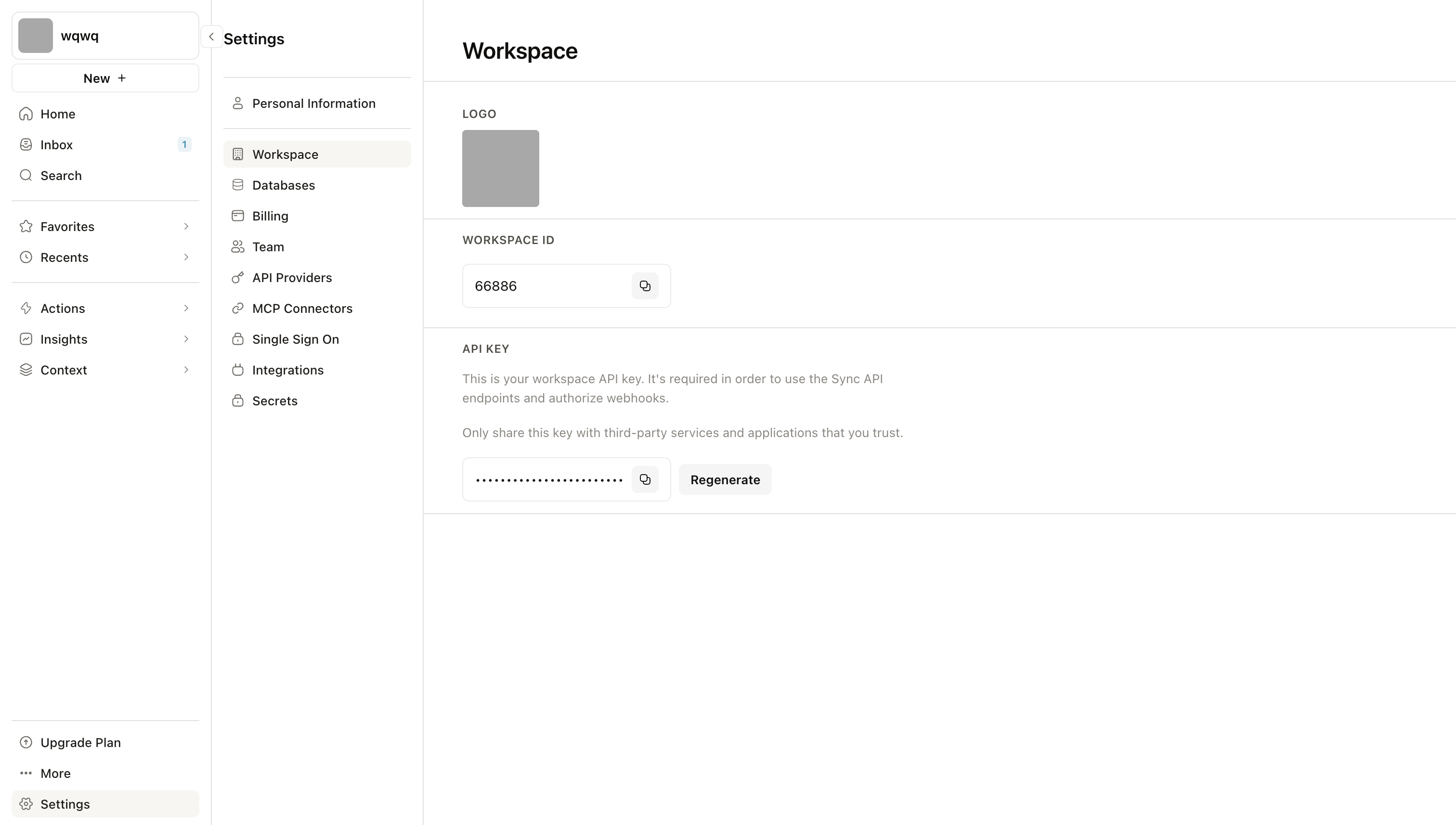
- Sign in to AirOps and click Settings in the bottom-left sidebar.
- Select Workspace from the settings menu.
- Under API Key, click the copy icon to copy your key. To rotate the key, click Regenerate.
-
Create a connection in Scalekit
- In Scalekit dashboard, go to AgentKit > Connections > Create Connection. Find AirOps and click Create.
- Note the Connection name — use this as
connection_namein your code (e.g.,airopsmcp). - Click Save.
-
Add a connected account
Connected accounts link a user identifier in your system to an AirOps API key.
Via dashboard (for testing)
- Open the connection and click the Connected Accounts tab → Add account.
- Fill in:
- Your User’s ID — a unique identifier for this user in your system (e.g.,
user_123) - API Key — the AirOps API key you copied in step 1
- Your User’s ID — a unique identifier for this user in your system (e.g.,
- Click Save.
Via API (for production)
// Never hard-code API keys — read from secure storage or user inputconst airopsApiKey = getUserAiropsKey(); // retrieve from your secure storeawait scalekit.actions.upsertConnectedAccount({connectionName: 'airopsmcp',identifier: 'user_123',credentials: { api_key: airopsApiKey },});# Never hard-code API keys — read from secure storage or user inputairops_api_key = get_user_airops_key() # retrieve from your secure storescalekit_client.actions.upsert_connected_account(connection_name="airopsmcp",identifier="user_123",credentials={"api_key": airops_api_key})
-
-
Make your first call
Section titled “Make your first call”quickstart.ts import { ScalekitClient } from '@scalekit-sdk/node'import 'dotenv/config'const scalekit = new ScalekitClient(process.env.SCALEKIT_ENV_URL,process.env.SCALEKIT_CLIENT_ID,process.env.SCALEKIT_CLIENT_SECRET,)const actions = scalekit.actionsconst connector = 'airopsmcp'const identifier = 'user_123'// Make your first callconst result = await actions.executeTool({connector,identifier,toolName: 'airopsmcp_list_aeo_page_content_updates',toolInput: {},})console.log(result)quickstart.py import osfrom scalekit.client import ScalekitClientfrom dotenv import load_dotenvload_dotenv()scalekit_client = ScalekitClient(env_url=os.getenv("SCALEKIT_ENV_URL"),client_id=os.getenv("SCALEKIT_CLIENT_ID"),client_secret=os.getenv("SCALEKIT_CLIENT_SECRET"),)actions = scalekit_client.actionsconnection_name = "airopsmcp"identifier = "user_123"# Make your first callresult = actions.execute_tool(tool_input={},tool_name="airopsmcp_list_aeo_page_content_updates",connection_name=connection_name,identifier=identifier,)print(result)
What you can do
Section titled “What you can do”Connect this agent connector to let your agent:
- Update topic, aeo tag, aeo prompt assignments — Update an existing AEO topic’s name and/or color on a Brand Kit
- Opportunity reject, accept — Reject pending opportunities for a campaign
- Read grid cell, grid — Read the full value of a single grid cell
- Case manage brand kit visual use — Create or update a Visual Use Case for a Brand Kit
- List opportunities, campaigns, answers — List opportunities for a campaign
- Manage knowledge base — Create or update a Knowledge Base
Tool list
Section titled “Tool list”Use the exact tool names from the Tool list below when you call execute_tool. If you’re not sure which name to use, list the tools available for the current user first.
airopsmcp_accept_opportunity#Accept pending opportunities for a campaign and add them to the campaign action grid. For v2 campaigns, pass opportunity_ids; acceptance uses the original rationale and every opportunity context. Before calling this tool, summarize the opportunities or opportunity items that will be accepted and get explicit user confirmation.3 params
Accept pending opportunities for a campaign and add them to the campaign action grid. For v2 campaigns, pass opportunity_ids; acceptance uses the original rationale and every opportunity context. Before calling this tool, summarize the opportunities or opportunity items that will be accepted and get explicit user confirmation.
play_idintegerrequiredCampaign ID.opportunity_idsarrayoptionalOpportunity IDs to accept. Required for v2; for v1 this accepts every pending item in each opportunity.opportunity_item_idsarrayoptionalV1-only opportunity item IDs to accept. Use this for item-level acceptance.airopsmcp_add_aeo_region#Add a region (ISO alpha-2 country code) to a Brand Kit's configured AEO regions.
Why this tool exists: AEO prompts and prompt-assignments can only reference regions
that are configured on the Brand Kit. When `create_aeo_prompt` or
`update_aeo_prompt_assignments` returns a `validation_error` mentioning that the
country code is "not configured on this brand kit", call this tool to add the
missing region first, then retry.
Behavior:
- Re-adding an already-configured region is a no-op (idempotent) and returns success.
- The country code must be a valid ISO 3166-1 alpha-2 code supported by the platform
(e.g. US, GB, DE, FR, JP, BR, IN, ...).
- Optional `add_to_all_prompts` (default `false`): when `true`, the new region is
also assigned to every existing live prompt in the Brand Kit. This may incur
additional answer credits/month; if the workspace's estimated answers limit would
be exceeded, the call is rejected with a `validation_error` containing
`estimated_answers` and `max_answers` in `details`. Defaults to `false` so the
agent does not silently incur credits.
IMPORTANT: Always show the user the region you plan to add (and whether
`add_to_all_prompts` is on) and get explicit confirmation before calling. Adding a
region cannot be undone via this tool.3 params
Add a region (ISO alpha-2 country code) to a Brand Kit's configured AEO regions. Why this tool exists: AEO prompts and prompt-assignments can only reference regions that are configured on the Brand Kit. When `create_aeo_prompt` or `update_aeo_prompt_assignments` returns a `validation_error` mentioning that the country code is "not configured on this brand kit", call this tool to add the missing region first, then retry. Behavior: - Re-adding an already-configured region is a no-op (idempotent) and returns success. - The country code must be a valid ISO 3166-1 alpha-2 code supported by the platform (e.g. US, GB, DE, FR, JP, BR, IN, ...). - Optional `add_to_all_prompts` (default `false`): when `true`, the new region is also assigned to every existing live prompt in the Brand Kit. This may incur additional answer credits/month; if the workspace's estimated answers limit would be exceeded, the call is rejected with a `validation_error` containing `estimated_answers` and `max_answers` in `details`. Defaults to `false` so the agent does not silently incur credits. IMPORTANT: Always show the user the region you plan to add (and whether `add_to_all_prompts` is on) and get explicit confirmation before calling. Adding a region cannot be undone via this tool.
brand_kit_idintegerrequiredThe Brand Kit ID to add the region to.country_codestringrequiredISO 3166-1 alpha-2 country code (e.g. "US", "GB", "JP"). Must be one of the platform-supported codes.add_to_all_promptsbooleanoptionalIf true, also assigns this region to every existing live prompt in the Brand Kit (subject to the workspace answers limit). Defaults to false.airopsmcp_add_grid_column#Add a new column to a grid table. Use this before write_grid when you need to write to a column that does not exist yet.5 params
Add a new column to a grid table. Use this before write_grid when you need to write to a column that does not exist yet.
data_typestringrequiredThe data type for the column.grid_idintegerrequiredThe ID of the grid.grid_table_idintegerrequiredThe ID of the grid table (sheet).titlestringrequiredThe column title.positionintegeroptionalOptional column position. If omitted, appended at the end.airopsmcp_analytics_chart#Query analytics data and display it as an interactive chart. Returns data with a UI reference for visualization.14 params
Query analytics data and display it as an interactive chart. Returns data with a UI reference for visualization.
brand_kit_idintegerrequiredThe Brand Kit ID to query analytics formetricsarrayrequiredMetrics to calculate and display (e.g., citation_rate, mention_rate, share_of_voice).chart_typestringoptionalType of chart to render. Line for time series, bar for comparisons, pie for proportions, area for comparison and visualizing totals with filled area under the curve. Default: line.countriesarrayoptionalFilter by country codes (ISO 3166-1 alpha-2)dimensionsarrayoptionalDimensions to group by (max 3).end_datestringoptionalEnd date (YYYY-MM-DD). Defaults to yesterday. Must be before today because today's data may still be processing and is incomplete — yesterday is used to ensure robust, complete data. Leave blank unless a specific date is requested.grainstringoptionalTime granularity for aggregation. Default: totalpersonasarrayoptionalFilter by persona IDsprovidersarrayoptionalFilter by AI providersstart_datestringoptionalStart date (YYYY-MM-DD). Default: 7 days agotagsarrayoptionalFilter by tag IDs. Returns data only for prompts tagged with any of the given tags.themesarrayoptionalFilter sentiment data by theme IDs. Only applies to sentiment_score metric.titlestringoptionalOptional chart title. If not provided, a title will be auto-generated.topicsarrayoptionalFilter by topic IDsairopsmcp_bulk_update_aeo_prompt_tags#Apply a single tag operation (add or remove) to a batch of AEO prompts in one
Brand Kit, atomically.
Operations:
- `add` — adds the supplied tag_ids to each prompt's existing tags. Duplicates
are silently deduped.
- `remove` — removes the supplied tag_ids from each prompt. Tags not currently
on a prompt are silently no-oped.
Specifying tags:
- Pass `tag_ids` (use `list_tags` to discover them).
- Tags must already exist on the Brand Kit. This tool does NOT create new tags.
Atomicity:
- The call is fully atomic. If ANY supplied `prompt_id` is missing/discarded/
cross-brand-kit, or ANY `tag_id` is unknown on the Brand Kit, the call is
refused with a `validation_error` listing every problem, and no taggings are
changed.
- On success, all listed prompts receive the operation in a single DB transaction.
Limits:
- Up to 100 `prompt_ids` per call.
IMPORTANT: Always show the user the prompts and tags you plan to operate on, and
get explicit confirmation before calling.4 params
Apply a single tag operation (add or remove) to a batch of AEO prompts in one Brand Kit, atomically. Operations: - `add` — adds the supplied tag_ids to each prompt's existing tags. Duplicates are silently deduped. - `remove` — removes the supplied tag_ids from each prompt. Tags not currently on a prompt are silently no-oped. Specifying tags: - Pass `tag_ids` (use `list_tags` to discover them). - Tags must already exist on the Brand Kit. This tool does NOT create new tags. Atomicity: - The call is fully atomic. If ANY supplied `prompt_id` is missing/discarded/ cross-brand-kit, or ANY `tag_id` is unknown on the Brand Kit, the call is refused with a `validation_error` listing every problem, and no taggings are changed. - On success, all listed prompts receive the operation in a single DB transaction. Limits: - Up to 100 `prompt_ids` per call. IMPORTANT: Always show the user the prompts and tags you plan to operate on, and get explicit confirmation before calling.
brand_kit_idintegerrequiredThe Brand Kit ID that owns the prompts and tags.operationstringrequiredTag operation to apply to every listed prompt.prompt_idsarrayrequiredAEO prompt (question) IDs to operate on. All must belong to the Brand Kit and not be discarded.tag_idsarrayrequiredTag IDs to add or remove. Must exist on the Brand Kit. Use `list_tags` to discover available tag_ids.airopsmcp_bulk_update_aeo_prompt_topics#Reassign a batch of AEO prompts to an existing topic in one Brand Kit.
Specifying the destination topic:
- Pass `topic_id` (use `list_topics` to discover them).
- The topic must already exist on the Brand Kit. This tool does NOT create topics.
To create a new topic first, use `create_topic`, then pass its id here.
Specifying prompts:
- Pass `prompt_ids` (use `list_aeo_prompts` filtered by `topic_id` to find prompts
currently under a source topic).
- IDs that are missing, discarded, or not in the Brand Kit are skipped; only
matching prompts are updated.
IMPORTANT: Always show the user the prompts and destination topic you plan to
operate on, and get explicit confirmation before calling.3 params
Reassign a batch of AEO prompts to an existing topic in one Brand Kit. Specifying the destination topic: - Pass `topic_id` (use `list_topics` to discover them). - The topic must already exist on the Brand Kit. This tool does NOT create topics. To create a new topic first, use `create_topic`, then pass its id here. Specifying prompts: - Pass `prompt_ids` (use `list_aeo_prompts` filtered by `topic_id` to find prompts currently under a source topic). - IDs that are missing, discarded, or not in the Brand Kit are skipped; only matching prompts are updated. IMPORTANT: Always show the user the prompts and destination topic you plan to operate on, and get explicit confirmation before calling.
brand_kit_idintegerrequiredThe Brand Kit ID that owns the prompts and topic.prompt_idsarrayrequiredAEO prompt (question) IDs to reassign. Unknown or discarded IDs are skipped.topic_idintegerrequiredDestination topic ID. Must exist on the Brand Kit. Use `list_topics` to discover available topic_ids. Does NOT create topics — use `create_topic` first if needed.airopsmcp_commit_aeo_prompt_assignments#Commit the current prompt-assignment draft for a Brand Kit to live. Replaces all
live country, persona, and platform assignments for the brand kit's prompts with
the draft data.
The workspace's estimated answers limit is enforced. If committing would push the
workspace over its quota, the call is rejected with an `AnswersLimitExceeded`
validation error containing `estimated_answers` and `max_answers` in `details`.
Recover by calling `update_aeo_prompt_assignments` to adjust, or
`discard_aeo_prompt_assignments` to abandon.
IMPORTANT:
- This action affects live data and is not undoable except by manually editing
assignments again. Always get explicit user confirmation before calling.
- If the human user has unsaved UI edits in the same draft, those will also be
committed. Surface this to the user before proceeding.
- After a successful commit, a fresh empty draft is automatically re-mirrored from
the new live data. You may immediately stage further edits with
`update_aeo_prompt_assignments`.
- This tool does NOT return the new live estimated-answers/month. If you or the
user need the post-commit estimates, call `get_aeo_prompt_assignments_status`.
Do NOT reuse the pre-commit `draft_estimated_answers` from
`update_aeo_prompt_assignments` and do NOT compute the estimate yourself —
repetition-times, persona/country/platform interactions, and concurrent edits
can all shift the result.1 param
Commit the current prompt-assignment draft for a Brand Kit to live. Replaces all live country, persona, and platform assignments for the brand kit's prompts with the draft data. The workspace's estimated answers limit is enforced. If committing would push the workspace over its quota, the call is rejected with an `AnswersLimitExceeded` validation error containing `estimated_answers` and `max_answers` in `details`. Recover by calling `update_aeo_prompt_assignments` to adjust, or `discard_aeo_prompt_assignments` to abandon. IMPORTANT: - This action affects live data and is not undoable except by manually editing assignments again. Always get explicit user confirmation before calling. - If the human user has unsaved UI edits in the same draft, those will also be committed. Surface this to the user before proceeding. - After a successful commit, a fresh empty draft is automatically re-mirrored from the new live data. You may immediately stage further edits with `update_aeo_prompt_assignments`. - This tool does NOT return the new live estimated-answers/month. If you or the user need the post-commit estimates, call `get_aeo_prompt_assignments_status`. Do NOT reuse the pre-commit `draft_estimated_answers` from `update_aeo_prompt_assignments` and do NOT compute the estimate yourself — repetition-times, persona/country/platform interactions, and concurrent edits can all shift the result.
brand_kit_idintegerrequiredThe Brand Kit ID whose draft should be committed.airopsmcp_create_aeo_persona#Create a new AEO persona on a Brand Kit. Personas represent the characters used to
simulate AI-search queries when measuring AI visibility, citations, and mentions.
Behavior:
- `title` must be unique within the Brand Kit (max 200 chars) and `description` is
required (max 5000 chars).
- Optional `add_to_all_prompts` (default `false`): when `true`, the new persona is
also assigned to every existing live prompt in the Brand Kit. This may incur
additional answer credits/month; if the workspace's estimated answers limit would
be exceeded, the call is rejected with a `validation_error` containing
`estimated_answers` and `max_answers` in `details`. Defaults to `false` so the
agent does not silently incur credits.
Writing guidance: avoid including specific brand names in the persona's title or
description — the LLM may then mention the brand in its answer, which the analyzer
will count as a mention and skew the data.
IMPORTANT: Always show the user the persona you plan to create (title, description,
and whether `add_to_all_prompts` is on) and get explicit confirmation before
calling. You can verify the persona was created by calling `list_personas` sorted
by `created_at` descending.4 params
Create a new AEO persona on a Brand Kit. Personas represent the characters used to simulate AI-search queries when measuring AI visibility, citations, and mentions. Behavior: - `title` must be unique within the Brand Kit (max 200 chars) and `description` is required (max 5000 chars). - Optional `add_to_all_prompts` (default `false`): when `true`, the new persona is also assigned to every existing live prompt in the Brand Kit. This may incur additional answer credits/month; if the workspace's estimated answers limit would be exceeded, the call is rejected with a `validation_error` containing `estimated_answers` and `max_answers` in `details`. Defaults to `false` so the agent does not silently incur credits. Writing guidance: avoid including specific brand names in the persona's title or description — the LLM may then mention the brand in its answer, which the analyzer will count as a mention and skew the data. IMPORTANT: Always show the user the persona you plan to create (title, description, and whether `add_to_all_prompts` is on) and get explicit confirmation before calling. You can verify the persona was created by calling `list_personas` sorted by `created_at` descending.
brand_kit_idintegerrequiredThe Brand Kit ID to add the persona to.descriptionstringrequiredA description of the persona's perspective and concerns (max 5000 characters). Avoid including specific brand names.titlestringrequiredThe persona title (max 200 characters). Must be unique within the Brand Kit. Example: "Enterprise CTO".add_to_all_promptsbooleanoptionalIf true, also assigns this persona to every existing live prompt in the Brand Kit (subject to the workspace answers limit). Defaults to false.airopsmcp_create_aeo_prompt#Create a new AEO prompt for a Brand Kit. Prompts are questions that can be asked about a brand to AI search engines, used to track AI visibility and citations.6 params
Create a new AEO prompt for a Brand Kit. Prompts are questions that can be asked about a brand to AI search engines, used to track AI visibility and citations.
brand_kit_idintegerrequiredThe Brand Kit ID to add the prompt totextstringrequiredThe prompt text (max 512 characters). Must be unique within the Brand Kit.topic_idintegerrequiredTopic ID to associate with the prompt. Must belong to the same Brand Kit. Use `list_topics` to discover available topics and either suggest one or ask the user to choose.countriesarrayoptionalISO alpha-2 country codes to assign (e.g., ["US", "GB"]). Must be configured on the Brand Kit.persona_idsarrayoptionalPersona IDs to assign. Must belong to the same Brand Kit. Use `list_personas` to discover available personas.platformsarrayoptionalPlatforms to assign. Valid values: chat_gpt, gemini, perplexity, google_ai_mode, google_ai_overview.airopsmcp_create_aeo_tag#Create a new AEO tag on a Brand Kit. Tags are user-defined labels that can be applied
to prompts via `bulk_update_aeo_prompt_tags`.
Behavior:
- `name` must be unique within the Brand Kit (case-insensitive). The model enforces
this via a unique index on (brand_kit_id, lower(name)).
- `color` is optional. If omitted, a color is auto-assigned from the platform
palette. Valid colors: light_grey, grey, green, teal, blue, purple, lilac, pink, red, coral, orange.
- This tool does NOT apply the new tag to any prompts. Use
`bulk_update_aeo_prompt_tags` with `operation: 'add'` to assign it afterward.
IMPORTANT: Always show the user the tag you plan to create (name and color) and get
explicit confirmation before calling. You can verify the tag was created by calling
`list_tags` filtered by name.3 params
Create a new AEO tag on a Brand Kit. Tags are user-defined labels that can be applied to prompts via `bulk_update_aeo_prompt_tags`. Behavior: - `name` must be unique within the Brand Kit (case-insensitive). The model enforces this via a unique index on (brand_kit_id, lower(name)). - `color` is optional. If omitted, a color is auto-assigned from the platform palette. Valid colors: light_grey, grey, green, teal, blue, purple, lilac, pink, red, coral, orange. - This tool does NOT apply the new tag to any prompts. Use `bulk_update_aeo_prompt_tags` with `operation: 'add'` to assign it afterward. IMPORTANT: Always show the user the tag you plan to create (name and color) and get explicit confirmation before calling. You can verify the tag was created by calling `list_tags` filtered by name.
brand_kit_idintegerrequiredThe Brand Kit ID to add the tag to.namestringrequiredThe tag name. Must be unique within the Brand Kit (case-insensitive).colorstringoptionalOptional. Named color from the platform palette. If omitted, a color is auto-assigned.airopsmcp_create_brand_kit_direct_upload#Initiate a direct file upload for use with Brand Kit visual tools.5 params
Initiate a direct file upload for use with Brand Kit visual tools.
brand_kit_idintegerrequiredThe Brand Kit ID this file is intended forbyte_sizeintegerrequiredSize of the file in byteschecksumstringrequiredBase64-encoded MD5 digest of the file contentscontent_typestringrequiredMIME type of the filefilenamestringrequiredThe filename including extension, e.g. "logo.png" or "brand-font.woff2"airopsmcp_create_brand_kit_recap_entry#Record a recap entry summarizing the changes you made to a Brand Kit.
Call this once, near the end of a session that mutated the Brand Kit draft — not for every edit.
Do not call this tool if you made no Brand Kit draft mutations this session (for example,
you only read the Brand Kit, suggested edits the user rejected, or worked on Playbooks,
Campaigns, or Insights). Never create a recap that says nothing changed.
Put the evidence behind the changes in `body_markdown`: verbatim quotes, source URLs, and pages.
Example:
create_brand_kit_recap_entry(
brand_kit_id: 123,
title: "Refreshed tone & voice and added 2 regions",
body_markdown: "Made the tone more concise per the latest brand guidelines (https://acme.com/brand). Added US East and US West to support the Q3 launch."
)3 params
Record a recap entry summarizing the changes you made to a Brand Kit. Call this once, near the end of a session that mutated the Brand Kit draft — not for every edit. Do not call this tool if you made no Brand Kit draft mutations this session (for example, you only read the Brand Kit, suggested edits the user rejected, or worked on Playbooks, Campaigns, or Insights). Never create a recap that says nothing changed. Put the evidence behind the changes in `body_markdown`: verbatim quotes, source URLs, and pages. Example: create_brand_kit_recap_entry( brand_kit_id: 123, title: "Refreshed tone & voice and added 2 regions", body_markdown: "Made the tone more concise per the latest brand guidelines (https://acme.com/brand). Added US East and US West to support the Q3 launch." )
brand_kit_idintegerrequiredThe Brand Kit IDtitlestringrequiredOne-line summary of what changed (max 200 characters)body_markdownstringoptionalMarkdown detail with the evidence behind the changes, e.g. quotes, source URLs, pages (max 4000 characters)airopsmcp_create_grid#Create a new empty, general-purpose grid with the given name. The grid is created with a single empty sheet (zero rows, zero columns).2 params
Create a new empty, general-purpose grid with the given name. The grid is created with a single empty sheet (zero rows, zero columns).
namestringrequiredThe name for the new grid.workspace_idintegeroptionalOptional workspace ID. Defaults to the user's only workspace when unambiguous.airopsmcp_create_grid_sheet#Create a new sheet (grid table) within an existing grid. The sheet is created with zero rows and zero columns.2 params
Create a new sheet (grid table) within an existing grid. The sheet is created with zero rows and zero columns.
grid_idintegerrequiredThe ID of the grid to add the sheet to.namestringrequiredThe name for the new sheet.airopsmcp_create_opportunity#Create a pending opportunity for a campaign. Before calling this tool, summarize the proposed opportunity name, description, and target resources for the user, then get explicit confirmation. In Quill or other OAuth MCP clients, provide play_id from list_campaigns or get_campaign. In playbook sessions, play_id is optional and is derived from the current session.6 params
Create a pending opportunity for a campaign. Before calling this tool, summarize the proposed opportunity name, description, and target resources for the user, then get explicit confirmation. In Quill or other OAuth MCP clients, provide play_id from list_campaigns or get_campaign. In playbook sessions, play_id is optional and is derived from the current session.
descriptionstringrequiredOpportunity description.namestringrequiredOpportunity name.contextsarrayoptionalOrdered supporting resources for v2 campaigns. Rejected for v1 campaigns.itemsarrayoptionalRequired for v1 campaigns and rejected for v2 campaigns.play_idintegeroptionalCampaign ID. Required outside playbook sessions.target_page_idintegeroptionalRequired for v2 page-refresh campaigns and rejected otherwise.airopsmcp_create_page#Add a web page to a Brand Kit's AEO pages. The URL is normalized before the page is
created, and the page is associated with the Brand Kit's configured AEO domain.
The URL must be unique within the Brand Kit.
IMPORTANT: Always show the user the URL and Brand Kit you plan to use and get explicit
confirmation before calling this tool. You can verify the page was created by calling
`list_pages` filtered by URL.2 params
Add a web page to a Brand Kit's AEO pages. The URL is normalized before the page is created, and the page is associated with the Brand Kit's configured AEO domain. The URL must be unique within the Brand Kit. IMPORTANT: Always show the user the URL and Brand Kit you plan to use and get explicit confirmation before calling this tool. You can verify the page was created by calling `list_pages` filtered by URL.
brand_kit_idintegerrequiredThe Brand Kit ID to add the page to.urlstringrequiredThe web page URL. Must be unique within the Brand Kit.airopsmcp_create_report#[STALE: no longer present in the upstream airopsmcp MCP tools/list as of 2026-08-19 — upstream only exposes get_report and list_reports now, with no create_report equivalent] Create a new analytics report for a Brand Kit. Reports contain one or more modules that visualize metrics like citation_rate, mention_rate, share_of_voice, etc.3 params
[STALE: no longer present in the upstream airopsmcp MCP tools/list as of 2026-08-19 — upstream only exposes get_report and list_reports now, with no create_report equivalent] Create a new analytics report for a Brand Kit. Reports contain one or more modules that visualize metrics like citation_rate, mention_rate, share_of_voice, etc.
brand_kit_idintegerrequiredThe Brand Kit IDmodulesarrayrequiredArray of module configurationsnamestringrequiredReport name (must be unique per brand kit)airopsmcp_create_topic#Create a new AEO topic on a Brand Kit. Topics are categories used to group AEO prompts.
Behavior:
- `name` must be unique within the Brand Kit.
- `color` is optional. If omitted, a color is auto-assigned from the platform palette.
Valid colors: light_grey, grey, green, teal, blue, purple, lilac, pink, red, coral, orange.
- This tool does NOT create or assign prompts. Use `create_aeo_prompt` with the returned
topic ID to add prompts to the topic.
IMPORTANT: Always show the user the topic you plan to create (name and color) and get
explicit confirmation before calling. You can verify the topic was created by calling
`list_topics` filtered by name.3 params
Create a new AEO topic on a Brand Kit. Topics are categories used to group AEO prompts. Behavior: - `name` must be unique within the Brand Kit. - `color` is optional. If omitted, a color is auto-assigned from the platform palette. Valid colors: light_grey, grey, green, teal, blue, purple, lilac, pink, red, coral, orange. - This tool does NOT create or assign prompts. Use `create_aeo_prompt` with the returned topic ID to add prompts to the topic. IMPORTANT: Always show the user the topic you plan to create (name and color) and get explicit confirmation before calling. You can verify the topic was created by calling `list_topics` filtered by name.
brand_kit_idintegerrequiredThe Brand Kit ID to add the topic to.namestringrequiredThe topic name. Must be unique within the Brand Kit.colorstringoptionalOptional. Named color from the platform palette. If omitted, a color is auto-assigned.airopsmcp_delete_aeo_prompt#Delete an AEO prompt from a Brand Kit.
Use `list_aeo_prompts` to find the prompt ID and verify the prompt text before deletion.
IMPORTANT: This action is destructive. Always show the user the exact prompt text and
get explicit confirmation before calling this tool.2 params
Delete an AEO prompt from a Brand Kit. Use `list_aeo_prompts` to find the prompt ID and verify the prompt text before deletion. IMPORTANT: This action is destructive. Always show the user the exact prompt text and get explicit confirmation before calling this tool.
brand_kit_idintegerrequiredThe Brand Kit ID that owns the prompt.prompt_idintegerrequiredThe ID of the prompt to remove.airopsmcp_delete_aeo_tag#Delete an AEO tag from a Brand Kit.
Behavior:
- This is a HARD delete. The tag is removed from the Brand Kit entirely.
- All taggings on prompts that referenced this tag are also deleted (cascade via
`Aeo::Tag has_many :taggings, dependent: :destroy`). Every prompt that had this
tag will lose it.
- The response includes `tagged_prompts_count`: the number of prompts that lost the
tag. Use this to communicate the blast radius back to the user.
IMPORTANT: This action is destructive and cannot be undone via this tool. Always
show the user the tag name AND `tagged_prompts_count` (look it up first via
`list_tags` + `list_aeo_prompts` if needed) and get explicit confirmation before
calling.2 params
Delete an AEO tag from a Brand Kit. Behavior: - This is a HARD delete. The tag is removed from the Brand Kit entirely. - All taggings on prompts that referenced this tag are also deleted (cascade via `Aeo::Tag has_many :taggings, dependent: :destroy`). Every prompt that had this tag will lose it. - The response includes `tagged_prompts_count`: the number of prompts that lost the tag. Use this to communicate the blast radius back to the user. IMPORTANT: This action is destructive and cannot be undone via this tool. Always show the user the tag name AND `tagged_prompts_count` (look it up first via `list_tags` + `list_aeo_prompts` if needed) and get explicit confirmation before calling.
brand_kit_idintegerrequiredThe Brand Kit ID that owns the tag.tag_idintegerrequiredThe tag ID to delete.airopsmcp_delete_brand_kit_writing_rules#Delete one or more writing rules from a Brand Kit.
This edits the Brand Kit draft version only; it does not change the active (live) version.
A failure deleting one rule does not block or roll back the others: the response reports
which rules were deleted and which could not be.
IMPORTANT: Always show the user exactly which writing rules will be deleted and ask for
confirmation before calling this tool.2 params
Delete one or more writing rules from a Brand Kit. This edits the Brand Kit draft version only; it does not change the active (live) version. A failure deleting one rule does not block or roll back the others: the response reports which rules were deleted and which could not be. IMPORTANT: Always show the user exactly which writing rules will be deleted and ask for confirmation before calling this tool.
brand_kit_idintegerrequiredThe Brand Kit IDwriting_rule_idsarrayrequiredThe IDs of the writing rules to delete (up to 10)airopsmcp_delete_topic#Delete an AEO topic from a Brand Kit.
Behavior:
- This is a HARD delete. The topic is removed from the Brand Kit entirely.
- Deletion is blocked when the topic has associated prompts. Use `list_aeo_prompts`
filtered by `topic_id` to inspect prompts before deleting.
- Candidate questions and question recommendations for the topic are deleted by model
associations when the topic is deleted.
IMPORTANT: This action is destructive and cannot be undone via this tool. Always show
the user the topic name and associated prompt count, then get explicit confirmation
before calling.2 params
Delete an AEO topic from a Brand Kit. Behavior: - This is a HARD delete. The topic is removed from the Brand Kit entirely. - Deletion is blocked when the topic has associated prompts. Use `list_aeo_prompts` filtered by `topic_id` to inspect prompts before deleting. - Candidate questions and question recommendations for the topic are deleted by model associations when the topic is deleted. IMPORTANT: This action is destructive and cannot be undone via this tool. Always show the user the topic name and associated prompt count, then get explicit confirmation before calling.
brand_kit_idintegerrequiredThe Brand Kit ID that owns the topic.topic_idintegerrequiredThe topic ID to delete.airopsmcp_discard_aeo_prompt_assignments#Discard the current prompt-assignment draft for a Brand Kit. Throws away ALL
uncommitted edits — both your own and any unsaved edits the human user made in the
UI — and re-mirrors a fresh empty draft from live.
Live assignments are never touched.
IMPORTANT:
- This action is destructive and unrecoverable. Pending UI edits the user has not
committed will be lost.
- Always get explicit user confirmation before calling.
- Calling discard when no draft exists is a no-op; a fresh empty draft is still
created so further `update_aeo_prompt_assignments` calls work without setup.1 param
Discard the current prompt-assignment draft for a Brand Kit. Throws away ALL uncommitted edits — both your own and any unsaved edits the human user made in the UI — and re-mirrors a fresh empty draft from live. Live assignments are never touched. IMPORTANT: - This action is destructive and unrecoverable. Pending UI edits the user has not committed will be lost. - Always get explicit user confirmation before calling. - Calling discard when no draft exists is a no-op; a fresh empty draft is still created so further `update_aeo_prompt_assignments` calls work without setup.
brand_kit_idintegerrequiredThe Brand Kit ID whose draft should be discarded.airopsmcp_get_aeo_citation#Get prompts citing a specific URL. The 'id' parameter is the URL to look up.9 params
Get prompts citing a specific URL. The 'id' parameter is the URL to look up.
brand_kit_idintegerrequiredThe ID of the Brand KitidstringrequiredResource IDcountriesarrayoptionalFilter metrics by country codesend_datestringoptionalEnd date for metrics (ISO 8601). Defaults to today.fieldsarrayoptionalSpecify which fields to return in the response, as a list of field names.filtersarrayoptionalFilter results by column values. Each filter requires column_id, operator, and value.personasarrayoptionalFilter metrics by persona IDsprovidersarrayoptionalFilter metrics by AI providersstart_datestringoptionalStart date for metrics (ISO 8601). Defaults to 1 month ago.airopsmcp_get_aeo_page_content_update#Get a specific page content update by ID. Track content updates.6 params
Get a specific page content update by ID. Track content updates.
idintegerrequiredResource IDbrand_kit_idintegeroptionalOptional Brand Kit ID to filter content updates byfieldsarrayoptionalSpecify which fields to return in the response, as a list of field names.filtersarrayoptionalFilter results by column values. Each filter requires column_id, operator, and value.includesarrayoptionalRelated resources to include in the response, as a list of relationship names.workspace_idintegeroptionalID of the workspace to retrieve results from. If not provided, returns results from all workspaces the user belongs to.airopsmcp_get_aeo_prompt_assignments_status#Inspect the current prompt-assignment draft state for a Brand Kit without modifying
anything. Read-only.
This is the authoritative source for workspace estimated-answers numbers (live
and draft). Call it whenever you need them — never compute or guess them yourself.
In particular:
- At the start of a session, to detect a pre-existing draft from unsaved UI edits.
- Immediately after `commit_aeo_prompt_assignments`, to read the new live
`estimated_answers` — the commit tool does not return them.
- Before staging more changes via `update_aeo_prompt_assignments`, to compare
against `max_answers`.
Returns:
- `has_draft`: whether a draft session exists for this brand kit.
- `has_changes`: whether the draft has uncommitted edits relative to live (null if
no draft).
- `draft_id`: the draft's ID (null if no draft).
- `live_estimated_answers`: current workspace estimated answers/month based on live
assignments.
- `draft_estimated_answers`: what the workspace estimated answers/month would be if
the draft were committed now (null if no draft).
- `max_answers`: the workspace's effective answers limit.
- `limit_exceeded`: whether committing the draft now would exceed the limit (false
if no draft).1 param
Inspect the current prompt-assignment draft state for a Brand Kit without modifying anything. Read-only. This is the authoritative source for workspace estimated-answers numbers (live and draft). Call it whenever you need them — never compute or guess them yourself. In particular: - At the start of a session, to detect a pre-existing draft from unsaved UI edits. - Immediately after `commit_aeo_prompt_assignments`, to read the new live `estimated_answers` — the commit tool does not return them. - Before staging more changes via `update_aeo_prompt_assignments`, to compare against `max_answers`. Returns: - `has_draft`: whether a draft session exists for this brand kit. - `has_changes`: whether the draft has uncommitted edits relative to live (null if no draft). - `draft_id`: the draft's ID (null if no draft). - `live_estimated_answers`: current workspace estimated answers/month based on live assignments. - `draft_estimated_answers`: what the workspace estimated answers/month would be if the draft were committed now (null if no draft). - `max_answers`: the workspace's effective answers limit. - `limit_exceeded`: whether committing the draft now would exceed the limit (false if no draft).
brand_kit_idintegerrequiredThe Brand Kit ID to inspect.airopsmcp_get_answer#Get a specific AI answer by ID with full text content.3 params
Get a specific AI answer by ID with full text content.
idintegerrequiredResource IDfieldsarrayoptionalSpecify which fields to return in the response, as a list of field names.includesarrayoptionalRelated resources to include in the response, as a list of relationship names.airopsmcp_get_brand_kit#Fetch a Brand Kit's brand identity (writing_tone, writing_persona) and associated entities (product lines, audiences, content types, regions, writing rules, cus...6 params
Fetch a Brand Kit's brand identity (writing_tone, writing_persona) and associated entities (product lines, audiences, content types, regions, writing rules, cus...
idintegerrequiredResource IDfieldsarrayoptionalSpecify which fields to return in the response, as a list of field names.filtersarrayoptionalFilter results by column values. Each filter requires column_id, operator, and value.includesarrayoptionalRelated resources to include in the response, as a list of relationship names.versionstringoptionalBrand Kit version to read from (`active` or `draft`). Defaults to `active`.workspace_idintegeroptionalID of the workspace to retrieve brand kits from. If not provided, returns brand kits from all workspaces the user belongs to.airopsmcp_get_campaign#Get a campaign by ID, including action grid IDs needed to inspect or update its grid. Campaigns are Plays that coordinate strategy playbooks, action grids, and related opportunities for improving AEO performance.3 params
Get a campaign by ID, including action grid IDs needed to inspect or update its grid. Campaigns are Plays that coordinate strategy playbooks, action grids, and related opportunities for improving AEO performance.
idintegerrequiredResource IDfieldsarrayoptionalSelect specific fields to return.
**Available fields:**
- **id**: Campaign ID
- **name**: Campaign name
- **status**: Campaign status
- **resource_type**: Resource type this campaign works on
- **brand_kit_id**: Brand Kit this campaign belongs to
- **workspace_id**: Workspace this campaign belongs to
- **strategy_playbook_id**: Strategy playbook generated for this campaign
- **opportunity_schema_version**: Persisted Opportunity schema version
- **created_at**: When the campaign was created
- **updated_at**: When the campaign was last updated
- **action_grid_id**: Action grid ID to use with grid tools
- **action_grid_table_id**: Action grid table ID to use with grid tools
- **custom_instructions**: Campaign-specific guidance for working related opportunitiesfiltersarrayoptionalFilter results. Nested fields (e.g. `writing_rules.text`) filter within an included association and require that association in `includes`.
**Available fields:**
- **name** (EQUALS, CONTAINS): Filter by campaign name
- **status** (EQUALS, IN): Filter by campaign status
- **workspace_id** (EQ, IN): Filter by workspace ID
- **brand_kit_id** (EQ, IN): Filter by Brand Kit ID
- **resource_type** (EQUALS, IN): Filter by campaign resource typeairopsmcp_get_grid_row_execution_status#Check the status of grid row executions. Returns the overall status and per-column detail for each execution.2 params
Check the status of grid row executions. Returns the overall status and per-column detail for each execution.
grid_idintegerrequiredThe ID of the grid containing the executions.row_execution_idsarrayrequiredIDs of the row executions to check (max 50).airopsmcp_get_insights_settings#Get AEO insights configuration for a Brand Kit, this includes the relevant information to use any AEO and analytics tools.3 params
Get AEO insights configuration for a Brand Kit, this includes the relevant information to use any AEO and analytics tools.
idintegerrequiredResource IDfieldsarrayoptionalSpecify which fields to return in the response, as a list of field names.workspace_idintegeroptionalID of the workspace to retrieve results from. If not provided, returns results from all workspaces the user belongs to.airopsmcp_get_page_details#Get AEO metrics for a specific web page. Page details include citation share, citation rate, unique cited questions count, and Google Search Console metrics (cl...4 params
Get AEO metrics for a specific web page. Page details include citation share, citation rate, unique cited questions count, and Google Search Console metrics (cl...
idintegerrequiredResource IDend_datestringoptionalEnd date for metrics period (YYYY-MM-DD format). Defaults to current date.fieldsarrayoptionalSpecify which fields to return in the response, as a list of field names.start_datestringoptionalStart date for metrics period (YYYY-MM-DD format). Defaults to 1 month ago.airopsmcp_get_page_prompts#Get prompts citing a specific web page. Returns AI prompts that cite the page along with citation metrics (citation_rate, mention_rate) and trends.13 params
Get prompts citing a specific web page. Returns AI prompts that cite the page along with citation metrics (citation_rate, mention_rate) and trends.
brand_kit_idintegerrequiredID of the brand kitweb_page_idintegerrequiredID of the web page to get citing prompts forcountriesarrayoptionalCountry codes to filter by (ISO 3166-1 alpha-2 format).end_datestringoptionalEnd date for analysis period (ISO 8601 format, defaults to today)fieldsarrayoptionalSpecify which fields to return in the response, as a list of field names.filtersarrayoptionalFilter results by column values. Each filter requires column_id, operator, and value.includesarrayoptionalRelated resources to include in the response, as a list of relationship names.pageintegeroptionalPage numberper_pageintegeroptionalItems per pagepersonasarrayoptionalFilter by persona IDsprovidersarrayoptionalFilter by AI providers (e.g., chat_gpt, gemini, perplexity, google_ai_mode, google_ai_overview, claude, grok, microsoft_copilot)start_datestringoptionalStart date for analysis period (ISO 8601 format, defaults to 1 month ago)topic_idsarrayoptionalFilter by topic IDsairopsmcp_get_prompt_answers#Get AI answers for a specific prompt/question. Prompt answers are the AI answers for a specific question/prompt asked to multiple AI providers and the answers a...10 params
Get AI answers for a specific prompt/question. Prompt answers are the AI answers for a specific question/prompt asked to multiple AI providers and the answers a...
prompt_idintegerrequiredID of the question/prompt to get answers forcountriesstringoptionalCountry codes to filter by (ISO 3166-1 alpha-2 format).end_datestringoptionalEnd date for analysis period (ISO 8601 format, defaults to today)fieldsarrayoptionalSpecify which fields to return in the response, as a list of field names.includesarrayoptionalRelated resources to include in the response, as a list of relationship names.pageintegeroptionalPage numberper_pageintegeroptionalItems per pagepersonasstringoptionalComma-separated persona IDs to filter by.Use "default" for the default persona.sortstringoptionalSort field. Prefix with - for descending.start_datestringoptionalStart date for analysis period (ISO 8601 format, defaults to 1 month ago)airopsmcp_get_report#Get a specific report by ID with its module configurations. Reports are saved analytics views for a Brand Kit.5 params
Get a specific report by ID with its module configurations. Reports are saved analytics views for a Brand Kit.
brand_kit_idintegerrequiredThe ID of the Brand KitidintegerrequiredResource IDfieldsarrayoptionalSpecify which fields to return in the response, as a list of field names.filtersarrayoptionalFilter results by column values. Each filter requires column_id, operator, and value.includesarrayoptionalRelated resources to include in the response, as a list of relationship names.airopsmcp_get_sentiment_theme_answers#Get individual AI answers with sentiment details for a specific theme. Returns answer text, sentiment (positive/neutral/negative), confidence score, and provide...10 params
Get individual AI answers with sentiment details for a specific theme. Returns answer text, sentiment (positive/neutral/negative), confidence score, and provide...
brand_kit_idintegerrequiredThe Brand Kit IDsentiment_theme_idintegerrequiredThe sentiment theme ID to drill into. Use query_analytics with dimensions=[theme] to discover available theme IDs first.countriesarrayoptionalFilter by country codes (ISO 3166-1 alpha-2)end_datestringoptionalEnd date (YYYY-MM-DD). Defaults to yesterday. Must be before today.pageintegeroptionalPage number. Default: 1per_pageintegeroptionalResults per page (1-50). Default: 10personasarrayoptionalFilter by persona IDsprovidersarrayoptionalFilter by AI providersstart_datestringoptionalStart date (YYYY-MM-DD). Default: 30 days agotopicsarrayoptionalFilter by topic IDsairopsmcp_knowledge_base_add_file#Step 2 of the two-step file ingestion flow for a Knowledge Base. Consumes a `signed_id`
returned by `knowledge_base_create_direct_upload` (step 1) plus the file's metadata, and
registers the document with the Knowledge Base. Returns immediately with the new
`document_id` in `pending` status — poll `knowledge_base_get_status` to monitor indexing.
Workflow:
1. Call `knowledge_base_create_direct_upload` with the file metadata to get back a
`signed_id` and a presigned `upload_url`.
2. PUT the file bytes to the `upload_url` with the provided headers.
3. Call this tool with the `signed_id`, the desired `name` (used as the document's display
name), the `document_type` MIME (must match the supported types), and an optional
`metadata` hash.
The `metadata` hash, if provided, is a single-level key/value object. It **replaces** any
existing metadata on the document (no merge) and is filterable at search time via
`search_knowledge_base`.5 params
Step 2 of the two-step file ingestion flow for a Knowledge Base. Consumes a `signed_id` returned by `knowledge_base_create_direct_upload` (step 1) plus the file's metadata, and registers the document with the Knowledge Base. Returns immediately with the new `document_id` in `pending` status — poll `knowledge_base_get_status` to monitor indexing. Workflow: 1. Call `knowledge_base_create_direct_upload` with the file metadata to get back a `signed_id` and a presigned `upload_url`. 2. PUT the file bytes to the `upload_url` with the provided headers. 3. Call this tool with the `signed_id`, the desired `name` (used as the document's display name), the `document_type` MIME (must match the supported types), and an optional `metadata` hash. The `metadata` hash, if provided, is a single-level key/value object. It **replaces** any existing metadata on the document (no merge) and is filterable at search time via `search_knowledge_base`.
document_typestringrequiredMIME type to index the document as. Typically matches the `content_type` passed to `knowledge_base_create_direct_upload`, but may intentionally differ to select a different loader (e.g. registering a `text/csv` blob as `text/plain` to bypass CSV-specific parsing).knowledge_base_idintegerrequiredThe ID of the Knowledge Base to register the document with.namestringrequiredDisplay name for the document.signed_idstringrequiredThe `signed_id` returned by `knowledge_base_create_direct_upload`.metadataobjectoptionalOptional single-level key/value hash to attach to the document. Filterable via `search_knowledge_base`.airopsmcp_knowledge_base_add_urls#Bulk-ingest one or more web pages into a Knowledge Base. Each URL becomes a separate
document that fetches and indexes asynchronously. The call returns immediately with the
new document IDs in `pending` state — poll `knowledge_base_get_status` to check progress.
URLs must be absolute and include the `http://` or `https://` scheme (e.g.
`https://example.com/page`). No documents are created if any URL fails validation.
The `metadata` hash, if provided, is applied identically to every document in the batch
(single-level keys only); it replaces (not merges) any existing metadata and is
filterable at search time.3 params
Bulk-ingest one or more web pages into a Knowledge Base. Each URL becomes a separate document that fetches and indexes asynchronously. The call returns immediately with the new document IDs in `pending` state — poll `knowledge_base_get_status` to check progress. URLs must be absolute and include the `http://` or `https://` scheme (e.g. `https://example.com/page`). No documents are created if any URL fails validation. The `metadata` hash, if provided, is applied identically to every document in the batch (single-level keys only); it replaces (not merges) any existing metadata and is filterable at search time.
knowledge_base_idintegerrequiredThe ID of the Knowledge Base to add URLs to.urlsarrayrequiredOne or more absolute URLs starting with `http://` or `https://` (e.g. `https://example.com/page`). Each URL becomes its own document. Bare hostnames without a scheme are rejected.metadataobjectoptionalOptional single-level hash applied identically to every new document. Replaces existing metadata (no merge). Filterable via search_knowledge_base.airopsmcp_knowledge_base_create_direct_upload#Initiate a direct file upload for a Knowledge Base. Returns a presigned S3 upload URL,
the required upload headers, and a `signed_id` you'll use with `knowledge_base_add_file`
to register the document.
This is the first call in the two-step file ingestion flow — large files (PDFs, DOCX,
MD, HTML, etc.) don't fit through the MCP transport, so the file bytes go directly from
your client to S3.
Workflow:
1. Call this tool with the file metadata (filename, content_type, byte_size, checksum).
The checksum must be the Base64-encoded MD5 digest of the file contents.
2. PUT the raw file bytes to the returned `upload_url` with **all** the provided
`upload_headers`. No additional authentication is needed — the URL is a time-limited
presigned URL.
3. Pass the returned `signed_id` to `knowledge_base_add_file` to register the document.
Only after step 3 is the file searchable.
Example:
> knowledge_base_create_direct_upload(knowledge_base_id: 1, filename: "report.pdf",
content_type: "application/pdf", byte_size: 1234567, checksum: "...")
# → { signed_id: "abc...", upload_url: "https://s3...", upload_headers: { ... } }
> knowledge_base_add_file(knowledge_base_id: 1, signed_id: "abc...",
name: "Q4 Report", document_type: "application/pdf")
# → { document_ids: [42], status: "pending" }
Maximum file size is 256 MB.5 params
Initiate a direct file upload for a Knowledge Base. Returns a presigned S3 upload URL, the required upload headers, and a `signed_id` you'll use with `knowledge_base_add_file` to register the document. This is the first call in the two-step file ingestion flow — large files (PDFs, DOCX, MD, HTML, etc.) don't fit through the MCP transport, so the file bytes go directly from your client to S3. Workflow: 1. Call this tool with the file metadata (filename, content_type, byte_size, checksum). The checksum must be the Base64-encoded MD5 digest of the file contents. 2. PUT the raw file bytes to the returned `upload_url` with **all** the provided `upload_headers`. No additional authentication is needed — the URL is a time-limited presigned URL. 3. Pass the returned `signed_id` to `knowledge_base_add_file` to register the document. Only after step 3 is the file searchable. Example: > knowledge_base_create_direct_upload(knowledge_base_id: 1, filename: "report.pdf", content_type: "application/pdf", byte_size: 1234567, checksum: "...") # → { signed_id: "abc...", upload_url: "https://s3...", upload_headers: { ... } } > knowledge_base_add_file(knowledge_base_id: 1, signed_id: "abc...", name: "Q4 Report", document_type: "application/pdf") # → { document_ids: [42], status: "pending" } Maximum file size is 256 MB.
byte_sizeintegerrequiredSize of the file in bytes. Maximum: 256 MB.checksumstringrequiredBase64-encoded MD5 digest of the file contents.content_typestringrequiredMIME type of the file.filenamestringrequiredThe filename including extension, e.g. "report.pdf" or "transcript.md".knowledge_base_idintegerrequiredThe ID of the Knowledge Base the file will be ingested into.airopsmcp_knowledge_base_delete#Permanently delete a Knowledge Base and ALL of its documents. This cascades through
every document in the KB and drops the underlying vectors. This action cannot be
undone.
IMPORTANT: Always warn the user that deletion is permanent and irreversible, name
the Knowledge Base being deleted, and ask for explicit confirmation before calling
this tool.1 param
Permanently delete a Knowledge Base and ALL of its documents. This cascades through every document in the KB and drops the underlying vectors. This action cannot be undone. IMPORTANT: Always warn the user that deletion is permanent and irreversible, name the Knowledge Base being deleted, and ask for explicit confirmation before calling this tool.
knowledge_base_idintegerrequiredThe ID of the Knowledge Base to delete.airopsmcp_knowledge_base_delete_document#Permanently delete a single document from a Knowledge Base. This action cannot be undone.
IMPORTANT: Always warn the user that deletion is permanent and ask for explicit
confirmation before calling this tool.2 params
Permanently delete a single document from a Knowledge Base. This action cannot be undone. IMPORTANT: Always warn the user that deletion is permanent and ask for explicit confirmation before calling this tool.
document_idintegerrequiredThe ID of the document to delete.knowledge_base_idintegerrequiredThe ID of the Knowledge Base the document belongs to.airopsmcp_knowledge_base_get_document#Read the full reconstructed text content of a Knowledge Base document end-to-end —
the loader-extracted text from every chunk concatenated in `position` order.
Use when chunked search results aren't enough: summarizing a whole document,
answering questions across an entire report, or reading back a doc before
delete-and-recreate. For finding specific passages, prefer `search_knowledge_base`.
Returns up to `max_chars` characters starting at `offset` (defaults to 0 and
200000). When the document is larger than the slice, the response
includes `next_offset` (the value to pass on the next call to continue reading);
when fully read, `next_offset` is `null`.
For documents still indexing (`status: pending`) or in error (`status: error`),
content may be empty — check `status` first.
Content is reconstructed by joining chunks; minor overlap or duplication between
adjacent chunks is possible depending on the original loader's chunking strategy.
For the original source file, use the existing download path outside MCP.4 params
Read the full reconstructed text content of a Knowledge Base document end-to-end — the loader-extracted text from every chunk concatenated in `position` order. Use when chunked search results aren't enough: summarizing a whole document, answering questions across an entire report, or reading back a doc before delete-and-recreate. For finding specific passages, prefer `search_knowledge_base`. Returns up to `max_chars` characters starting at `offset` (defaults to 0 and 200000). When the document is larger than the slice, the response includes `next_offset` (the value to pass on the next call to continue reading); when fully read, `next_offset` is `null`. For documents still indexing (`status: pending`) or in error (`status: error`), content may be empty — check `status` first. Content is reconstructed by joining chunks; minor overlap or duplication between adjacent chunks is possible depending on the original loader's chunking strategy. For the original source file, use the existing download path outside MCP.
document_idintegerrequiredThe ID of the document to read.knowledge_base_idintegerrequiredThe ID of the Knowledge Base the document belongs to.max_charsintegeroptionalMaximum characters to return in this call (default 200000, cap 500000). For larger documents, paginate via `next_offset`.offsetintegeroptionalCharacter offset to start reading from (default 0). Use the `next_offset` from a previous call to paginate.airopsmcp_knowledge_base_get_status#Get the indexing status of a Knowledge Base and its documents.
Returns a Knowledge Base–level rollup (status, pending and total document counts) plus a
paginated list of per-document statuses. Use this to monitor indexing after writes — only
documents with status "ready" are returned by search_knowledge_base. Pass the returned
`cursor` back to fetch the next page; pass `document_ids` to filter to specific documents.4 params
Get the indexing status of a Knowledge Base and its documents. Returns a Knowledge Base–level rollup (status, pending and total document counts) plus a paginated list of per-document statuses. Use this to monitor indexing after writes — only documents with status "ready" are returned by search_knowledge_base. Pass the returned `cursor` back to fetch the next page; pass `document_ids` to filter to specific documents.
knowledge_base_idintegerrequiredThe ID of the Knowledge Base to inspect.cursorintegeroptionalOptional. Cursor token returned by a previous call. Pass it back to fetch the next page.document_idsarrayoptionalOptional. Filter the documents array to only the listed document IDs.itemsintegeroptionalOptional. Page size for the documents array (1–100, default 25).airopsmcp_knowledge_base_manage#Create or update a Knowledge Base. Omit `knowledge_base_id` to create a new one; pass it
to update an existing one. On create, `name` is required; pass `workspace_id` if you have
access to more than one workspace. On update, only the fields you pass change.3 params
Create or update a Knowledge Base. Omit `knowledge_base_id` to create a new one; pass it to update an existing one. On create, `name` is required; pass `workspace_id` if you have access to more than one workspace. On update, only the fields you pass change.
knowledge_base_idintegeroptionalOmit to create a new Knowledge Base; pass it to update an existing one.namestringoptionalDisplay name. Required on create; optional on update (omit to leave unchanged).workspace_idintegeroptionalWorkspace ID for the new Knowledge Base. Required on create when the caller has access to multiple workspaces; inferred otherwise. Ignored on update (workspace is fixed by the existing Knowledge Base).airopsmcp_knowledge_base_update_document_metadata#Replace a document's user-facing metadata in full. Accepts a single-level hash that
**replaces** (not merges) the existing user-facing metadata. To remove a key, pass the
full new hash that omits it. To clear all metadata, pass `{}`. Filterable at search
time via `search_knowledge_base`.
Metadata-only — does not re-embed the document. Loader-derived metadata (scraped page
metadata for URLs, chunker metadata for files) is not touched. Search filters may
take a few seconds to reflect the new values.
The document must be fully indexed (`status: ready`) before calling this tool. If
indexing isn't complete, the tool returns a validation error.3 params
Replace a document's user-facing metadata in full. Accepts a single-level hash that **replaces** (not merges) the existing user-facing metadata. To remove a key, pass the full new hash that omits it. To clear all metadata, pass `{}`. Filterable at search time via `search_knowledge_base`. Metadata-only — does not re-embed the document. Loader-derived metadata (scraped page metadata for URLs, chunker metadata for files) is not touched. Search filters may take a few seconds to reflect the new values. The document must be fully indexed (`status: ready`) before calling this tool. If indexing isn't complete, the tool returns a validation error.
document_idintegerrequiredThe ID of the document whose metadata to replace.knowledge_base_idintegerrequiredThe ID of the Knowledge Base the document belongs to.metadataobjectrequiredSingle-level key/value hash. Replaces the existing user-facing metadata in full. Values must be a string, number, or boolean (no nested objects / arrays). String values are capped at 512 characters.airopsmcp_list_aeo_citations#List citations (URLs) with metrics for a Brand Kit.11 params
List citations (URLs) with metrics for a Brand Kit.
brand_kit_idintegerrequiredThe ID of the Brand KitcountriesarrayoptionalFilter metrics by country codesend_datestringoptionalEnd date for metrics (ISO 8601). Defaults to today.fieldsarrayoptionalSpecify which fields to return in the response, as a list of field names.filtersarrayoptionalFilter results by column values. Each filter requires column_id, operator, and value.pageintegeroptionalPage numberper_pageintegeroptionalItems per pagepersonasarrayoptionalFilter metrics by persona IDsprovidersarrayoptionalFilter metrics by AI providerssortstringoptionalSort field. Prefix with - for descending.start_datestringoptionalStart date for metrics (ISO 8601). Defaults to 1 month ago.airopsmcp_list_aeo_domains#List domains cited in AI answers for a Brand Kit. Cited domains aggregated by domain with citation metrics.11 params
List domains cited in AI answers for a Brand Kit. Cited domains aggregated by domain with citation metrics.
brand_kit_idintegerrequiredThe ID of the Brand KitcountriesarrayoptionalFilter metrics by country codesend_datestringoptionalEnd date for metrics (ISO 8601). Defaults to today.fieldsarrayoptionalSpecify which fields to return in the response, as a list of field names.filtersarrayoptionalFilter results by column values. Each filter requires column_id, operator, and value.pageintegeroptionalPage numberper_pageintegeroptionalItems per pagepersonasarrayoptionalFilter metrics by persona IDsprovidersarrayoptionalFilter metrics by AI providerssortstringoptionalSort field. Prefix with - for descending.start_datestringoptionalStart date for metrics (ISO 8601). Defaults to 1 month ago.airopsmcp_list_aeo_page_content_updates#List page content updates for a workspace. Track content updates.8 params
List page content updates for a workspace. Track content updates.
brand_kit_idintegeroptionalOptional Brand Kit ID to filter content updates byfieldsarrayoptionalSpecify which fields to return in the response, as a list of field names.filtersarrayoptionalFilter results by column values. Each filter requires column_id, operator, and value.includesarrayoptionalRelated resources to include in the response, as a list of relationship names.pageintegeroptionalPage numberper_pageintegeroptionalItems per pagesortstringoptionalSort field. Prefix with - for descending.workspace_idintegeroptionalID of the workspace to retrieve results from. If not provided, returns results from all workspaces the user belongs to.airopsmcp_list_aeo_prompts#List AEO prompts for a specific Brand Kit. Questions are the AI prompts that can be asked about a brand.12 params
List AEO prompts for a specific Brand Kit. Questions are the AI prompts that can be asked about a brand.
brand_kit_idintegerrequiredThe ID of the Brand KitcountriesarrayoptionalFilter metrics by country codesend_datestringoptionalEnd date for metrics (ISO 8601). Defaults to today.fieldsarrayoptionalSpecify which fields to return in the response, as a list of field names.filtersarrayoptionalFilter results by column values. Each filter requires column_id, operator, and value.includesarrayoptionalRelated resources to include in the response, as a list of relationship names.pageintegeroptionalPage numberper_pageintegeroptionalItems per pagepersonasarrayoptionalFilter metrics by persona IDsprovidersarrayoptionalFilter metrics by AI providerssortstringoptionalSort field. Prefix with - for descending.start_datestringoptionalStart date for metrics (ISO 8601). Defaults to 1 month ago.airopsmcp_list_answers#List AI answers for a brand kit with filters for date range, providers, countries, prompt_id, and brand_mentioned. Individual AI answers with their cited URLs and brand/competitor mentions.10 params
List AI answers for a brand kit with filters for date range, providers, countries, prompt_id, and brand_mentioned. Individual AI answers with their cited URLs and brand/competitor mentions.
brand_kit_idintegerrequiredThe ID of the Brand Kitbrand_mentionedbooleanoptionalWhen set, filter to answers where the brand was (or was not) mentioned.countriesarrayoptionalFilter by ISO alpha-2 country codes.end_datestringoptionalEnd date (ISO 8601) on aeo_analyses.created_at. Defaults to today.fieldsarrayoptionalSelect additional fields to return.
**Optional fields:**
- **id**: Answer ID
- **date**: Analysis date (YYYY-MM-DD)
- **text**: Answer text. Truncated to 200 chars with ellipsis on list; full on show.
- **prompt**: Prompt (question) text
- **citations**: URLs cited by the answer (deduped)
- **mentions**: Brand names mentioned in the answer (self brand + competitors)
- **persona**: Persona name or "default"
- **provider**: AI provider
- **country**: ISO alpha-2 country code
- **web_search_triggered**: Whether the AI performed a web search for this answer
- **brand_mentioned**: Whether the brand was mentioned in this answerpageintegeroptionalPage numberper_pageintegeroptionalItems per pageprompt_idintegeroptionalFilter answers by a single prompt (question) ID.providersarrayoptionalFilter by AI providers.start_datestringoptionalStart date (ISO 8601) on aeo_analyses.created_at. Defaults to 30 days ago.airopsmcp_list_brand_kits#List all Brand Kits the user has access to. Returns `brand_management_enabled` and `aeo_enabled` flags for each brand kit.7 params
List all Brand Kits the user has access to. Returns `brand_management_enabled` and `aeo_enabled` flags for each brand kit.
fieldsarrayoptionalSpecify which fields to return in the response, as a list of field names.filtersarrayoptionalFilter results by column values. Each filter requires column_id, operator, and value.pageintegeroptionalPage numberper_pageintegeroptionalItems per pagesortstringoptionalSort field. Prefix with - for descending.versionstringoptionalBrand Kit version to read from (`active` or `draft`). Defaults to `active`.workspace_idintegeroptionalID of the workspace to retrieve results from. If not provided, returns results from all workspaces the user belongs to.airopsmcp_list_campaigns#List campaigns the authenticated user has access to. Use get_campaign to retrieve action grid IDs and custom instructions for a campaign. Campaigns are Plays that coordinate strategy playbooks, action grids, and related opportunities for improving AEO performance.5 params
List campaigns the authenticated user has access to. Use get_campaign to retrieve action grid IDs and custom instructions for a campaign. Campaigns are Plays that coordinate strategy playbooks, action grids, and related opportunities for improving AEO performance.
fieldsarrayoptionalSelect additional fields to return.
Default fields (id, name, status, resource_type, brand_kit_id, workspace_id, strategy_playbook_id, opportunity_schema_version, created_at, updated_at) are always included.
**Optional fields:**
- **action_grid_id**: Action grid ID to use with grid tools
- **action_grid_table_id**: Action grid table ID to use with grid tools
- **custom_instructions**: Campaign-specific guidance for working related opportunitiesfiltersarrayoptionalFilter results. Nested fields (e.g. `writing_rules.text`) filter within an included association and require that association in `includes`.
**Available fields:**
- **name** (EQUALS, CONTAINS): Filter by campaign name
- **status** (EQUALS, IN): Filter by campaign status
- **workspace_id** (EQ, IN): Filter by workspace ID
- **brand_kit_id** (EQ, IN): Filter by Brand Kit ID
- **resource_type** (EQUALS, IN): Filter by campaign resource typepageintegeroptionalPage numberper_pageintegeroptionalItems per pagesortstringoptionalSort field. Prefix with - for descending.
**Available sort fields:**
- **name/-name**: Sort by campaign name
- **created_at/-created_at**: Sort by creation date
- **updated_at/-updated_at**: Sort by last updated dateairopsmcp_list_grids#List grids the authenticated user has access to. Use includes=[\"grid_tables.grid_columns\"] to get table and column structure needed for read_grid and write_gr...6 params
List grids the authenticated user has access to. Use includes=[\"grid_tables.grid_columns\"] to get table and column structure needed for read_grid and write_gr...
fieldsarrayoptionalSpecify which fields to return in the response, as a list of field names.filtersarrayoptionalFilter results by column values. Each filter requires column_id, operator, and value.includesarrayoptionalRelated resources to include in the response, as a list of relationship names.pageintegeroptionalPage numberper_pageintegeroptionalItems per pagesortstringoptionalSort field. Prefix with - for descending.airopsmcp_list_knowledge_bases#List all Knowledge Bases the authenticated user has access to. Knowledge Bases store documents for semantic search.5 params
List all Knowledge Bases the authenticated user has access to. Knowledge Bases store documents for semantic search.
fieldsarrayoptionalSpecify which fields to return in the response, as a list of field names.filtersarrayoptionalFilter results by column values. Each filter requires column_id, operator, and value.pageintegeroptionalPage numberper_pageintegeroptionalItems per pagesortstringoptionalSort field. Prefix with - for descending.airopsmcp_list_opportunities#List opportunities for a campaign. V1 responses include matching opportunity items; v2 responses include parent review state, the target page, and ordered contexts.3 params
List opportunities for a campaign. V1 responses include matching opportunity items; v2 responses include parent review state, the target page, and ordered contexts.
play_idintegerrequiredCampaign ID.limitintegeroptionalMaximum number of opportunities to return. Defaults to 30.statusarrayoptionalOptional item statuses for v1 or parent statuses for v2. Defaults to all.airopsmcp_list_pages#List web pages with daily metrics (AEO citations, GSC clicks/impressions, GA4 traffic) for a brand kit.9 params
List web pages with daily metrics (AEO citations, GSC clicks/impressions, GA4 traffic) for a brand kit.
brand_kit_idintegerrequiredID of the brand kit to retrieve web page metrics forend_datestringoptionalEnd date for analysis period (ISO 8601 format, defaults to today)fieldsarrayoptionalSpecify which fields to return in the response, as a list of field names.filtersarrayoptionalFilter results by column values. Each filter requires column_id, operator, and value.pageintegeroptionalPage numberper_pageintegeroptionalItems per pagesmart_filterstringoptionalApply a predefined filter preset.sortstringoptionalSort field. Prefix with - for descending.start_datestringoptionalStart date for analysis period (ISO 8601 format, defaults to 1 month ago)airopsmcp_list_personas#List personas for a specific Brand Kit. Personas are the characters that can be used to ask questions about a brand.6 params
List personas for a specific Brand Kit. Personas are the characters that can be used to ask questions about a brand.
brand_kit_idintegerrequiredThe ID of the Brand KitfieldsarrayoptionalSpecify which fields to return in the response, as a list of field names.filtersarrayoptionalFilter results by column values. Each filter requires column_id, operator, and value.pageintegeroptionalPage numberper_pageintegeroptionalItems per pagesortstringoptionalSort field. Prefix with - for descending.airopsmcp_list_reports#List saved analytics reports for a specific Brand Kit.7 params
List saved analytics reports for a specific Brand Kit.
brand_kit_idintegerrequiredThe ID of the Brand KitfieldsarrayoptionalSpecify which fields to return in the response, as a list of field names.filtersarrayoptionalFilter results by column values. Each filter requires column_id, operator, and value.includesarrayoptionalRelated resources to include in the response, as a list of relationship names.pageintegeroptionalPage numberper_pageintegeroptionalItems per pagesortstringoptionalSort field. Prefix with - for descending.airopsmcp_list_tags#List tags for a specific Brand Kit. Tags are user-defined labels applied to prompts within a Brand Kit.6 params
List tags for a specific Brand Kit. Tags are user-defined labels applied to prompts within a Brand Kit.
brand_kit_idintegerrequiredThe ID of the Brand KitfieldsarrayoptionalSpecify which fields to return in the response, as a list of field names.filtersarrayoptionalFilter results by column values. Each filter requires column_id, operator, and value.pageintegeroptionalPage numberper_pageintegeroptionalItems per pagesortstringoptionalSort field. Prefix with - for descending.airopsmcp_list_topics#List topics for a specific Brand Kit. Topics are the categories of questions that can be asked about a Brand Kit.6 params
List topics for a specific Brand Kit. Topics are the categories of questions that can be asked about a Brand Kit.
brand_kit_idintegerrequiredThe ID of the Brand KitfieldsarrayoptionalSpecify which fields to return in the response, as a list of field names.filtersarrayoptionalFilter results by column values. Each filter requires column_id, operator, and value.pageintegeroptionalPage numberper_pageintegeroptionalItems per pagesortstringoptionalSort field. Prefix with - for descending.airopsmcp_list_workspaces#List all workspaces the authenticated user has access to. Workspaces are the top-level container for all resources in the AirOps platform.5 params
List all workspaces the authenticated user has access to. Workspaces are the top-level container for all resources in the AirOps platform.
fieldsarrayoptionalSpecify which fields to return in the response, as a list of field names.filtersarrayoptionalFilter results by column values. Each filter requires column_id, operator, and value.pageintegeroptionalPage numberper_pageintegeroptionalItems per pagesortstringoptionalSort field. Prefix with - for descending.airopsmcp_manage_brand_kit_audience#Create or update an audience for a Brand Kit draft. Omit `id` to create a new audience; provide `id` to update an existing one.4 params
Create or update an audience for a Brand Kit draft. Omit `id` to create a new audience; provide `id` to update an existing one.
brand_kit_idintegerrequiredThe Brand Kit IDdescriptionstringoptionalAudience descriptionidintegeroptionalAudience ID (omit to create new)namestringoptionalAudience name (required on create)airopsmcp_manage_brand_kit_competitor#Create or update a competitor for a Brand Kit. Omit `id` to create a new competitor; provide `id` to update an existing one.5 params
Create or update a competitor for a Brand Kit. Omit `id` to create a new competitor; provide `id` to update an existing one.
brand_kit_idintegerrequiredThe Brand Kit IDdomainstringoptionalCompetitor domain (e.g. "example.com")idintegeroptionalCompetitor ID (omit to create new)namestringoptionalCompetitor name (required on create)product_line_idsarrayoptionalProduct line IDs to associate (must belong to this brand kit, at least one required)airopsmcp_manage_brand_kit_content_sample#Create or update a content sample for a Brand Kit. Omit `id` to create a new content sample; provide `id` to update an existing one.7 params
Create or update a content sample for a Brand Kit. Omit `id` to create a new content sample; provide `id` to update an existing one.
brand_kit_idintegerrequiredThe Brand Kit IDaudience_idsarrayoptionalAudience IDs to associate (must belong to this brand kit). Pass [] to clear.contentstringoptionalPlain text content for the sample. On create, provide either content or url (not both).content_type_idintegeroptionalContent type ID (required on create, must belong to this brand kit)idintegeroptionalContent sample ID (omit to create new)region_idsarrayoptionalRegion IDs to associate (must belong to this brand kit). Pass [] to clear.urlstringoptionalURL of the content sample. On create, provide either url or content (not both).airopsmcp_manage_brand_kit_content_type#Create or update a content type for a Brand Kit. Omit `id` to create a new content type; provide `id` to update an existing one.9 params
Create or update a content type for a Brand Kit. Omit `id` to create a new content type; provide `id` to update an existing one.
brand_kit_idintegerrequiredThe Brand Kit IDcta_textstringoptionalCall-to-action textcta_urlstringoptionalCall-to-action URLheader_casestringoptionalHeader case styleheader_case_custom_valuestringoptionalCustom header case rules (when header_case is custom)idintegeroptionalContent type ID (omit to create new)namestringoptionalContent type name (required on create)sample_urlstringoptionalURL of a content sample (only used on create)template_outlinestringoptionalTemplate outlineairopsmcp_manage_brand_kit_custom_variable#Before creating a custom variable, you MUST analyze the user's intent and suggest the appropriate Brand Kit dimension instead.4 params
Before creating a custom variable, you MUST analyze the user's intent and suggest the appropriate Brand Kit dimension instead.
brand_kit_idintegerrequiredThe Brand Kit IDidintegeroptionalCustom variable ID (omit to create new)namestringoptionalCustom variable name (required on create)valuestringoptionalCustom variable value (required on create, editable on update)airopsmcp_manage_brand_kit_font#Create or update a font for a Brand Kit. Omit `id` to create a new font; provide `id` to update an existing one.7 params
Create or update a font for a Brand Kit. Omit `id` to create a new font; provide `id` to update an existing one.
brand_kit_idintegerrequiredThe Brand Kit IDfile_urlstringoptionalPublicly accessible URL to a font file (TTF, OTF, WOFF, WOFF2, or EOT). Use signed_id instead if the file was uploaded via create_brand_kit_direct_upload. Pass null or empty to leave the existing file unchanged.google_font_linkstringoptionalGoogle Fonts URL for this font (e.g. https://fonts.google.com/specimen/Inter). Pass null or empty string to clear.idintegeroptionalFont ID (omit to create new)namestringoptionalFont name, e.g. "Inter" or "Brand Heading Font" (required on create)signed_idstringoptionalSigned blob ID returned by create_brand_kit_direct_upload after a direct upload. Preferred over file_url when the user has a local file. Pass null to leave the existing file unchanged.usage_instructionsstringoptionalInstructions for agents on when and how to use this font. Pass null or empty string to clear.airopsmcp_manage_brand_kit_logo_size#Create or update a logo size for a Brand Kit. Omit `id` to create a new logo size; provide `id` to update an existing one.6 params
Create or update a logo size for a Brand Kit. Omit `id` to create a new logo size; provide `id` to update an existing one.
brand_kit_idintegerrequiredThe Brand Kit IDheightintegeroptionalHeight in pixels. Pass null to clear.idintegeroptionalLogo size ID (omit to create new)namestringoptionalLogo size name, e.g. "Web Banner" or "Social Media Square" (required on create)usage_instructionsstringoptionalInstructions for agents on when and how to use this logo size. Pass null to clear.widthintegeroptionalWidth in pixels. Pass null to clear.airopsmcp_manage_brand_kit_logo_variant#Create or update a logo variant for a Brand Kit. Omit `id` to create a new logo variant; provide `id` to update an existing one.7 params
Create or update a logo variant for a Brand Kit. Omit `id` to create a new logo variant; provide `id` to update an existing one.
brand_kit_idintegerrequiredThe Brand Kit IDbackground_colorstringoptionalBackground color as a hex value (e.g. #ffffff). Pass null to clear.file_urlstringoptionalPublicly accessible URL to a PNG or SVG image. Use signed_id instead if the file was uploaded via create_brand_kit_direct_upload. Pass null to leave the existing file unchanged.idintegeroptionalLogo variant ID (omit to create new)namestringoptionalLogo variant name, e.g. "Primary Logo" or "Dark Background Logo" (required on create)signed_idstringoptionalSigned blob ID returned by create_brand_kit_direct_upload after a direct upload. Preferred over file_url when the user has a local file. Pass null to leave the existing file unchanged.usage_instructionsstringoptionalInstructions for agents on when and how to use this logo, e.g. "Use on dark backgrounds only". Pass null to clear.airopsmcp_manage_brand_kit_palette#Create or update a color palette for a Brand Kit. Omit `id` to create a new palette; provide `id` to update an existing one.3 params
Create or update a color palette for a Brand Kit. Omit `id` to create a new palette; provide `id` to update an existing one.
brand_kit_idintegerrequiredThe Brand Kit IDidintegeroptionalPalette ID (omit to create new)namestringoptionalThe palette name, e.g. "Primary" (required on create)airopsmcp_manage_brand_kit_palette_color#Create or update a color within a Brand Kit palette. Omit `id` to create a new color; provide `id` to update an existing one.6 params
Create or update a color within a Brand Kit palette. Omit `id` to create a new color; provide `id` to update an existing one.
brand_kit_idintegerrequiredThe Brand Kit IDidintegeroptionalColor ID (omit to create new)namestringoptionalColor name, e.g. "Brand Blue" (required on create)palette_idintegeroptionalThe palette ID (required on create)usage_instructionsstringoptionalInstructions for agents on when and how to use this colorvaluestringoptionalHex color value, e.g. "#0055ff" (required on create)airopsmcp_manage_brand_kit_product_line#Create or update a product line for a Brand Kit. Omit `id` to create a new product line; provide `id` to update an existing one.7 params
Create or update a product line for a Brand Kit. Omit `id` to create a new product line; provide `id` to update an existing one.
brand_kit_idintegerrequiredThe Brand Kit IDdetailsstringoptionalProduct line detailsidintegeroptionalProduct line ID (omit to create new)ideal_customer_profilestringoptionalIdeal customer profilenamestringoptionalProduct line name (required on create)positioningstringoptionalProduct positioningurlstringoptionalProduct line URLairopsmcp_manage_brand_kit_region#Create or update a region for a Brand Kit. Omit `id` to create a new region; provide `id` to update an existing one.5 params
Create or update a region for a Brand Kit. Omit `id` to create a new region; provide `id` to update an existing one.
brand_kit_idintegerrequiredThe Brand Kit IDdescriptionstringoptionalRegion descriptionicon_namestringoptionalFlag icon name (e.g. flag-us, flag-gb). Pass empty string or null to clear.idintegeroptionalRegion ID (omit to create new)namestringoptionalRegion name (required on create)airopsmcp_manage_brand_kit_type_size#Create or update a type size for a Brand Kit. Omit `id` to create a new type size; provide `id` to update an existing one.8 params
Create or update a type size for a Brand Kit. Omit `id` to create a new type size; provide `id` to update an existing one.
brand_kit_idintegerrequiredThe Brand Kit IDfont_idintegeroptionalID of the font this type size belongs toidintegeroptionalType size ID (omit to create new)line_heightnumberoptionalLine height as a decimal multiplier, e.g. 1.5.namestringoptionalType size name, e.g. "H1 Display" or "Body Regular" (required on create)sizeintegeroptionalFont size in pixels.usage_instructionsstringoptionalInstructions for agents on when and how to use this type size. Pass null or empty string to clear.weightintegeroptionalFont weight as an integer (100–900), e.g. 400 or 700.airopsmcp_manage_brand_kit_usage_rule#Create or update a usage rule for a Brand Kit. Omit `id` to create a new usage rule; provide `id` to update an existing one.4 params
Create or update a usage rule for a Brand Kit. Omit `id` to create a new usage rule; provide `id` to update an existing one.
brand_kit_idintegerrequiredThe Brand Kit IDapplies_tostringoptionalWhat this rule applies to. Required on create; ignored on update.idintegeroptionalUsage rule ID (omit to create new)namestringoptionalThe usage rule text, e.g. "Use only on white backgrounds" (required on create)airopsmcp_manage_brand_kit_visual_example#Create or update a visual example for a Brand Kit's Data Visualization section. Omit `id` to create a new visual example; provide `id` to update an existing one...7 params
Create or update a visual example for a Brand Kit's Data Visualization section. Omit `id` to create a new visual example; provide `id` to update an existing one...
brand_kit_idintegerrequiredThe Brand Kit IDfile_urlstringoptionalPublicly accessible URL to a PNG, JPG, SVG, GIF, or WebP image. Use signed_id instead if the file was uploaded via create_brand_kit_direct_upload. Pass null to leave the existing file unchanged.idintegeroptionalVisual example ID (omit to create new)sample_urlstringoptionalOptional URL to a live sample. Pass null to clear.signed_idstringoptionalSigned blob ID returned by create_brand_kit_direct_upload after a direct upload. Preferred over file_url when the user has a local file. Pass null to leave the existing file unchanged.titlestringoptionalTitle of the visual example, e.g. "Dashboard Overview" (required on create)usage_instructionsstringoptionalInstructions for agents on when and how to use this visual example. Pass null to clear.airopsmcp_manage_brand_kit_visual_use_case#Create or update a Visual Use Case for a Brand Kit.
A Visual Use Case is a named grouping of visual examples that share a common set of instructions
for when and how to apply them (e.g., "Hero sections", "Social posts", "Email headers").
Omit `id` to create a new visual use case; provide `id` to update an existing one.
On update, only provided fields are changed.
This tool edits the Brand Kit draft version only; it does not change the active (live) version.
IMPORTANT: Always show the user exactly which fields will be created or changed and ask for confirmation before calling this tool.4 params
Create or update a Visual Use Case for a Brand Kit. A Visual Use Case is a named grouping of visual examples that share a common set of instructions for when and how to apply them (e.g., "Hero sections", "Social posts", "Email headers"). Omit `id` to create a new visual use case; provide `id` to update an existing one. On update, only provided fields are changed. This tool edits the Brand Kit draft version only; it does not change the active (live) version. IMPORTANT: Always show the user exactly which fields will be created or changed and ask for confirmation before calling this tool.
brand_kit_idintegerrequiredThe Brand Kit IDidintegeroptionalVisual use case ID (omit to create new)instructionsstringoptionalFree-form instructions for when and how to apply the visual examples grouped under this visual use case. Pass null to clear.namestringoptionalName of the visual use case, e.g. "Hero sections" (required on create)airopsmcp_manage_brand_kit_writing_rule#Create or update a writing rule for a Brand Kit. Omit `id` to create a new rule; provide `id` to update an existing one.6 params
Create or update a writing rule for a Brand Kit. Omit `id` to create a new rule; provide `id` to update an existing one.
brand_kit_idintegerrequiredThe Brand Kit IDaudience_idintegeroptionalAudience ID to scope this rule to (mutually exclusive with content_type_id and region_id). Only on create.content_type_idintegeroptionalContent type ID to scope this rule to (mutually exclusive with audience_id and region_id). Only on create.idintegeroptionalWriting rule ID (omit to create new)region_idintegeroptionalRegion ID to scope this rule to (mutually exclusive with content_type_id and audience_id). Only on create.textstringoptionalWriting rule text (required on create)airopsmcp_publish_brand_kit#Publish a Brand Kit's current draft so changes become active. This promotes the current draft to active and creates a fresh draft from it.1 param
Publish a Brand Kit's current draft so changes become active. This promotes the current draft to active and creates a fresh draft from it.
brand_kit_idintegerrequiredThe Brand Kit ID to publishairopsmcp_query_analytics#Query analytics data for a Brand Kit with flexible metrics, dimensions, and filters.15 params
Query analytics data for a Brand Kit with flexible metrics, dimensions, and filters.
brand_kit_idintegerrequiredThe Brand Kit ID to query analytics formetricsarrayrequiredMetrics to calculate and display (e.g., citation_rate, mention_rate, share_of_voice).brand_mentionedstringoptionalFilter by prompt type. Options: category (generic prompts - recommended for accurate visibility metrics), brand (prompts mentioning the brand). Defaults to category if not specifiedcountriesarrayoptionalFilter by country codes (ISO 3166-1 alpha-2)dimensionsarrayoptionalDimensions to group by (max 3).end_datestringoptionalEnd date (YYYY-MM-DD). Defaults to yesterday. Must be before today because today's data may still be processing and is incomplete — yesterday is used to ensure robust, complete data. Leave blank unless a specific date is requested.grainstringoptionalTime granularity for aggregation. Default: totallimitintegeroptionalMaximum rows to return (1-1000). Default: 100order_bystringoptionalCustom sort order (e.g., "citation_count DESC")personasarrayoptionalFilter by persona IDsprovidersarrayoptionalFilter by AI providersstart_datestringoptionalStart date (YYYY-MM-DD). Default: 7 days agotagsarrayoptionalFilter by tag IDs. Returns data only for prompts tagged with any of the given tags.themesarrayoptionalFilter sentiment data by theme IDs. Only applies to sentiment_score metric.topicsarrayoptionalFilter by topic IDsairopsmcp_read_grid#Read rows from a grid table. Returns rows as objects with column titles as keys.7 params
Read rows from a grid table. Returns rows as objects with column titles as keys.
grid_idintegerrequiredThe ID of the grid to read from.grid_table_idintegerrequiredThe ID of the grid table (sheet) to read.column_idsarrayoptionalOptional list of column IDs to include. If omitted, all columns are returned.filtersarrayoptionalOptional filters to apply.limitintegeroptionalNumber of rows to return (1-100, default 50).offsetintegeroptionalRow offset for pagination (default: 0). Use with limit to page through results.truncateintegeroptionalMaximum number of characters per cell value. 0 means no truncation (default).airopsmcp_read_grid_cell#Read the full value of a single grid cell. read_grid() truncates cell values; use this tool when you need the complete content of one cell (e.g. a full article, brief, or HTML payload). Identify the cell via the row __id and column id returned by read_grid().4 params
Read the full value of a single grid cell. read_grid() truncates cell values; use this tool when you need the complete content of one cell (e.g. a full article, brief, or HTML payload). Identify the cell via the row __id and column id returned by read_grid().
column_idintegerrequiredThe grid column ID (from the columns array returned by read_grid).grid_idintegerrequiredThe ID of the grid.grid_table_idintegerrequiredThe ID of the grid table (sheet).row_idintegerrequiredThe row ID (the __id field returned by read_grid).airopsmcp_reject_opportunity#Reject pending opportunities for a campaign. For v2 campaigns, pass opportunity_ids; opportunity item selection and rejection reasons are v1-only. Before calling this tool, summarize the opportunities or opportunity items that will be rejected and get explicit user confirmation.4 params
Reject pending opportunities for a campaign. For v2 campaigns, pass opportunity_ids; opportunity item selection and rejection reasons are v1-only. Before calling this tool, summarize the opportunities or opportunity items that will be rejected and get explicit user confirmation.
play_idintegerrequiredCampaign ID.opportunity_idsarrayoptionalOpportunity IDs to reject. Required for v2; for v1 this rejects every pending item in each opportunity.opportunity_item_idsarrayoptionalV1-only opportunity item IDs to reject. Use this for item-level rejection.rejection_reasonstringoptionalV1-only optional reason to store on rejected opportunity items.airopsmcp_run_grid_rows#Trigger execution of one or more grid rows. This runs all workflow (app execution) columns for each specified row in dependency order.3 params
Trigger execution of one or more grid rows. This runs all workflow (app execution) columns for each specified row in dependency order.
grid_idintegerrequiredThe ID of the grid containing the rows to execute.grid_row_idsarrayrequiredIDs of the grid rows to execute (max 50).grid_table_idintegerrequiredThe ID of the grid table (sheet) containing the rows.airopsmcp_search_knowledge_base#Search a Knowledge Base for relevant content using semantic similarity. Use list_knowledge_bases() first to find available Knowledge Bases and their IDs.3 params
Search a Knowledge Base for relevant content using semantic similarity. Use list_knowledge_bases() first to find available Knowledge Bases and their IDs.
knowledge_base_idintegerrequiredThe ID of the Knowledge Base to search.querystringrequiredThe search query. Use natural language to describe what you are looking for.top_kintegeroptionalNumber of results to return (1-20, default 5).airopsmcp_suggest_brand_kit_edits#Suggest edits to a Brand Kit's fields without applying them. Returns a comparison of current vs suggested values for user review.5 params
Suggest edits to a Brand Kit's fields without applying them. Returns a comparison of current vs suggested values for user review.
brand_kit_idintegerrequiredThe Brand Kit IDsuggestionsobjectrequiredField name to suggested value pairs. Valid fields depend on entity_type. Use arrays for multi_select fields (e.g. product_line_ids).entity_typestringoptionalWhich entity to suggest edits for. Defaults to brand_kit.idintegeroptionalRecord ID of the existing record to update. Omit to suggest creating a new record.titlestringoptionalOptional heading to display in the review UIairopsmcp_track_aeo_page_content_update#Track a page content update (publish/refresh) to correlate future analytics with content changes.3 params
Track a page content update (publish/refresh) to correlate future analytics with content changes.
typestringrequiredThe type of content update to trackurlstringrequiredThe page URL to track (max 512 characters). The URL must belong to a brand_url or domain configured in one of the workspace's Brand Kits (use get_insights_settings to see domains). For example, if the Brand Kit domain is "example.com", URLs like "https://example.com/blog/post" will match.workspace_idintegerrequiredThe workspace ID to create the content update inairopsmcp_update_aeo_prompt_assignments#Update the country, persona, and platform assignments of one or more existing AEO
prompts on a Brand Kit. Writes to the brand kit's draft session ONLY — changes do
NOT take effect until you call `commit_aeo_prompt_assignments`.
Semantics:
- For each entry in `prompts`, a non-empty array REPLACES that prompt's current
draft assignments for the given dimension.
- An empty array CLEARS that dimension on the prompt.
- Omitting a dimension or passing null leaves that dimension UNCHANGED.
- At most 100 prompts can be updated per call.
Workflow:
1. Call `update_aeo_prompt_assignments` to stage your changes in the draft.
2. Inspect `limit_exceeded` in the response. If true, the workspace would exceed
its estimated-answers quota on commit. Adjust by calling
`update_aeo_prompt_assignments` again, or call
`discard_aeo_prompt_assignments` to abandon.
3. When ready, call `commit_aeo_prompt_assignments` to apply the draft to live.
Always confirm with the user before committing.
IMPORTANT — shared draft with the UI:
- There is one draft per brand kit, shared between MCP and the human-facing UI.
- If the user has unsaved UI edits, your edits accumulate in the same draft. A
subsequent commit will publish both sets of edits together; a discard will
destroy both. Surface this to the user before committing or discarding.
To discover prompt IDs and current assignments, use `list_aeo_prompts`.
To inspect current draft state without modifying it, use
`get_aeo_prompt_assignments_status`.2 params
Update the country, persona, and platform assignments of one or more existing AEO prompts on a Brand Kit. Writes to the brand kit's draft session ONLY — changes do NOT take effect until you call `commit_aeo_prompt_assignments`. Semantics: - For each entry in `prompts`, a non-empty array REPLACES that prompt's current draft assignments for the given dimension. - An empty array CLEARS that dimension on the prompt. - Omitting a dimension or passing null leaves that dimension UNCHANGED. - At most 100 prompts can be updated per call. Workflow: 1. Call `update_aeo_prompt_assignments` to stage your changes in the draft. 2. Inspect `limit_exceeded` in the response. If true, the workspace would exceed its estimated-answers quota on commit. Adjust by calling `update_aeo_prompt_assignments` again, or call `discard_aeo_prompt_assignments` to abandon. 3. When ready, call `commit_aeo_prompt_assignments` to apply the draft to live. Always confirm with the user before committing. IMPORTANT — shared draft with the UI: - There is one draft per brand kit, shared between MCP and the human-facing UI. - If the user has unsaved UI edits, your edits accumulate in the same draft. A subsequent commit will publish both sets of edits together; a discard will destroy both. Surface this to the user before committing or discarding. To discover prompt IDs and current assignments, use `list_aeo_prompts`. To inspect current draft state without modifying it, use `get_aeo_prompt_assignments_status`.
brand_kit_idintegerrequiredThe Brand Kit ID owning the prompts to update.promptsarrayrequiredPer-prompt assignment updates. Empty arrays clear a dimension; omitted or null dimensions remain unchanged.airopsmcp_update_aeo_tag#Update an existing AEO tag's name and/or color on a Brand Kit.
Behavior:
- At least one of `name` or `color` must be provided.
- If `name` is provided, it must remain unique within the Brand Kit
(case-insensitive).
- Valid colors: light_grey, grey, green, teal, blue, purple, lilac, pink, red, coral, orange.
- Existing taggings on prompts are preserved — only the tag's own attributes change.
IMPORTANT: Always show the user the tag (current name) and the change you plan to
apply, and get explicit confirmation before calling. You can verify the change by
calling `list_tags`.4 params
Update an existing AEO tag's name and/or color on a Brand Kit. Behavior: - At least one of `name` or `color` must be provided. - If `name` is provided, it must remain unique within the Brand Kit (case-insensitive). - Valid colors: light_grey, grey, green, teal, blue, purple, lilac, pink, red, coral, orange. - Existing taggings on prompts are preserved — only the tag's own attributes change. IMPORTANT: Always show the user the tag (current name) and the change you plan to apply, and get explicit confirmation before calling. You can verify the change by calling `list_tags`.
brand_kit_idintegerrequiredThe Brand Kit ID that owns the tag.tag_idintegerrequiredThe tag ID to update.colorstringoptionalOptional. New color from the platform palette.namestringoptionalOptional. New name for the tag. Must be unique within the Brand Kit (case-insensitive).airopsmcp_update_brand_kit#Update a Brand Kit's base fields. Only provided fields are changed.6 params
Update a Brand Kit's base fields. Only provided fields are changed.
brand_kit_idintegerrequiredThe Brand Kit ID to updatebrand_aboutstringoptionalDescription/overview of the brandbrand_namestringoptionalName of the brandbrand_urlstringoptionalURL of the brand websitewriting_personastringoptionalThe persona/voice used in brand writingwriting_tonestringoptionalThe tone of voice for brand contentairopsmcp_update_topic#Update an existing AEO topic's name and/or color on a Brand Kit.
Behavior:
- At least one of `name` or `color` must be provided.
- If `name` is provided, it must remain unique within the Brand Kit.
- Valid colors: light_grey, grey, green, teal, blue, purple, lilac, pink, red, coral, orange.
- Existing prompt assignments are preserved. This tool cannot move a topic to another
Brand Kit.
IMPORTANT: Always show the user the topic (current name) and the change you plan to
apply, and get explicit confirmation before calling. You can verify the change by
calling `list_topics`.4 params
Update an existing AEO topic's name and/or color on a Brand Kit. Behavior: - At least one of `name` or `color` must be provided. - If `name` is provided, it must remain unique within the Brand Kit. - Valid colors: light_grey, grey, green, teal, blue, purple, lilac, pink, red, coral, orange. - Existing prompt assignments are preserved. This tool cannot move a topic to another Brand Kit. IMPORTANT: Always show the user the topic (current name) and the change you plan to apply, and get explicit confirmation before calling. You can verify the change by calling `list_topics`.
brand_kit_idintegerrequiredThe Brand Kit ID that owns the topic.topic_idintegerrequiredThe topic ID to update.colorstringoptionalOptional. New color from the platform palette.namestringoptionalOptional. New name for the topic. Must be unique within the Brand Kit.airopsmcp_write_grid#Create or update rows in a grid table. When mode is 'create', rows are added as new rows with column titles as keys.4 params
Create or update rows in a grid table. When mode is 'create', rows are added as new rows with column titles as keys.
grid_idintegerrequiredThe ID of the grid to write to.grid_table_idintegerrequiredThe ID of the grid table (sheet) to write to.modestringrequired'create' to add new rows, 'update' to modify existing rows (requires __id in each row).rowsarrayrequiredArray of row objects. Keys are column titles, values are cell values. For update mode, include __id with the row ID.