


Carbone.io MCP
Vendor MCP11 toolsBearer TokenFiles & DocumentsAIDeveloper ToolsConnect to Carbone.io MCP. Upload templates, render documents by merging templates with JSON data, convert between 100+ formats, and manage template...
Carbone.io MCP connector
-
Install the SDK
Section titled “Install the SDK”Terminal window npm install @scalekit-sdk/nodeTerminal window pip install scalekit -
Set your credentials
Section titled “Set your credentials”Add your Scalekit credentials to your
.envfile. Find values in app.scalekit.com > Developers > API Credentials..env SCALEKIT_ENVIRONMENT_URL=<your-environment-url>SCALEKIT_CLIENT_ID=<your-client-id>SCALEKIT_CLIENT_SECRET=<your-client-secret> -
Set up the connector
Section titled “Set up the connector”Register your Carbone.io MCP credentials with Scalekit so it can authenticate requests on your behalf. You do this once per environment.
Dashboard setup steps
Register your Carbone API key with Scalekit so it can authenticate and proxy document generation requests on behalf of your users. Carbone.io MCP uses Bearer Token authentication — there is no redirect URI or OAuth flow.
-
Get a Carbone API key
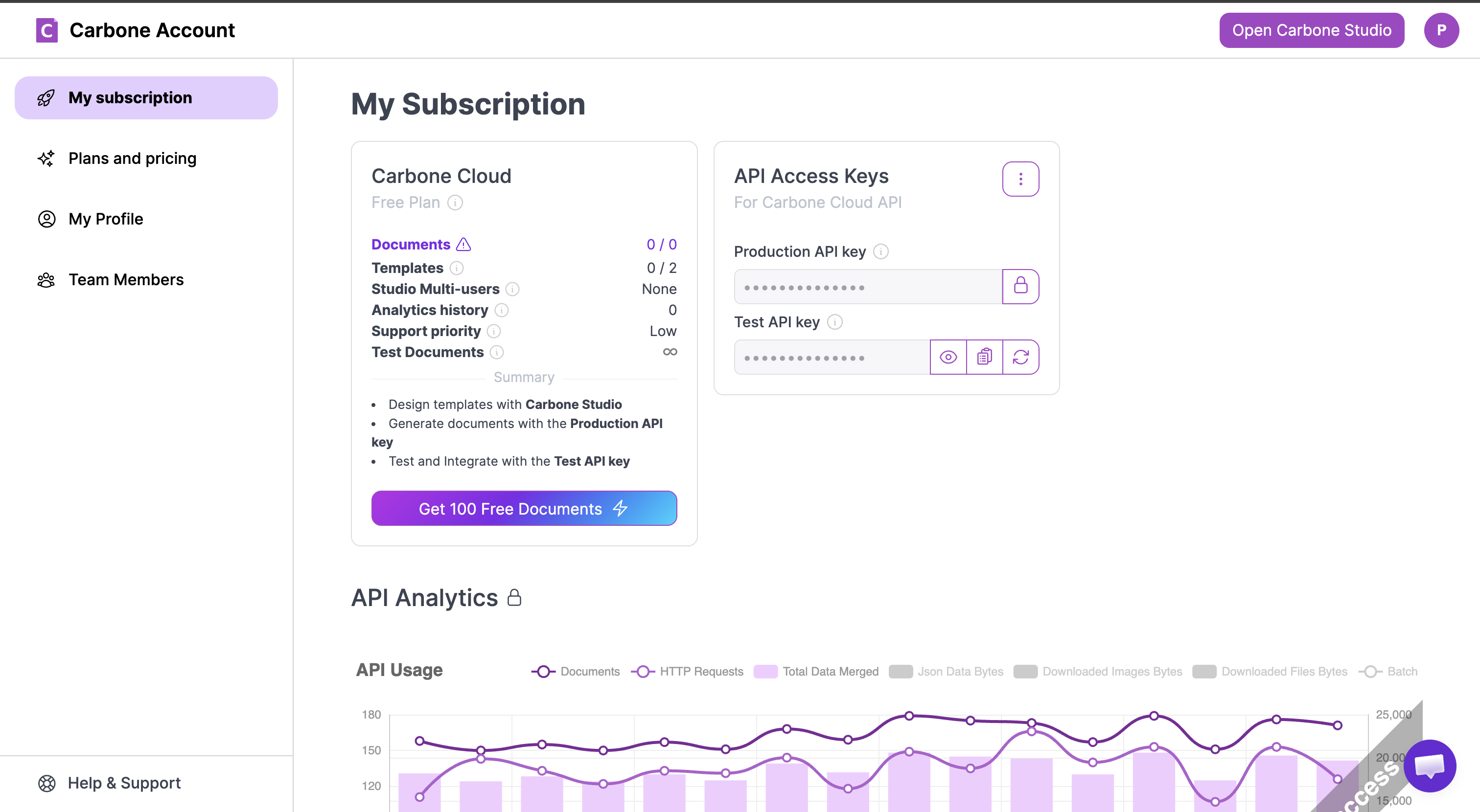
- Go to account.carbone.io and sign in.
- Click My subscription in the left sidebar.
- On the right side, find the API Access Keys panel.
- For production use, click the lock icon next to Production API key to reveal and copy it.
- For testing, click the eye icon next to Test API key to reveal it.
-
Create a connection in Scalekit
- In the Scalekit dashboard, go to AgentKit → Connections → Create Connection.
- Search for Carbone.io MCP and click Create.
- Note the Connection name — use this as
connection_namein your code (e.g.,carboneiomcp).
-
Add a connected account
Connected accounts link a specific user identifier in your system to a Carbone API key. Add them via the dashboard for testing, or via the Scalekit API in production.
Via dashboard (for testing)
- Open the connection and click the Connected Accounts tab → Add account.
- Fill in Your User’s ID and API Key, then click Save.
Via API (for production)
await scalekit.connect.upsertConnectedAccount({connectionName: 'carboneiomcp',identifier: 'user@example.com',credentials: { token: 'your-carbone-api-key' },})scalekit_client.connect.upsert_connected_account(connection_name="carboneiomcp",identifier="user@example.com",credentials={"token": "your-carbone-api-key"},)
-
-
Make your first call
Section titled “Make your first call”quickstart.ts import { ScalekitClient } from '@scalekit-sdk/node'import 'dotenv/config'const scalekit = new ScalekitClient(process.env.SCALEKIT_ENV_URL,process.env.SCALEKIT_CLIENT_ID,process.env.SCALEKIT_CLIENT_SECRET,)const actions = scalekit.actionsconst connector = 'carboneiomcp'const identifier = 'user_123'// Make your first callconst result = await actions.executeTool({connector,identifier,toolName: 'carboneiomcp_get_api_status',toolInput: {},})console.log(result)quickstart.py import osfrom scalekit.client import ScalekitClientfrom dotenv import load_dotenvload_dotenv()scalekit_client = ScalekitClient(env_url=os.getenv("SCALEKIT_ENV_URL"),client_id=os.getenv("SCALEKIT_CLIENT_ID"),client_secret=os.getenv("SCALEKIT_CLIENT_SECRET"),)actions = scalekit_client.actionsconnection_name = "carboneiomcp"identifier = "user_123"# Make your first callresult = actions.execute_tool(tool_input={},tool_name="carboneiomcp_get_api_status",connection_name=connection_name,identifier=identifier,)print(result)
What you can do
Section titled “What you can do”Connect this agent connector to let your agent:
- Template upload, download — Upload and store a reusable Carbone template
- Update template metadata — Update the metadata of a stored template: name, comment, category, tags, deployment timestamp, or expiration
- Document render, convert — Generate a document by merging a Carbone template with JSON data
- List templates, tags, categories — List stored Carbone templates with filtering, search, and pagination
- Get capabilities, api status — Returns a summary of all Carbone capabilities: supported formats, features, tool usage examples, and links to full documentation
- Delete template — Delete a stored Carbone template
Tool list
Section titled “Tool list”Use the exact tool names from the Tool list below when you call execute_tool. If you’re not sure which name to use, list the tools available for the current user first.
carboneiomcp_convert_document#Convert any document to another format without storing a template. Supports 100+ input/output format combinations: Office documents, PDFs, images, web pages, spreadsheets, and more. The source file can be a local path, a URL, or a base64 string. Carbone tags are PRESERVED, not resolved: converting a template keeps every {d.field} intact, so this is also how you proof a template in another format (DOCX template → PDF, or DOCX → ODT while it stays a template). Use render_document instead when you need data injection ({d.field} tags resolved), translations, or batch generation. Common conversions: DOCX → PDF (file: "report.docx", convertTo: "pdf"; add converter: "I" for the fastest DOCX→PDF path), XLSX → PDF (file: "data.xlsx", convertTo: "pdf"), PPTX → PDF (file: "slides.pptx", convertTo: "pdf", converter: "O" for best fidelity), HTML → PDF (file: "page.html", convertTo: "pdf", converter: "C" for full CSS/JS rendering), DOCX → HTML (file: "doc.docx", convertTo: "html"), XLSX → CSV (file: "sheet.xlsx", convertTo: "csv"), PDF → PNG (file: "doc.pdf", convertTo: "png"), PPTX → PNG (first slide as image), MD → PDF (file: "readme.md", convertTo: "pdf").9 params
Convert any document to another format without storing a template. Supports 100+ input/output format combinations: Office documents, PDFs, images, web pages, spreadsheets, and more. The source file can be a local path, a URL, or a base64 string. Carbone tags are PRESERVED, not resolved: converting a template keeps every {d.field} intact, so this is also how you proof a template in another format (DOCX template → PDF, or DOCX → ODT while it stays a template). Use render_document instead when you need data injection ({d.field} tags resolved), translations, or batch generation. Common conversions: DOCX → PDF (file: "report.docx", convertTo: "pdf"; add converter: "I" for the fastest DOCX→PDF path), XLSX → PDF (file: "data.xlsx", convertTo: "pdf"), PPTX → PDF (file: "slides.pptx", convertTo: "pdf", converter: "O" for best fidelity), HTML → PDF (file: "page.html", convertTo: "pdf", converter: "C" for full CSS/JS rendering), DOCX → HTML (file: "doc.docx", convertTo: "html"), XLSX → CSV (file: "sheet.xlsx", convertTo: "csv"), PDF → PNG (file: "doc.pdf", convertTo: "png"), PPTX → PNG (first slide as image), MD → PDF (file: "readme.md", convertTo: "pdf").
convertTostringrequiredTarget output format. Documents : "pdf", "docx", "xlsx", "pptx", "odt", "ods", "odp", "odg", "rtf", "epub", plus the legacy "doc", "xls", "ppt" (output only — Carbone writes them but cannot read them back). Web/text : "html", "xhtml", "txt", "csv", "md", "xml", "idml". Images : "png", "jpg", "jpeg", "webp", "svg", "tiff", "bmp", "gif". Archive : "zip" (batch output). Simple usage: "pdf". Advanced usage: { "formatName": "pdf", "formatOptions": { "EncryptFile": true, "DocumentOpenPassword": "secret" } }.filestringrequiredThe document to convert. Two input forms are accepted: (1) HTTPS URL — the file is downloaded automatically, e.g. "https://example.com/file.pptx". (2) Base64-encoded string — the raw file content encoded as base64. Local file paths are NOT accepted — this server is reached over HTTP, so a path would resolve on the server's disk rather than yours and is rejected. Upload the bytes as base64, or host the file at a URL. Supported input formats: DOCX, XLSX, PPTX, ODT, ODS, ODP, ODG, HTML, XHTML, XML, SVG, IDML, Markdown (MD), TXT, CSV, RTF, PDF, PNG and JPG. Carbone reads XML-based and text-based documents only, so the legacy BINARY Office formats DOC, XLS and PPT are REJECTED as input — Carbone can produce them as output but cannot read them. Re-save such a file as DOCX/XLSX/PPTX first. Full conversion matrix: https://carbone.io/documentation/developer/http-api/generate-reports.mdasAttachmentbooleanoptionalIf true, return the document as a downloadable file attachment (a base64 EmbeddedResource), for any format. Default delivery: text and png/jpg/gif/webp are returned inline; other binary outputs (PDF, Office, …) are saved to a temp file in stdio mode (path returned), or returned as an attachment in HTTP mode. Ignored when outputPath or returnLink is set.converterstringoptionalConverter engine. Only relevant when convertTo is "pdf" (or an image format rasterised from a document). "L" — LibreOffice (default): best all-round engine for DOCX, XLSX, PPTX, ODT, ODS, ODP. "O" — OnlyOffice: highest fidelity rendering for Microsoft Office formats (DOCX, XLSX, PPTX). "C" — Chromium: best for HTML, CSS, JavaScript — full browser rendering. "I" — Carbone ICE (Instant Converter Engine, Carbone 5.14.0+): DOCX → PDF ONLY, no third-party converter — up to 60x faster than LibreOffice on a 1000-page DOCX (3x on a one-page document). Any other input or output format is REJECTED — use another converter for those. PDF options: only Watermarks are applied. EncryptFile, DocumentOpenPassword, RestrictPermissions and the other security options are SILENTLY IGNORED — the PDF comes back readable by anyone, with no error — so NEVER pick "I" when the request needs a password or restricted permissions; use "L" for those. Also unsupported: WEBP and EMF/WMF images, table of contents, SmartArt, complex charts, footnotes/endnotes, comments, tracked changes, form fields, equations, bookmarks and links; a missing font falls back to Noto Sans. If omitted, LibreOffice is used by default.egressAuthorizationstringoptionalValue for the Authorization header Carbone adds to its OUTBOUND (egress) requests during conversion — e.g. when a Chromium HTML→PDF conversion fetches a protected external image or stylesheet. For example "Bearer abc123" makes Carbone send `authorization: Bearer abc123` to those hosts. Only the authorization header can be customised; max 512 characters.hardRefreshbooleanoptionalForces Carbone to run the converter even when the output format already matches the input format. Only useful for PDF: converting PDF → PDF to APPLY formatOptions (watermark, password, PDF/A, page range). Without it Carbone may pass the file straight through and none of those options take effect. Leave unset for any format-changing conversion (DOCX → PDF, XLSX → CSV, …), where the converter runs anyway.outputPathstringoptionalNOT AVAILABLE on this server, which is reached over HTTP: the converted document would be written to the server's disk instead of yours, so passing outputPath is rejected. Use asAttachment to receive the bytes, or returnLink for a one-time download URL.reportNamestringoptionalFilename (WITHOUT extension) for the converted document, returned in the Content-Disposition header. Carbone appends the extension matching convertTo, so do not include one — "report.pdf" yields "report.pdf.pdf". Examples: "contract", "2026-invoice". Unlike render_document, Carbone tags are NOT resolved here (conversion does not run templating), so pass a literal name rather than a pattern like "{d.id}" — a pattern would come back verbatim. Ignored when returnLink is set, which returns a download URL rather than a named file.returnLinkbooleanoptionalIf true, generate the document and return a public download URL instead of the file contents. The link is SHORT-LIVED and ONE-TIME — Carbone deletes the file after the first download — so it is meant for the end user to download once (do not fetch it programmatically). Works in stdio and HTTP. Mutually exclusive with outputPath and asAttachment.carboneiomcp_delete_template#Delete a stored Carbone template. This is a soft delete: the template is marked for garbage collection and removed after a delay (default 24 hours). You can delete by Template ID (removes all versions) or by Version ID (removes only that specific version). For immediate or scheduled deletion, use update_template_metadata with expireAt = 42000000000 (NOW) or a future Unix timestamp.1 param
Delete a stored Carbone template. This is a soft delete: the template is marked for garbage collection and removed after a delay (default 24 hours). You can delete by Template ID (removes all versions) or by Version ID (removes only that specific version). For immediate or scheduled deletion, use update_template_metadata with expireAt = 42000000000 (NOW) or a future Unix timestamp.
templateIdstringrequiredTemplate ID (64-bit) or Version ID (SHA-256) to delete. Template ID — deletes the template record and all its versions. Version ID — deletes only that specific version, leaving other versions intact. Both formats are returned by upload_template and list_templates.carboneiomcp_download_template#Download the original source file of a stored Carbone template (e.g. the DOCX, XLSX, PPTX, or HTML file that was uploaded). Use this to inspect, edit, or back up a template. Pass a Template ID to download the currently deployed version, or a Version ID to download a specific version. Set sample:true to fetch the JSON sample dataset stored with the template instead of the template file itself.4 params
Download the original source file of a stored Carbone template (e.g. the DOCX, XLSX, PPTX, or HTML file that was uploaded). Use this to inspect, edit, or back up a template. Pass a Template ID to download the currently deployed version, or a Version ID to download a specific version. Set sample:true to fetch the JSON sample dataset stored with the template instead of the template file itself.
templateIdstringrequiredTemplate ID (64-bit) or Version ID (SHA-256) to download. Template ID — downloads the currently deployed version of the template. Version ID — downloads that exact version regardless of deployment status. Both formats are returned by upload_template and list_templates.asAttachmentbooleanoptionalIf true, return the template as a downloadable file attachment (base64 resource) instead of inline text/image. Useful in HTTP mode where outputPath is unavailable. Default: false. Ignored when outputPath is set.outputPathstringoptionalNOT AVAILABLE on this server, which is reached over HTTP: the template file would be written to the server's disk instead of yours, so passing outputPath is rejected. Use asAttachment to receive the bytes, or returnLink for a one-time download URL.samplebooleanoptionalIf true, download the JSON SAMPLE DATASET saved with the template (the "sample" array passed to upload_template) instead of the template file. Returns JSON of the form [{ "data": {...}, "complement": {...}, "translations": {...}, "enum": {...} }]. Use it to recover the example data a template expects — handy before calling render_document against an unfamiliar template. Errors if the template was uploaded without a sample.carboneiomcp_get_api_status#Check Carbone API health and version. Returns the current API version and a status message. Useful for verifying connectivity and confirming which Carbone version is active.0 params
Check Carbone API health and version. Returns the current API version and a status message. Useful for verifying connectivity and confirming which Carbone version is active.
carboneiomcp_get_capabilities#Returns a summary of all Carbone capabilities: supported formats, features, tool usage examples, and links to full documentation. Call this first if you are unsure what Carbone can do.0 params
Returns a summary of all Carbone capabilities: supported formats, features, tool usage examples, and links to full documentation. Call this first if you are unsure what Carbone can do.
carboneiomcp_list_categories#List all template categories currently in use in your Carbone account. Categories act like folders for organising templates (e.g. "invoices", "legal", "hr"). Use the returned names as the category filter in list_templates or upload_template.0 params
List all template categories currently in use in your Carbone account. Categories act like folders for organising templates (e.g. "invoices", "legal", "hr"). Use the returned names as the category filter in list_templates or upload_template.
carboneiomcp_list_tags#List all tags currently used across templates in your Carbone account. Tags are free-form labels attached to templates (e.g. "sales", "billing", "v2"). Note: the Carbone API does not support filtering list_templates by tag — use this tool to discover available tags, then call list_templates and filter the results manually.0 params
List all tags currently used across templates in your Carbone account. Tags are free-form labels attached to templates (e.g. "sales", "billing", "v2"). Note: the Carbone API does not support filtering list_templates by tag — use this tool to discover available tags, then call list_templates and filter the results manually.
carboneiomcp_list_templates#List stored Carbone templates with filtering, search, and pagination. Filter by Template ID, Version ID, category, or upload origin. Use includeVersions to see the full version history of each template. Supports cursor-based pagination for large collections. Note: filtering by tags is not supported by the Carbone API — use list_tags to discover tags, then filter results manually. Note: templates uploaded with versioning disabled appear with id = null and are identified only by their versionId — pass that versionId where a Template ID is expected (e.g. delete_template, download_template).8 params
List stored Carbone templates with filtering, search, and pagination. Filter by Template ID, Version ID, category, or upload origin. Use includeVersions to see the full version history of each template. Supports cursor-based pagination for large collections. Note: filtering by tags is not supported by the Carbone API — use list_tags to discover tags, then filter results manually. Note: templates uploaded with versioning disabled appear with id = null and are identified only by their versionId — pass that versionId where a Template ID is expected (e.g. delete_template, download_template).
categorystringoptionalFilter by category (e.g. "invoices", "legal").cursorstringoptionalPagination cursor from the previous response nextCursor field. Use to fetch the next page.idstringoptionalFilter by Template ID (64-bit format). Cannot be a Version ID.includeVersionsbooleanoptionalIf true, returns all versions for each template. Default: false (only deployed version).limitintegeroptionalMaximum number of results to return, between 1 and 100. Default: 100. Use cursor to page beyond that.originintegeroptionalFilter by upload origin. 0 = API, 1 = Carbone Studio, 2 = Salesforce, 3 = Odoo, 4 = HubSpot. Templates created through this MCP are origin 0.searchstringoptionalFuzzy search in template names, or exact match on Template ID / Version ID.versionIdstringoptionalFilter by Version ID (SHA-256 format).carboneiomcp_render_document#Generate a document by merging a Carbone template with JSON data. Two modes: (1) pass templateId to use a previously uploaded template; (2) pass template (file path, URL, or base64) to upload and render in a single request without storing a template. Supports output format conversion, multilingual rendering, currency conversion, batch generation, and advanced PDF options (watermark, password, PDF/A). Async mode: pass webhookUrl to render asynchronously — Carbone will POST the renderId to your URL when the document is ready. Async mode is required when using batch generation (batchSplitBy).26 params
Generate a document by merging a Carbone template with JSON data. Two modes: (1) pass templateId to use a previously uploaded template; (2) pass template (file path, URL, or base64) to upload and render in a single request without storing a template. Supports output format conversion, multilingual rendering, currency conversion, batch generation, and advanced PDF options (watermark, password, PDF/A). Async mode: pass webhookUrl to render asynchronously — Carbone will POST the renderId to your URL when the document is ready. Async mode is required when using batch generation (batchSplitBy).
asAttachmentbooleanoptionalIf true, return the document as a downloadable file attachment (a base64 EmbeddedResource), for any format. Default delivery: text and png/jpg/gif/webp are returned inline; other binary outputs (PDF, Office, …) are saved to a temp file in stdio mode (path returned), or returned as an attachment in HTTP mode. Ignored when outputPath or returnLink is set.batchOutputstringoptionalHow the batch result is packaged. Defaults to "zip". "zip" — every generated document is bundled into a single ZIP archive (use batchReportName to name each entry). "pdf" — all documents are CONCATENATED into one continuous PDF instead of being zipped; this requires convertTo to be "pdf" as well. Must be used together with batchSplitBy.batchReportNamestringoptionalFilename pattern for each individual document inside the batch ZIP. Supports Carbone tags. Tags are resolved against the item's data (relative path) or the full dataset (absolute path). Examples: "invoice-{d.id}.pdf", "{d.client.name}-{d.date}.docx". Carbone sanitises the result — path separators, "..", Windows-forbidden and control characters each become an underscore — and appends an index to duplicates ("report_1.pdf", "report_2.pdf"), so a pattern that resolves to the same name for several items will not silently drop documents. Only meaningful with batchOutput: "zip"; a concatenated "pdf" batch is a single file. Must be used together with batchSplitBy.batchSplitBystringoptionalJSON path to the array in your data that drives batch generation. One document is generated per element of the array. Two forms: "d" when data itself IS the array (one report per top-level element), or "d.arrayName" to split on a child array. Example: "d.invoices" — produces one PDF per item in data.invoices. Example: "d.employees" — produces one contract per employee. Carbone Cloud allows 1 to 100 objects per batch (on-premise follows the nbReportMaxPerBatch setting). Batch is ALWAYS asynchronous — webhookUrl is required. Pair with batchOutput to choose ZIP or a single concatenated PDF, and batchReportName to name each document.complementstringoptionalExtra data object accessible in templates with {c.field} tags (as opposed to {d.field} for main data). Useful for static or shared values that should not be mixed into the main dataset: company info, logo URLs, footer text, configuration constants. Example: { "company": "Acme Corp", "address": "123 Main St", "vatNumber": "FR12345" }. Like data, may instead be passed by reference as a string — an HTTPS URL or a base64-encoded JSON string (local file paths are not accepted over HTTP).converterstringoptionalConverter engine. Only relevant when convertTo is "pdf" (or an image rasterised from a document). "L" — LibreOffice (default): best all-round engine for DOCX, XLSX, PPTX, ODT, ODS, ODP. "O" — OnlyOffice: highest fidelity for Microsoft Office formats (DOCX, XLSX, PPTX). "C" — Chromium: best for HTML/CSS/JS templates — full browser rendering. "I" — Carbone ICE (Instant Converter Engine, Carbone 5.14.0+): DOCX → PDF ONLY, no third-party converter — up to 60x faster than LibreOffice on a 1000-page DOCX (3x on a one-page document). Any other input or output format is REJECTED — use another converter for those. PDF options: only Watermarks are applied. EncryptFile, DocumentOpenPassword, RestrictPermissions and the other security options are SILENTLY IGNORED — the PDF comes back readable by anyone, with no error — so NEVER pick "I" when the request needs a password or restricted permissions; use "L" for those. Also unsupported: WEBP and EMF/WMF images, table of contents, SmartArt, complex charts, footnotes/endnotes, comments, tracked changes, form fields, equations, bookmarks and links; a missing font falls back to Noto Sans. If omitted, LibreOffice is used by default.convertTostringoptionalOutput format. If omitted, the output matches the template format. Documents : "pdf", "docx", "xlsx", "pptx", "odt", "ods", "odp", "odg", "rtf", "epub". Web/text : "html", "xhtml", "txt", "csv", "md", "xml", "idml". Images : "png", "jpg", "jpeg", "webp", "svg", "tiff", "bmp", "gif". Archive : "zip" (use with batchSplitBy for batch output). Simple usage: "pdf". Advanced usage: { "formatName": "pdf", "formatOptions": { ... } } for PDF-specific options.currencyRatesstringoptionalExchange rate table used by :formatC for currency conversion. Keys are ISO 4217 currency codes; values are rates relative to a common base. The base currency should have rate 1. Example: { "EUR": 1, "USD": 1.08, "GBP": 0.86, "JPY": 160.5 }. May instead be passed by reference as a string — an HTTPS URL or a base64-encoded JSON string (local file paths are not accepted over HTTP).currencySourcestringoptionalISO 4217 currency code of the monetary amounts in the JSON data. Used by the :formatC formatter as the conversion source. Must be set together with currencyTarget and currencyRates. Example: "EUR" if all prices in your data are in euros.currencyTargetstringoptionalISO 4217 currency code of the output document. The :formatC formatter converts amounts from currencySource to this currency using currencyRates. Must be set together with currencySource and currencyRates. Example: "USD" to display prices in US dollars. Documentation: https://carbone.io/documentation.html#formatc-precisionorformat-datastringoptionalJSON data merged into the template — an object, or a top-level array (accessed with {d[i].field}). Access fields with {d.fieldName} tags. Nested objects: {d.customer.name}. Array loops: {d.items[i].description} … {d.items[i+1]}. Conditionals: {d.status == "active" ? "Yes" : "No"}. Optional — if omitted, defaults to an empty object {} so the template is simply converted (tags resolve to empty). Useful to convert a stored template by templateId without data injection. Instead of inlining a large dataset, you may pass a STRING reference to the JSON: an HTTPS URL or a base64-encoded JSON string (local file paths are not accepted over HTTP) — it is read and parsed server-side.egressAuthorizationstringoptionalValue for the Authorization header Carbone adds to its OUTBOUND (egress) requests while rendering — fetching external images ({d.imageUrl}), external PDFs (:appendFile / :attachFile), and calling webhooks. For example "Bearer abc123" or "my-secret" makes Carbone send `authorization: <value>` to those hosts. Only the authorization header can be customised; max 512 characters. For webhook calls specifically, webhookHeaders.authorization (if set) overrides this value.enumstringoptionalEnumeration map used with the :convEnum(TYPE) formatter to translate code values into human-readable labels. Define one key per enum type; each value is an object mapping code → label. Example: { "STATUS": { "1": "Active", "2": "Inactive", "3": "Pending" }, "ROLE": { "A": "Admin", "U": "User" } }. Template usage: {d.status:convEnum(STATUS)}, {d.role:convEnum(ROLE)}. May instead be passed by reference as a string — an HTTPS URL or a base64-encoded JSON string (local file paths are not accepted over HTTP). Documentation: https://carbone.io/documentation.html#convenum-type-hardRefreshbooleanoptionalIf true, Carbone recomputes pagination and refreshes the table of contents after rendering. Requires convertTo to be defined. Use this for DOCX/ODT templates that contain a TOC field or cross-references that need updating after data injection.keepTagsbooleanoptionalIf true, SKIP templating entirely and leave every Carbone tag in the document exactly as written — {d.customer} comes out as the literal text "{d.customer}", formatters included. Use it to proof a stored template in another format (e.g. render templateId to PDF to check the tag layout), or to convert a template between formats while it stays a template. Mutually exclusive with data — passing both is rejected, because data would have nothing to fill. Note the difference from omitting data: no data renders the template with an EMPTY dataset, so every tag resolves to an empty string; keepTags leaves the tags themselves in place. Requires Carbone 5.9.0+ (carbone-version: 5).langstringoptionalLocale of the generated document. Affects three things: (1) {t(key)} translation tags — selects the matching translation from the translations map. (2) :formatN number formatter — applies locale-specific thousand/decimal separators. (3) :formatC currency formatter — applies locale-specific currency symbols and formatting. Format: BCP-47 lowercase, e.g. "fr-fr", "en-us", "de-de", "es-es", "pt-br", "zh-cn", "ja-jp". Full list: https://github.com/carboneio/carbone/blob/master/formatters/_locale.jsoutputPathstringoptionalNOT AVAILABLE on this server, which is reached over HTTP: the generated document would be written to the server's disk instead of yours, so passing outputPath is rejected. Use asAttachment to receive the bytes, or returnLink for a one-time download URL. Ignored for async/webhook renders (no document is returned inline).reportNamestringoptionalFilename (WITHOUT extension) for the generated document, returned in the Content-Disposition header. Carbone automatically appends the extension that matches convertTo, so do not include one — passing "invoice.pdf" yields "invoice.pdf.pdf". Supports Carbone tags resolved against the data at render time. Examples: "invoice" (static), "{d.type}-{d.id}" (dynamic), "{d.client}-{d.date:formatD(YYYY-MM)}".returnLinkbooleanoptionalIf true, generate the document and return a public download URL instead of the file contents. The link is SHORT-LIVED and ONE-TIME — Carbone deletes the file after the first download — so it is meant for the end user to download once (do not fetch it programmatically). Works in stdio and HTTP. Mutually exclusive with outputPath, asAttachment, and webhookUrl (async).templatestringoptionalInline template for one-shot render without storing a template first. Two input forms are accepted: (1) HTTPS URL — the file is downloaded automatically, e.g. "https://example.com/file.pptx". (2) Base64-encoded string — the raw file content encoded as base64. Local file paths are NOT accepted — this server is reached over HTTP, so a path would resolve on the server's disk rather than yours and is rejected. Upload the bytes as base64, or host the file at a URL. The template is uploaded and rendered in a single API request — no Template ID is returned. Use this for ephemeral renders; use upload_template + templateId when you need to reuse the template. Supported formats: DOCX, XLSX, PPTX, ODT, ODS, ODP, ODG, HTML, XHTML, IDML, XML, Markdown (MD), PDF, and more. Mutually exclusive with templateId — provide exactly one, never both.templateIdstringoptionalThe ID of a previously uploaded template to render. Two ID formats are accepted: (1) Template ID (64-bit) — stable identifier shared across versions; Carbone automatically uses the deployed version. (2) Version ID (SHA-256) — pins rendering to a specific version regardless of deployment status. Both are returned by upload_template. Mutually exclusive with template — provide exactly one, never both.timezonestringoptionalIANA timezone used to convert dates in the rendered document. Default: "Europe/Paris". Applied when templates use the :formatD formatter, e.g. {d.date:formatD(YYYY-MM-DD HH:mm)}. Common values: "UTC", "America/New_York", "America/Los_Angeles", "Europe/London", "Europe/Paris", "Europe/Berlin", "Asia/Tokyo", "Asia/Shanghai", "Australia/Sydney". Full list (TZ identifier column): https://en.wikipedia.org/wiki/List_of_tz_database_time_zonestranslationsstringoptionalTranslation map for multilingual documents. Requires "lang" to be set to select the active locale. Top-level keys are BCP-47 locale codes; values are key → translated-string maps. Template usage: {t(greeting)} is replaced by the matching string for the active locale. Example: { "fr-fr": { "greeting": "Bonjour", "total": "Total" }, "en-us": { "greeting": "Hello", "total": "Total" } }. These dictionaries get large, so you may instead pass a string reference — an HTTPS URL or a base64-encoded JSON string (local file paths are not accepted over HTTP). Documentation: https://carbone.io/documentation.html#translationsvariableStrstringoptionalCarbone alias expressions evaluated once before rendering, available everywhere in the template. Used to pre-compute reusable values or shorten repetitive paths. Syntax: "{#aliasName = expression}". Example: "{#fullName = d.firstName + \" \" + d.lastName}{#total = d.price * d.qty}". Aliases are then used in the template as {#fullName}, {#total}. Documentation: https://carbone.io/documentation.html#aliaswebhookHeadersobjectoptionalCustom headers Carbone will include when POSTing to your webhookUrl. Pass plain header names as keys — the prefix "carbone-webhook-header-" is added automatically before sending to Carbone, and Carbone forwards the original header names to your webhook endpoint. Example: { "authorization": "my-secret", "custom-id": "12345", "custom-name": "Jane Doe" } — Carbone will call your URL with headers: authorization: my-secret, custom-id: 12345, custom-name: Jane Doe. Requires webhookUrl to be set.webhookUrlstringoptionalWebhook URL to enable asynchronous rendering. When provided, Carbone returns immediately and POSTs { "success": true, "data": { "renderId": "..." } } to this URL when the document is ready. The default render timeout is extended to 5 minutes on Carbone Cloud (vs 60 s for synchronous requests). Download the document with GET /render/:renderId once the webhook is received. Required when using batchSplitBy (batch generation is always asynchronous). Example: "https://your-server.com/carbone-webhook".carboneiomcp_update_template_metadata#Update the metadata of a stored template: name, comment, category, tags, deployment timestamp, or expiration. Use deployedAt to activate a specific version for rendering. Use expireAt to schedule or trigger immediate deletion.8 params
Update the metadata of a stored template: name, comment, category, tags, deployment timestamp, or expiration. Use deployedAt to activate a specific version for rendering. Use expireAt to schedule or trigger immediate deletion.
templateIdstringrequiredTemplate ID (64-bit) or Version ID (SHA-256) to update. Using a Template ID updates the metadata shared by all versions. Using a Version ID updates only that specific version.categorystringoptionalNew category.commentstringoptionalNew free-text comment.deployedAtintegeroptionalUnix timestamp (seconds) to set as the deployment time for this version. Carbone picks the version with the most recent deployedAt when rendering. Use 42000000000 to deploy immediately (special "NOW" value).expireAtintegeroptionalUnix timestamp (seconds) at which this template will be automatically deleted. Use 42000000000 to delete immediately.idstringoptionalMove this version under a DIFFERENT Template ID, re-parenting it so both share a version history. Pass the destination Template ID (64-bit). Leave unset to keep the version where it is — this does not rename anything, use name for that.namestringoptionalNew display name.tagsarrayoptionalNew list of tags — replaces existing tags entirely.carboneiomcp_upload_template#Upload and store a reusable Carbone template. Once uploaded, use render_document with the returned Template ID to generate documents from it. Supports versioning: multiple versions can live under a single stable Template ID, with deployedAt controlling which version is active. Accepted formats: DOCX, XLSX, PPTX, ODT, ODS, ODP, ODG, HTML, XHTML, IDML, XML, Markdown, PDF, and more.10 params
Upload and store a reusable Carbone template. Once uploaded, use render_document with the returned Template ID to generate documents from it. Supports versioning: multiple versions can live under a single stable Template ID, with deployedAt controlling which version is active. Accepted formats: DOCX, XLSX, PPTX, ODT, ODS, ODP, ODG, HTML, XHTML, IDML, XML, Markdown, PDF, and more.
namestringrequiredDisplay name for the template (e.g. "Invoice Template", "NDA Contract").templatestringrequiredThe template file. Two input forms are accepted: (1) HTTPS URL — the file is downloaded automatically, e.g. "https://example.com/file.pptx". (2) Base64-encoded string — the raw file content encoded as base64. Local file paths are NOT accepted — this server is reached over HTTP, so a path would resolve on the server's disk rather than yours and is rejected. Upload the bytes as base64, or host the file at a URL. Supported formats: DOCX, XLSX, PPTX, ODT, ODS, ODP, ODG, HTML, XHTML, IDML, XML, Markdown (MD), PDF, and more. Full list: https://carbone.io/documentation/developer/http-api/generate-reports.mdcategorystringoptionalGroup templates into folders/categories (e.g. "invoices", "legal", "hr").commentstringoptionalFree-text comment to describe the template version or its purpose.deployedAtintegeroptionalUTC Unix timestamp (seconds) to set as the deployment time for this version. Carbone uses the version with the most recent deployedAt when rendering via Template ID. Use 42000000000 to deploy immediately (special "NOW" sentinel value).expireAtintegeroptionalUTC Unix timestamp (seconds) at which this template will be automatically deleted. Use 42000000000 to delete immediately (special "NOW" sentinel value).idstringoptionalExisting Template ID (64-bit format) to add this upload to its version history. If omitted, a new Template ID is generated. Providing a Version ID (SHA-256) is not allowed and will cause an error.samplearrayoptionalSample input data attached to the template for testing in Carbone Studio. Each item must include data, complement, translations, and enum objects.tagsarrayoptionalTags for searchability and filtering (e.g. ["sales", "billing", "v2"]).versioningbooleanoptionalEnable template versioning (default: true). When true, a stable Template ID is generated and multiple versions can be managed under it. When false, behaves as legacy mode and returns only a templateId (SHA-256 hash).