


Asana MCP
Vendor MCP38 toolsOAuth 2.1Project ManagementProductivityConnect to Asana MCP server to manage tasks, projects, and teams directly from your AI workflows.
Asana MCP connector
-
Install the SDK
Section titled “Install the SDK”Terminal window npm install @scalekit-sdk/nodeTerminal window pip install scalekit -
Set your credentials
Section titled “Set your credentials”Add your Scalekit credentials to your
.envfile. Find values in app.scalekit.com > Developers > API Credentials..env SCALEKIT_ENVIRONMENT_URL=<your-environment-url>SCALEKIT_CLIENT_ID=<your-client-id>SCALEKIT_CLIENT_SECRET=<your-client-secret> -
Set up the connector
Section titled “Set up the connector”Register your Asana MCP credentials with Scalekit so it handles the token lifecycle. You do this once per environment.
Dashboard setup steps
Register your Scalekit environment with the Asana MCP connector so Scalekit handles the OAuth flow and token lifecycle for your users. Asana MCP requires a dedicated MCP app — not an API app or a personal access token.
-
Copy the redirect URI from Scalekit
- In Scalekit dashboard, go to AgentKit > Connections > Create Connection.
- Search for Asana MCP and click Create.
- Copy the Redirect URI from the connection details panel. It looks like:
https://<YOUR_ENV>.scalekit.cloud/sso/v1/oauth/conn_<ID>/callback
-
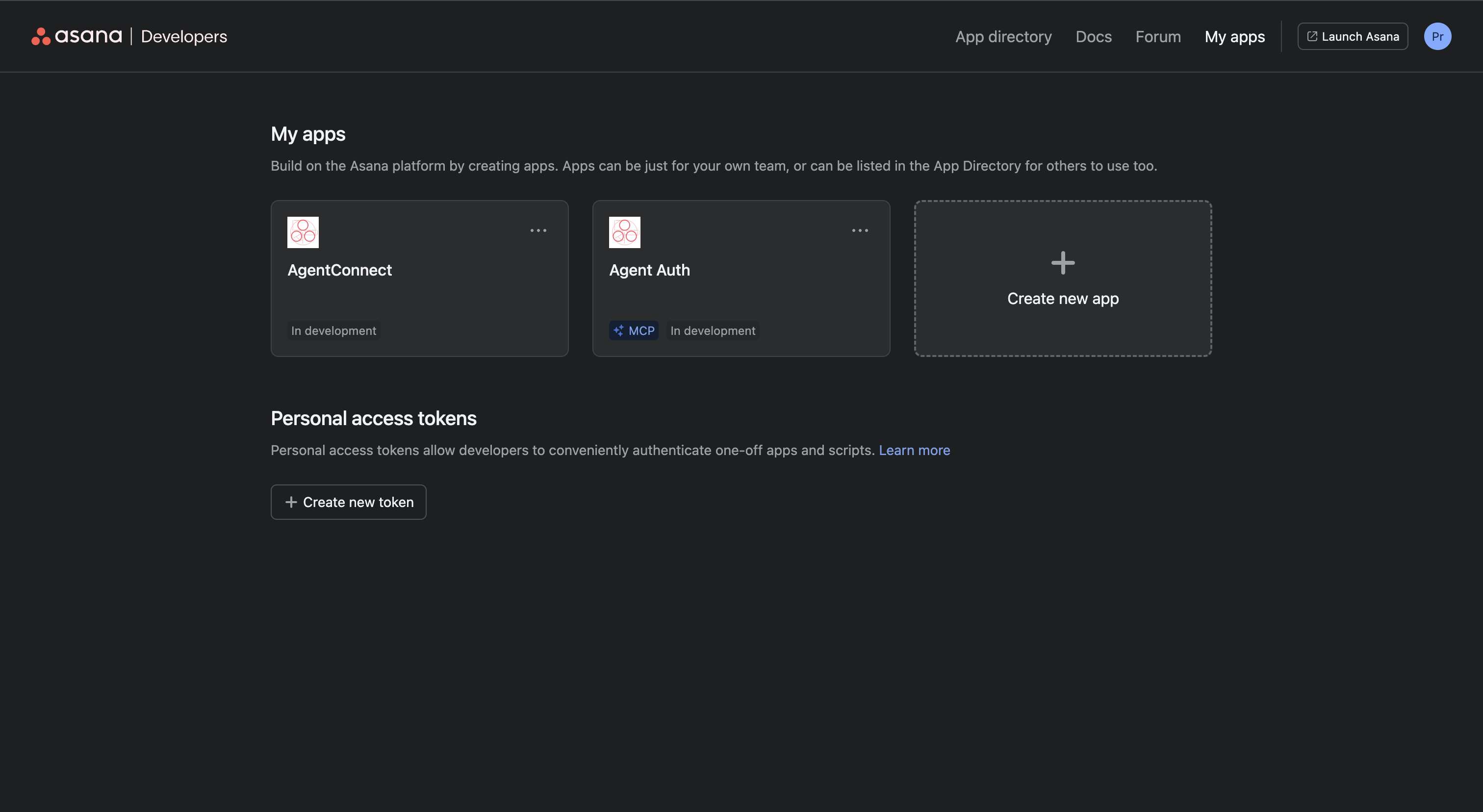
Create an MCP app in Asana
- Go to app.asana.com/-/developer_console and sign in.
- Click Create new app.
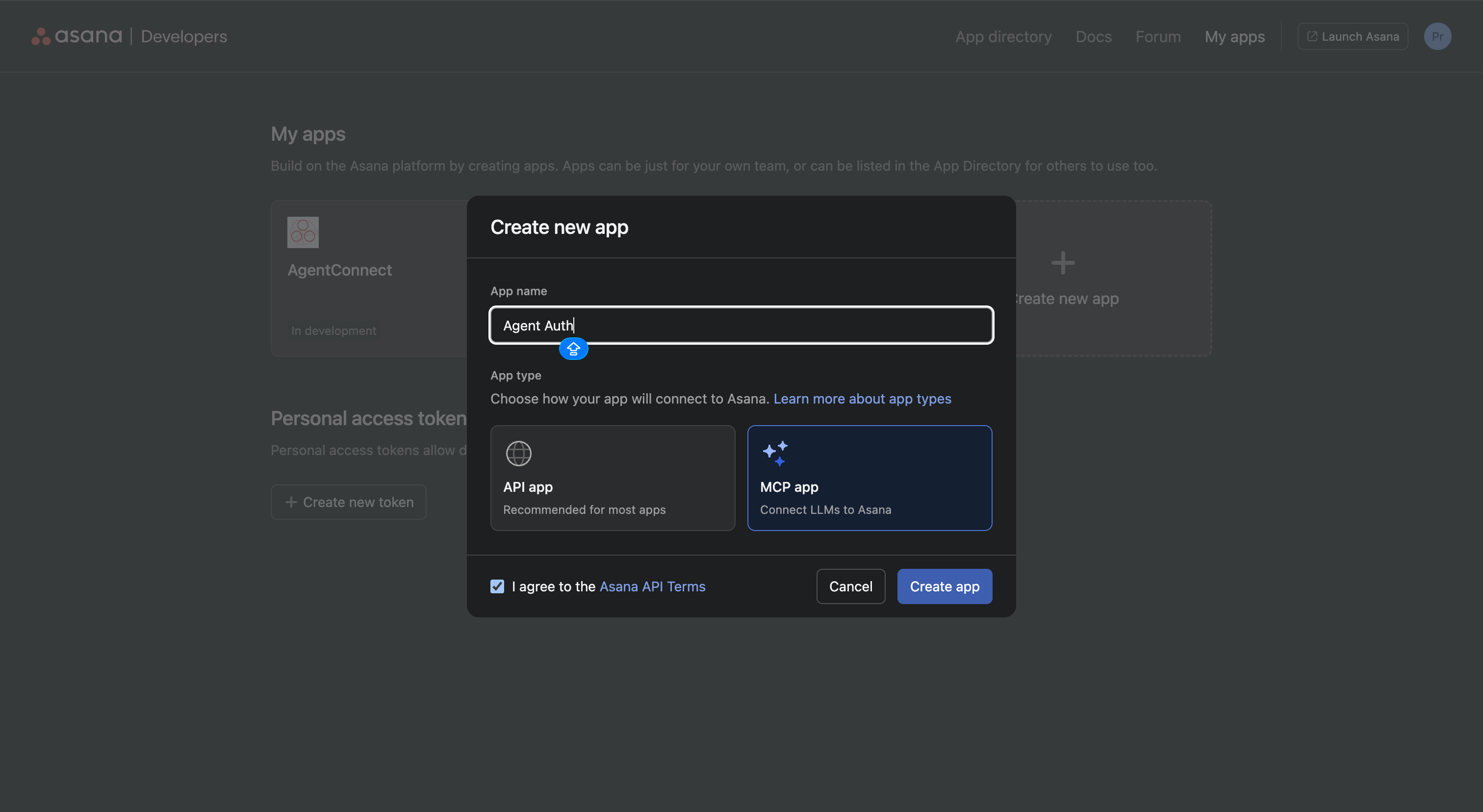
- In the Create new app dialog:
- Enter an App name, for example
Agent Auth. - Under App type, select MCP app (“Connect LLMs to Asana”). Do not select API app.
- Check I agree to the Asana API Terms.
- Click Create app.
- Enter an App name, for example
-
Add the redirect URI to your app
- Inside your new MCP app, open the left menu and click OAuth.
- Under Redirect URLs, click Add redirect URL, paste the redirect URI from Scalekit, and click Add.
-
Copy your app credentials
- In the same OAuth section, copy your Client ID and Client Secret.
-
Add credentials in Scalekit
- In Scalekit dashboard, go to AgentKit > Connections and open the Asana MCP connection you created.
- Enter:
- Client ID — from your Asana MCP app
- Client Secret — from your Asana MCP app
- Click Save.
-
-
Authorize and make your first call
Section titled “Authorize and make your first call”quickstart.ts import { ScalekitClient } from '@scalekit-sdk/node'import 'dotenv/config'const scalekit = new ScalekitClient(process.env.SCALEKIT_ENV_URL,process.env.SCALEKIT_CLIENT_ID,process.env.SCALEKIT_CLIENT_SECRET,)const actions = scalekit.actionsconst connector = 'asanamcp'const identifier = 'user_123'// Generate an authorization link for the userconst { link } = await actions.getAuthorizationLink({ connectionName: connector, identifier })console.log('Authorize Asana MCP:', link)process.stdout.write('Press Enter after authorizing...')await new Promise(r => process.stdin.once('data', r))// Make your first callconst result = await actions.executeTool({connector,identifier,toolName: 'asanamcp_get_me',toolInput: {},})console.log(result)quickstart.py import osfrom scalekit.client import ScalekitClientfrom dotenv import load_dotenvload_dotenv()scalekit_client = ScalekitClient(env_url=os.getenv("SCALEKIT_ENV_URL"),client_id=os.getenv("SCALEKIT_CLIENT_ID"),client_secret=os.getenv("SCALEKIT_CLIENT_SECRET"),)actions = scalekit_client.actionsconnection_name = "asanamcp"identifier = "user_123"# Generate an authorization link for the userlink_response = actions.get_authorization_link(connection_name=connection_name,identifier=identifier,)print("Authorize Asana MCP:", link_response.link)input("Press Enter after authorizing...")# Make your first callresult = actions.execute_tool(tool_input={},tool_name="asanamcp_get_me",connection_name=connection_name,identifier=identifier,)print(result)
What you can do
Section titled “What you can do”Connect this agent connector to let your agent:
- Search objects internal, tasks preview, tasks — DEPRECATED; DO NOT USE
- Confirm save task changes, save project changes — DEPRECATED; DO NOT USE
- Event log widget — DEPRECATED; DO NOT USE
- Get task stories, project internal, workspace agents — Get the full activity feed (stories) for a task by ID
- Create task preview v4, task confirm, project preview v3 — Generates a visual preview of a single task and asks for confirmation before creation
- Update tasks — Update one or more tasks in a single operation
Tool list
Section titled “Tool list”Use the exact tool names from the Tool list below when you call execute_tool. If you’re not sure which name to use, list the tools available for the current user first.
asanamcp_add_comment#Add a comment to a task. Use ONLY for human-authored discussion, feedback, questions, or additional context. Exactly one of text or html_text must be provided. Do NOT use for actions that are automatically logged (assignments, status changes, completion, field updates). Returns the created story with ID, content, author, and timestamp.5 params
Add a comment to a task. Use ONLY for human-authored discussion, feedback, questions, or additional context. Exactly one of text or html_text must be provided. Do NOT use for actions that are automatically logged (assignments, status changes, completion, field updates). Returns the created story with ID, content, author, and timestamp.
task_idstringrequiredGlobally unique identifier for the task. Example: '1234567890123456'html_textstringoptionalExactly one of text or html_text must be provided. Allowed elements only: <body>, <strong>, <em>, <u>, <s>, <code>, <ol>, <ul>, <li>, <a>, <blockquote>, <pre>. Do not use <h1>, <h2>, <hr/>, or <img> here. Must be well-formed XML with a single root <body>...</body>. Only <a> may have custom attributes; any attribute on any other element is invalid. Do not use elements outside the allowed list (400). . <a> links: For <a> tags specifically, to make it easier to create @-mentions through the API, we only require that you provide the GID of the object you wish to reference. If you have access to that object, the API will automatically generate the appropriate href and other attributes for you. For example, to create a link to a task with GID "123", you can send the tag <a data-asana-gid="123"/> which will then be expanded to <a href="https://app.asana.com/0/0/123/f" data-asana-accessible="true" data-asana-dynamic="true" data-asana-type="task" data-asana-gid="123">Task Name</a>. You can also generate a link to a task in a specific project or tag by including a data-asana-project or data-asana-tag attribute in the <a> tag. All other attributes, as well as the contents of the tag, are ignored.
To keep the contents of your tag and make a custom vanity link, include the property data-asana-dynamic="false" when setting the contents of the tag. You would send <a data-asana-gid="123" data-asana-dynamic="false">This is some custom text!</a> and receive <a data-asana-accessible="true" data-asana-dynamic="false" data-asana-type="task" data-asana-gid="123">This is some custom text!</a>
If you do not have access to the referenced object when you try to create a link, the API will not generate an href for you, but will instead look for an href you provide. This allows you to write back <a> tags unmodified even if you do not have access to the resource. If you do not have access to the referenced object and no href is provided, your request will be rejected with a 400 Bad Request error. Similarly, if you provide neither a GID nor a valid href, the request will be rejected with the same error.is_pinnedbooleanoptionalPinned comments stay at the top of the task's activity feed.opt_fieldsstringoptionalComma-separated list of optional fields to include in the response. Name each subfield explicitly as parent.child; wildcard and glob syntax such as parent.* is not supported. Returns gid,name,task,created_by,created_at,text,html_text,is_pinned by default. Example: 'name,assignee,due_on,completed'textstringoptionalPlain-text comment body. Exactly one of text or html_text must be provided. Example: 'This looks good, approved!'asanamcp_create_project#Create a new project with optional sections and tasks in a single operation. Use this as the default whenever the user wants a project created or set up, including with sections and tasks. Do not choose create_project_preview unless the user explicitly asks to preview or confirm the plan before creation, or to delay creating the project until they approve. Optionally pass sections, each with a sectionName and an optional list of tasks (with name, assignee, due_on, etc.), to set up the full project structure at creation time. Tasks are nested within their sections and will be assigned to the corresponding section automatically. If a team is not provided, the new project will be associated with a default team. Returns the created project ID, permalink, and results for any sections and tasks created.14 params
Create a new project with optional sections and tasks in a single operation. Use this as the default whenever the user wants a project created or set up, including with sections and tasks. Do not choose create_project_preview unless the user explicitly asks to preview or confirm the plan before creation, or to delay creating the project until they approve. Optionally pass sections, each with a sectionName and an optional list of tasks (with name, assignee, due_on, etc.), to set up the full project structure at creation time. Tasks are nested within their sections and will be assigned to the corresponding section automatically. If a team is not provided, the new project will be associated with a default team. Returns the created project ID, permalink, and results for any sections and tasks created.
namestringrequiredName of the project. The display name for this project. Example: 'Q4 Product Launch'colorstringoptionalColor of the project (light-green, dark-green, light-blue, dark-blue, etc).custom_fieldsobjectoptionalCustom field: each key is a custom field GID; each value matches that field's type in the Asana API. Use option GIDs for dropdown fields, not display names. Some tools expect a nested object; others expect one JSON string containing the same map. Examples: {"1200456789012345":"1200123456789012"} (single-select); {"1200456789012346":12.5} (number); {"1200456789012347":"Ship by Friday"} (text); {"1200456789012348":["1200111111111111","1200222222222222"]} (multi-select); {"1200456789012349":{"date":"2025-06-15"}} or {"1200456789012349":{"date_time":"2025-06-15T17:00:00.000Z"}} (date).default_access_levelstringoptionalThe default access for users or teams who join or are added as members to the project. Example: 'editor'default_viewstringoptionalThe default view of the project (list, board, calendar, timeline).due_onstringoptionalDate on which this project is due (YYYY-MM-DD). Example: '2024-12-31'html_notesstringoptionalHTML-formatted project description. Use notes for plain text. Allowed elements only: <body>, <strong>, <em>, <u>, <s>, <code>, <ol>, <ul>, <li>, <a>, <blockquote>, <pre>. Must be well-formed XML with a single root <body>...</body>. Only <a> may have custom attributes; any attribute on any other element is invalid. Do not use elements outside the allowed list (400). . <a> links: For <a> tags specifically, to make it easier to create @-mentions through the API, we only require that you provide the GID of the object you wish to reference. If you have access to that object, the API will automatically generate the appropriate href and other attributes for you. For example, to create a link to a task with GID "123", you can send the tag <a data-asana-gid="123"/> which will then be expanded to <a href="https://app.asana.com/0/0/123/f" data-asana-accessible="true" data-asana-dynamic="true" data-asana-type="task" data-asana-gid="123">Task Name</a>. You can also generate a link to a task in a specific project or tag by including a data-asana-project or data-asana-tag attribute in the <a> tag. All other attributes, as well as the contents of the tag, are ignored.
To keep the contents of your tag and make a custom vanity link, include the property data-asana-dynamic="false" when setting the contents of the tag. You would send <a data-asana-gid="123" data-asana-dynamic="false">This is some custom text!</a> and receive <a data-asana-accessible="true" data-asana-dynamic="false" data-asana-type="task" data-asana-gid="123">This is some custom text!</a>
If you do not have access to the referenced object when you try to create a link, the API will not generate an href for you, but will instead look for an href you provide. This allows you to write back <a> tags unmodified even if you do not have access to the resource. If you do not have access to the referenced object and no href is provided, your request will be rejected with a 400 Bad Request error. Similarly, if you provide neither a GID nor a valid href, the request will be rejected with the same error.membersstringoptionalComma-separated user GIDs to add as project members. Example: "123456,789012".notesstringoptionalPlain-text project description. Use html_notes for rich formatting or @-mentions. Example: 'Track all Q4 product launch tasks.'ownerstringoptionalUser identifier for project owner. Can be "me", an email, or a user GID. Prefer using "me" for the current user rather than calling get_me to look up the GID of the current user.privacy_settingstringoptionalPrivacy level for the project (public_to_workspace, private_to_team, private).sectionsarrayoptionalUsers will give you a request to create a project with a certain purpose.
JSON array of section objects. Each section must have:
- sectionName (string): Name of the section.
- tasks (array, optional): Array of task objects.
Each task object must have:
- name (string): Name of the task.
Each task object can optionally have:
- notes (string): Plain-text task description. Use html_notes for rich formatting or @-mentions.
- html_notes (string): HTML-formatted task description. Use notes for plain text.
- assignee (string): User identifier for task assignment. Can be 'me', an email, or a user GID.
- due_on (string): Due date in YYYY-MM-DD format.
- due_at (string): Due date and time in ISO 8601 format.
- start_on (string): Start date in YYYY-MM-DD format.
- start_at (string): Start date and time in ISO 8601 format.
- completed (boolean): True if the task is initially marked complete.
- followers (string): Comma-separated list of user identifiers.
- custom_fields (string): Custom field: each key is a custom field GID; each value matches that field's type in the Asana API. Use option GIDs for dropdown fields, not display names. Some tools expect a nested object; others expect one JSON string containing the same map. Examples: {"1200456789012345":"1200123456789012"} (single-select); {"1200456789012346":12.5} (number); {"1200456789012347":"Ship by Friday"} (text); {"1200456789012348":["1200111111111111","1200222222222222"]} (multi-select); {"1200456789012349":{"date":"2025-06-15"}} or {"1200456789012349":{"date_time":"2025-06-15T17:00:00.000Z"}} (date).
Example:
[
{
"sectionName": "Backlog",
"tasks": [
{
"name": "Design homepage",
"notes": "Create a modern and responsive homepage design",
"completed": false,
"start_on": "2025-01-10",
"due_on": "2025-01-15",
"assignee": "123456789"
},
{
"name": "Write documentation",
"completed": false,
"start_on": "2025-01-15",
"due_on": "2025-01-20",
"assignee": "987654321"
}
]
},
{
"sectionName": "In Progress",
"tasks": [
{
"name": "Implement API endpoints",
"notes": "Build RESTful API endpoints for user management",
"completed": false,
"start_on": "2025-01-10",
"due_on": "2025-01-25",
"assignee": "123456789"
},
{
"name": "Code review",
"completed": false,
"start_on": "2025-01-25",
"due_on": "2025-01-30"
},
{
"name": "Deploy to staging",
"notes": "Deploy the latest version to staging environment",
"completed": false,
"start_on": "2025-01-05",
"due_on": "2025-01-08",
"assignee": "987654321"
}
]
}
]start_onstringoptionalDate on which this project is started (YYYY-MM-DD). Example: '2024-01-01'teamstringoptionalGlobally unique identifier for the team. If not provided, default team will be used. Example: '1234567890123456'asanamcp_create_project_confirm#DEPRECATED; DO NOT USE. This tool must exist so that it can be invoked programmatically by widget UI, but it should not be called directly by the model.4 params
DEPRECATED; DO NOT USE. This tool must exist so that it can be invoked programmatically by widget UI, but it should not be called directly by the model.
projectNamestringrequiredName of the project to create. Internal widget field: the project's name, as confirmed in the preview widget. Example: 'Q4 Product Launch'sectionsarrayrequiredArray of section objects, each with sectionName and a tasks array, describing the full project structure confirmed by the user. Each task may include description, isComplete, startDate, dueDate, assignee, customFields (priority), and subtasks. Example: [{"sectionName": "Backlog", "tasks": [{"taskName": "Design homepage"}]}]widget_idstringrequiredALWAYS USE A CONSTANT VALUE OF 'model-generated-widget-id' FOR THIS PARAMETER.workspacestringrequiredGID of the Asana workspace the project will be created in. Example: '1234567890123456'asanamcp_create_project_confirm_populate#DEPRECATED; DO NOT USE. This tool must exist so that it can be invoked programmatically by widget UI, but it should not be called directly by the model.5 params
DEPRECATED; DO NOT USE. This tool must exist so that it can be invoked programmatically by widget UI, but it should not be called directly by the model.
projectstringrequiredGID of the existing (already-created) project to populate with the confirmed sections and tasks. Example: '1234567890123456'sectionsarrayrequiredArray of section objects, each with sectionName and a tasks array, describing the structure to add to the project. Each task may include description, isComplete, startDate, dueDate, assignee, customFields (priority), and subtasks. Example: [{"sectionName": "Backlog", "tasks": [{"taskName": "Design homepage"}]}]widget_idstringrequiredALWAYS USE A CONSTANT VALUE OF 'model-generated-widget-id' FOR THIS PARAMETER.workspacestringrequiredGID of the Asana workspace the project belongs to. Example: '1234567890123456'useRichTextTaskDescriptionbooleanoptionalWhether task description values should be saved as Asana rich-text HTML rather than plain text.asanamcp_create_project_preview#Present a structured project plan for confirmation before creating the project in Asana.5 params
Present a structured project plan for confirmation before creating the project in Asana.
project_namestringrequiredName of the project to preview. This is the primary label shown in Asana's project list. Example: 'Q4 Product Launch'descriptionstringoptionalDescription of the project, explaining its purpose or scope. Example: 'Track all Q4 product launch tasks.'sectionsarrayoptionalSections to pre-create in the project. Each section has a name and an optional list of tasks. Example: [{"sectionName": "Planning", "tasks": [{"taskName": "Define scope"}]}]teamstringoptionalGID of the team to associate the project with. Team projects are visible to all team members. Example: '1234567890123456'workspace_gidstringoptionalGID of the workspace where the project should be created. Required if no team is specified. Example: '1234567890123456'asanamcp_create_project_preview_v3#Show a visual preview of a project structure before the project is created in Asana. Do not use this tool for ordinary creation requests—use create_project instead when the user asks to create, set up, or add a project (with or without sections and tasks). Call this tool only when the user explicitly asks to preview first, see the plan before creating, review or confirm before creating, or postpone creation until they approve. Tasks in `sections` may include optional `subtasks` arrays (one level only; limit to no more than 5 per task unless necessary).2 params
Show a visual preview of a project structure before the project is created in Asana. Do not use this tool for ordinary creation requests—use create_project instead when the user asks to create, set up, or add a project (with or without sections and tasks). Call this tool only when the user explicitly asks to preview first, see the plan before creating, review or confirm before creating, or postpone creation until they approve. Tasks in `sections` may include optional `subtasks` arrays (one level only; limit to no more than 5 per task unless necessary).
project_namestringrequiredName of the project to create. Example: 'Q4 Product Launch'sectionsarrayrequiredUsers will give you a request to create a project with a certain purpose. Use your own knowledge of project management and the principles and guidance below to design the best project structure possible.
JSON array of section objects. Each section must have:
- sectionName (string): Name of the section.
- tasks (array): Array of task objects.
Each task object must have:
- taskName (string): Name of the task.
- description (string | null): Task details as Markdown (not raw HTML), or null. Use real list lines (`- item` or `1. item`); avoid one line of middot bullets — they will not become lists. The preview rich-text supports headings **h1** and **h2**, marks **strong**, **em**, **u**, **s**, inline **code**, and lists **ul** / **ol** / **li** — use the same constructs in Markdown. The server normalizes Markdown to HTML for the preview and Asana `html_notes`.
- isComplete (boolean): Whether the task is completed. Defaults to false if not provided.
- startDate (string | null): Start date of the task in YYYY-MM-DD format, or null if the task has no start date. If the start date is provided, the due date must also be provided. If both the start date and due date are provided, the due date must be greater than or equal to the start date. Defaults to null if not provided.
- dueDate (string | null): Due date of the task in YYYY-MM-DD format, or null if the task has no due date. If both the start date and due date are provided, the due date must be greater than or equal to the start date. Defaults to null if not provided.
- assignee (string | null): Assignee of the task, or null if the task is unassigned. This can be "me", an email, or a user GID chosen among those found using asana_get_workspace_users. Defaults to null if not provided.
- priority ("low" | "medium" | "high" | null): Priority level of the task. Must be one of 'low', 'medium', 'high', or null. Defaults to null if not provided.
This is general guidance for creating good project structures. Follow these principles and guidance as closely as possible unless the user specifically asks you to do otherwise:
Create the project structure in the same language as the user's request.
- Project should have >=4 sections.
- Limit the number of tasks to no more than 5 tasks per section.
- Limit sections up to 6.
- Every section should have at least one task.
- If the user does not specifically give you tasks they want to include in their project, make tasks for the project that are aligned with the project's purpose.
- Only mark tasks as complete (isComplete: true) if the user specifically mentioned they already completed that work. Otherwise, all tasks should be incomplete (isComplete: false).
- When adding dates to tasks, always provide BOTH startDate and dueDate together as a date range. Never provide only dueDate without startDate. Add date ranges to several tasks so they will be useful for timeline and calendar views when the project is created.
- All dates must be in the future (today or later), never in the past.
- Create logical, sequential timelines that make sense for the project's purpose. Tasks should progress in a meaningful order (e.g., beginner tasks before advanced tasks, setup tasks before execution tasks).
- Dates should form a coherent timeline, not be randomly scattered.
- Prefer including the 'priority' custom field for every task (one of 'low', 'medium', or 'high'), unless the user has specifically instructed you not to. This helps users organize their work by importance.
- Tasks may include an optional 'subtasks' array (one level only). Limit to no more than 5 subtasks per task unless necessary. Each subtask has taskName and optionally description.
Example:
[
{
"sectionName": "Backlog",
"tasks": [
{
"taskName": "Design homepage",
"description": "Create a modern and responsive homepage design",
"isComplete": false,
"startDate": "2025-01-10",
"dueDate": "2025-01-15",
"assignee": "123456789",
"priority": "high"
},
{
"taskName": "Write documentation",
"description": null,
"isComplete": false,
"startDate": "2025-01-15",
"dueDate": "2025-01-20",
"assignee": "987654321",
"priority": "medium"
}
]
},
{
"sectionName": "In Progress",
"tasks": [
{
"taskName": "Implement API endpoints",
"description": "Build RESTful API endpoints for user management",
"isComplete": false,
"startDate": "2025-01-10",
"dueDate": "2025-01-25",
"assignee": "123456789",
"priority": "high"
},
{
"taskName": "Code review",
"description": null,
"isComplete": false,
"startDate": "2025-01-25",
"dueDate": "2025-01-30",
"assignee": null,
"priority": "medium"
},
{
"taskName": "Deploy to staging",
"description": "Deploy the latest version to staging environment",
"isComplete": false,
"startDate": "2025-01-05",
"dueDate": "2025-01-08",
"assignee": "987654321",
"priority": "high"
}
]
}
]asanamcp_create_project_status_update#Post a status update to a project or portfolio. Use for project health updates, milestone documentation, or blocker reporting. Returns created status with gid, parent, title, status_type, author, created_at, permalink_url. Exactly one of text or html_text must be provided (omit the other in the request).5 params
Post a status update to a project or portfolio. Use for project health updates, milestone documentation, or blocker reporting. Returns created status with gid, parent, title, status_type, author, created_at, permalink_url. Exactly one of text or html_text must be provided (omit the other in the request).
colorstringrequiredStatus color: green (on track), yellow (at risk), red (off track), blue (on hold), completeparentstringrequiredGID of the project or portfolio to post the status update to. Example: '1234567890123456'titlestringrequiredStatus title. Short title/headline for this item. Example: 'On track for Q4 launch'html_textstringoptionalExactly one of text or html_text must be provided. Allowed elements only: <body>, <strong>, <em>, <u>, <s>, <code>, <ol>, <ul>, <li>, <a>, <blockquote>, <pre>. Do not use <h1>, <h2>, <hr/>, or <img> here. Must be well-formed XML with a single root <body>...</body>. Only <a> may have custom attributes; any attribute on any other element is invalid. Do not use elements outside the allowed list (400). . <a> links: For <a> tags specifically, to make it easier to create @-mentions through the API, we only require that you provide the GID of the object you wish to reference. If you have access to that object, the API will automatically generate the appropriate href and other attributes for you. For example, to create a link to a task with GID "123", you can send the tag <a data-asana-gid="123"/> which will then be expanded to <a href="https://app.asana.com/0/0/123/f" data-asana-accessible="true" data-asana-dynamic="true" data-asana-type="task" data-asana-gid="123">Task Name</a>. You can also generate a link to a task in a specific project or tag by including a data-asana-project or data-asana-tag attribute in the <a> tag. All other attributes, as well as the contents of the tag, are ignored.
To keep the contents of your tag and make a custom vanity link, include the property data-asana-dynamic="false" when setting the contents of the tag. You would send <a data-asana-gid="123" data-asana-dynamic="false">This is some custom text!</a> and receive <a data-asana-accessible="true" data-asana-dynamic="false" data-asana-type="task" data-asana-gid="123">This is some custom text!</a>
If you do not have access to the referenced object when you try to create a link, the API will not generate an href for you, but will instead look for an href you provide. This allows you to write back <a> tags unmodified even if you do not have access to the resource. If you do not have access to the referenced object and no href is provided, your request will be rejected with a 400 Bad Request error. Similarly, if you provide neither a GID nor a valid href, the request will be rejected with the same error.textstringoptionalPlain-text status body. Exactly one of text or html_text must be provided. Example: 'This looks good, approved!'asanamcp_create_task_confirm#DEPRECATED; DO NOT USE. This tool must exist so that it can be invoked programmatically by widget UI, but it should not be called directly by the model.12 params
DEPRECATED; DO NOT USE. This tool must exist so that it can be invoked programmatically by widget UI, but it should not be called directly by the model.
assigneeobjectrequiredThe user to assign the task to, or null to leave it unassigned. When set, provide the user's gid, name, and email (photoUrl is optional). Example: {"gid": "1234567890123456", "name": "Jane Doe", "email": "jane@example.com"}descriptionstringrequiredTask description to save on the new task, or null for no description. Example: 'Please review the Q4 financial report.'dueDatestringrequiredDue date of the task in YYYY-MM-DD format, or null if the task has no due date. Example: '2025-01-15'isCompletebooleanrequiredWhether the task is created already marked as completed.startDatestringrequiredStart date of the task in YYYY-MM-DD format, or null if the task has no start date. Example: '2025-01-10'taskNamestringrequiredName of the task to create. Internal widget field: the task's name, as confirmed in the preview widget. Example: 'Review Q4 report'widget_idstringrequiredALWAYS USE A CONSTANT VALUE OF 'model-generated-widget-id' FOR THIS PARAMETER.workspacestringrequiredGID of the Asana workspace the task will be created in. Example: '1234567890123456'projectobjectoptionalThe project to add the new task to, or null to create it without a project. When set, provide the project's gid and name (icon/color optional). Example: {"gid": "1234567890123456", "name": "Q4 Launch"}sectionobjectoptionalThe section within the project to place the new task in, or null. When set, provide the section's gid and name. Example: {"gid": "1234567890123456", "name": "Backlog"}subtasksarrayoptionalOptional subtasks for the parent task (one level only; not added to any project). Limit to no more than 5 unless necessary. Example: []useRichTextTaskDescriptionbooleanoptionalWhether the 'description' value should be saved as Asana rich-text HTML rather than plain text.asanamcp_create_task_preview#Draft an Asana task for review before creation. Shows a preview to the user without immediately creating the task.6 params
Draft an Asana task for review before creation. Shows a preview to the user without immediately creating the task.
taskNamestringrequiredName (title) of the task to preview. This is the primary identifier that will be shown in Asana's task list. Example: 'Review Q4 report'assigneestringoptionalGID or 'me' of the user to assign the task to. Use 'me' to assign to the authenticated user. Example: 'me' or '1234567890123456'descriptionstringoptionalTask description in plain text or HTML. Provides additional context for the preview. Example: 'Please review the Q4 financial report.'due_datestringoptionalProposed due date in ISO 8601 format (YYYY-MM-DD). Example: '2024-12-31'projectstringoptionalGID of the project to add the task to. Example: '1234567890123456'sectionstringoptionalGID of the section within the project to place the task in. Requires project to also be specified. Example: '1234567890123456'asanamcp_create_task_preview_v4#Generates a visual preview of a single task and asks for confirmation before creation. NON-DEFAULT tool for task creation: Use only when the user explicitly opts in with visually previewing, reviewing, or confirming a task before creation, or when the user implies they want to check or verify before the task is saved. Do not use when the user wants to create multiple tasks (2 or more) - use create_task or create_tasks instead. When the user's request implies a project, suggest a project via project_gid. When you set project_gid, it is preferable to also set section_gid when you can reasonably resolve a section (e.g. call get_project with include_sections true to list section GIDs for that project and match the user's intent); omit section_gid when the section is unknown, not specified, or irrelevant. When the user wants subtasks on the new task, pass a subtasks array (one level only; at most 5 subtasks; entries are not added to any project).9 params
Generates a visual preview of a single task and asks for confirmation before creation. NON-DEFAULT tool for task creation: Use only when the user explicitly opts in with visually previewing, reviewing, or confirming a task before creation, or when the user implies they want to check or verify before the task is saved. Do not use when the user wants to create multiple tasks (2 or more) - use create_task or create_tasks instead. When the user's request implies a project, suggest a project via project_gid. When you set project_gid, it is preferable to also set section_gid when you can reasonably resolve a section (e.g. call get_project with include_sections true to list section GIDs for that project and match the user's intent); omit section_gid when the section is unknown, not specified, or irrelevant. When the user wants subtasks on the new task, pass a subtasks array (one level only; at most 5 subtasks; entries are not added to any project).
taskNamestringrequiredName of the task. Example: 'Review Q4 report'assigneestringoptionalAssignee of the task, or null if the task is unassigned. This can be "me", an email, or a user GID chosen among those found using asana_get_workspace_users. Defaults to null if not provided. Example: 'me or 1234567890123456'descriptionstringoptionalTask details as Markdown (not raw HTML), or null. Use real list lines (`- item` or `1. item`); avoid one line of middot bullets â they will not become lists. The preview rich-text supports headings **h1** and **h2**, marks **strong**, **em**, **u**, **s**, inline **code**, and lists **ul** / **ol** / **li** â use the same constructs in Markdown. The server normalizes Markdown to HTML for the preview and Asana `html_notes`. Example: 'Please review the Q4 financial report.'dueDatestringoptionalDue date of the task in YYYY-MM-DD format, or null if the task has no due date. If both the start date and due date are provided, the due date must be greater than or equal to the start date. Defaults to null if not provided. Example: '2025-01-15'isCompletebooleanoptionalWhether the task is completed. Defaults to false if not provided.project_gidstringoptionalGID of an existing project to add the task to, or null. When you set this, it is preferable to also pass section_gid when you can resolve a section for that project (call get_project with include_sections true to list section GIDs for that project); omitting section_gid is fine when placement is unclear or irrelevant. Example: '1234567890123456'section_gidstringoptionalGID of an existing section to add the task to, or null. Project must also be set if section is provided, and the section must be in the project. Optional; omit when unknown or not specified. When project_gid is set, including section_gid is preferable if you can infer or look up a section (call get_project with include_sections true to list section GIDs for that project). Example: '1234567890123456'startDatestringoptionalStart date of the task in YYYY-MM-DD format, or null if the task has no start date. If the start date is provided, the due date must also be provided. If both the start date and due date are provided, the due date must be greater than or equal to the start date. Defaults to null if not provided. Example: '2025-01-10'subtasksarrayoptionalOptional array of subtasks (one level only; subtasks are not added to any project). Limit to no more than 5 unless necessary. Each entry may include taskName (required), description, isComplete, startDate and dueDate (YYYY-MM-DD), and assignee (me, email, or user id). Example: [{"taskName": "Gather feedback", "assignee": "me"}]asanamcp_create_tasks#Creates tasks immediately without visual preview or asking for confirmation. DEFAULT tool for task creation: Use by default any time the user asks to create any number of tasks. Do not use when the user explicitly opts in with visually previewing, reviewing, or confirming a task before creation, or when the user implies they want to check or verify before the task is saved. Requires default_project (for all tasks) or default_assignee for My Tasks. When the user indicates the task is for themselves â e.g. 'remind me', 'my', 'I need to', ALWAYS set assignee='me' (or default_assignee='me' when it applies to every task). If the user names a different assignee, use that person instead; resolve their GID with search_objects first. Each task can specify project_id, parent, section_id, assignee, notes, html_notes, due_on, start_on, followers, custom_fields; omitted fields use the defaults. Returns succeeded (created tasks), failed (with errors), and summary.3 params
Creates tasks immediately without visual preview or asking for confirmation. DEFAULT tool for task creation: Use by default any time the user asks to create any number of tasks. Do not use when the user explicitly opts in with visually previewing, reviewing, or confirming a task before creation, or when the user implies they want to check or verify before the task is saved. Requires default_project (for all tasks) or default_assignee for My Tasks. When the user indicates the task is for themselves â e.g. 'remind me', 'my', 'I need to', ALWAYS set assignee='me' (or default_assignee='me' when it applies to every task). If the user names a different assignee, use that person instead; resolve their GID with search_objects first. Each task can specify project_id, parent, section_id, assignee, notes, html_notes, due_on, start_on, followers, custom_fields; omitted fields use the defaults. Returns succeeded (created tasks), failed (with errors), and summary.
tasksarrayrequiredArray of task objects (1-50 tasks). Array of 1-50 task objects to create. Each object needs at minimum a 'name'; see the field description for the full list of optional fields (project_id, parent, assignee, due_on, custom_fields, etc.). Example: [{"name": "Review Q4 report", "project_id": "1234567890123456", "assignee": "me"}]default_assigneestringoptionalDefault assignee. Use "me" to assign the current authenticated user, an email, or a GID.default_projectstringoptionalDefault project GID for all tasks. Omit when each task has project_id or parent, or when creating in My Tasks (use workspace+default_assignee). Example: '1234567890123456'asanamcp_delete_task#Delete task from Asana. Use with extreme caution as recovery is challenging. Deletes the task and any subtasks that are not also in another project. Returns success confirmation. Requires task ID. Essential for removing duplicate or obsolete tasks.1 param
Delete task from Asana. Use with extreme caution as recovery is challenging. Deletes the task and any subtasks that are not also in another project. Returns success confirmation. Requires task ID. Essential for removing duplicate or obsolete tasks.
taskstringrequiredGlobally unique identifier for the task to delete. Example: '1234567890123456'asanamcp_get_agent#Returns the full record for a single AI Teammate agent by GID. Includes name, description, behavior_guidance, workspace, and photo URLs. Use get_workspace_agents first to discover agent GIDs, then call this tool for full details.2 params
Returns the full record for a single AI Teammate agent by GID. Includes name, description, behavior_guidance, workspace, and photo URLs. Use get_workspace_agents first to discover agent GIDs, then call this tool for full details.
agent_gidstringrequiredGlobally unique identifier for the agent. Example: '1234567890123456'opt_fieldsstringoptionalComma-separated list of optional fields to include in the response. Name each subfield explicitly as parent.child; wildcard and glob syntax such as parent.* is not supported. Available fields: gid, resource_type, resource_subtype, name, description, behavior_guidance, workspace, photo. Example: 'name,assignee,due_on,completed'asanamcp_get_attachments#List all attachments for a project, project brief, or task. By default, returns attachment names, IDs, and URLs (download_url, permanent_url, view_url). To expose other attachment fields use opt_fields. Use for accessing files attached to Asana objects. Supports pagination for objects with many attachments.4 params
List all attachments for a project, project brief, or task. By default, returns attachment names, IDs, and URLs (download_url, permanent_url, view_url). To expose other attachment fields use opt_fields. Use for accessing files attached to Asana objects. Supports pagination for objects with many attachments.
parentstringrequiredThe GID of the parent project, project_brief, or task to retrieve attachments for. Must be a GID for a project, project_brief, or task. Example: '1234567890123456'limitnumberoptionalResults per page (1-100). Maximum number of results to return per page (1-100). Example: 50offsetstringoptionalPagination offset token. Pagination token copied from a previous response. Leave blank to fetch the first page. Example: 'eyJ0eXAiOiJKV1Qi'opt_fieldsstringoptionalComma-separated list of optional fields to include in the response. Name each subfield explicitly as parent.child; wildcard and glob syntax such as parent.* is not supported. Example: 'name,assignee,due_on,completed'asanamcp_get_items_for_portfolio#List projects, goals, and other items in a portfolio. Returns item names, IDs, and types. Use for portfolio content exploration and management. Supports pagination for portfolios with many items.4 params
List projects, goals, and other items in a portfolio. Returns item names, IDs, and types. Use for portfolio content exploration and management. Supports pagination for portfolios with many items.
portfolio_gidstringrequiredGlobally unique identifier for the portfolio. Example: '1234567890123456'limitnumberoptionalResults per page (1-100). Maximum number of results to return per page (1-100). Example: 50offsetstringoptionalPagination offset token. Pagination token copied from a previous response. Leave blank to fetch the first page. Example: 'eyJ0eXAiOiJKV1Qi'opt_fieldsstringoptionalComma-separated list of optional fields to include in the response. Name each subfield explicitly as parent.child; wildcard and glob syntax such as parent.* is not supported. Example: 'name,assignee,due_on,completed'asanamcp_get_me#Get details of current authenticated user. Tools accept 'me' as a user identifier, so you rarely need to call this just to get the user's GID. Only call this when you need specific user details (e.g., name, email), when tools such as get_projects or search_objects require filtering results by user GID, or when tools do not accept 'me' as a user identifier.0 params
Get details of current authenticated user. Tools accept 'me' as a user identifier, so you rarely need to call this just to get the user's GID. Only call this when you need specific user details (e.g., name, email), when tools such as get_projects or search_objects require filtering results by user GID, or when tools do not accept 'me' as a user identifier.
asanamcp_get_my_tasks#Get the current user's tasks. Shortcut for common "what's on my plate" queries. Returns tasks assigned to the user. Use when the user asks about their tasks, workload, or what they need to do. If the user's request includes words like 'preview', 'visualization', or 'rendered view' in reference to seeing their tasks, you MUST use search_tasks_preview with assignee_any='me' instead. Do not use this to answer questions about project membership or ownership. Use get_me plus get_projects or search_objects instead.4 params
Get the current user's tasks. Shortcut for common "what's on my plate" queries. Returns tasks assigned to the user. Use when the user asks about their tasks, workload, or what they need to do. If the user's request includes words like 'preview', 'visualization', or 'rendered view' in reference to seeing their tasks, you MUST use search_tasks_preview with assignee_any='me' instead. Do not use this to answer questions about project membership or ownership. Use get_me plus get_projects or search_objects instead.
completed_sincestringoptionalFilter by completion. Use "now" for incomplete tasks only. Omit for all tasks. Use ISO datetime for tasks completed since a date.limitnumberoptionalResults per page (1-100). Default: 50. Maximum number of results to return per page (1-100).offsetstringoptionalPagination offset token from the next_page field of a previous response. If omitted, returns the first page of results. Example: 'eyJ0eXAiOiJKV1Qi'opt_fieldsstringoptionalComma-separated list of optional fields to include in the response. Name each subfield explicitly as parent.child; wildcard and glob syntax such as parent.* is not supported. Returns gid,name,assignee,due_on,completed by default.asanamcp_get_portfolio#Get detailed portfolio data by ID including name, owner, and projects. Use after finding portfolio ID via search_objects. Returns complete portfolio configuration. Essential for understanding portfolio context and content.2 params
Get detailed portfolio data by ID including name, owner, and projects. Use after finding portfolio ID via search_objects. Returns complete portfolio configuration. Essential for understanding portfolio context and content.
portfolio_gidstringrequiredGlobally unique identifier for the portfolio. Example: '1234567890123456'opt_fieldsstringoptionalComma-separated list of optional fields to include in the response. Name each subfield explicitly as parent.child; wildcard and glob syntax such as parent.* is not supported. Example: 'name,assignee,due_on,completed'asanamcp_get_portfolios#List portfolios in workspace owned by the current user. REQUIRES workspace parameter. Returns portfolio names and IDs for portfolios you own. Use for portfolio discovery and management. Supports pagination for workspaces with many portfolios.3 params
List portfolios in workspace owned by the current user. REQUIRES workspace parameter. Returns portfolio names and IDs for portfolios you own. Use for portfolio discovery and management. Supports pagination for workspaces with many portfolios.
limitnumberoptionalResults per page (1-100). Maximum number of results to return per page (1-100). Example: 50offsetstringoptionalPagination offset token. Pagination token copied from a previous response. Leave blank to fetch the first page. Example: 'eyJ0eXAiOiJKV1Qi'opt_fieldsstringoptionalComma-separated list of optional fields to include in the response. Name each subfield explicitly as parent.child; wildcard and glob syntax such as parent.* is not supported. Example: 'name,assignee,due_on,completed'asanamcp_get_project#Get detailed project data including name, description, owner, members, and current status. Also returns task counts (num_tasks, num_incomplete_tasks, num_completed_tasks) and optionally sections. A null task_counts or sections value means the data could not be retrieved and should not be interpreted as zero or empty.3 params
Get detailed project data including name, description, owner, members, and current status. Also returns task counts (num_tasks, num_incomplete_tasks, num_completed_tasks) and optionally sections. A null task_counts or sections value means the data could not be retrieved and should not be interpreted as zero or empty.
project_idstringrequiredGlobally unique identifier for the project. Example: '1234567890123456'include_sectionsbooleanoptionalSet to true to include the project's sections (up to 50) in the response.opt_fieldsstringoptionalComma-separated list of optional fields to include in the response. Name each subfield explicitly as parent.child; wildcard and glob syntax such as parent.* is not supported. Example: 'name,assignee,due_on,completed'asanamcp_get_project_internal#DEPRECATED; DO NOT USE. This tool must exist so that it can be invoked programmatically by widget UI, but it should not be called directly by the model.4 params
DEPRECATED; DO NOT USE. This tool must exist so that it can be invoked programmatically by widget UI, but it should not be called directly by the model.
project_idstringrequiredGlobally unique identifier for the project. Example: '1234567890123456'widget_idstringrequiredALWAYS USE A CONSTANT VALUE OF 'model-generated-widget-id' FOR THIS PARAMETER.include_sectionsbooleanoptionalSet to true to include the project's sections (up to 50) in the response.opt_fieldsstringoptionalComma-separated list of optional fields to include in the response. Name each subfield explicitly as parent.child; wildcard and glob syntax such as parent.* is not supported. Example: 'name,assignee,due_on,completed'asanamcp_get_projects#List projects in a workspace, optionally filtered by team. Returns project names, IDs, and task counts (num_tasks, num_incomplete_tasks, num_completed_tasks) by default. To expose other project fields, such as members or owner, use opt_fields. Prefer using search_objects with resource_type='project' for name-based searches instead of get_projects and filtering through the results. A null task_counts value means counts could not be retrieved and should not be interpreted as zero.5 params
List projects in a workspace, optionally filtered by team. Returns project names, IDs, and task counts (num_tasks, num_incomplete_tasks, num_completed_tasks) by default. To expose other project fields, such as members or owner, use opt_fields. Prefer using search_objects with resource_type='project' for name-based searches instead of get_projects and filtering through the results. A null task_counts value means counts could not be retrieved and should not be interpreted as zero.
archivedbooleanoptionalInclude archived projects. Set to true to include archived projects in the results.limitnumberoptionalNumber of projects to return per page (1-100). Defaults to 20. Example: 50offsetstringoptionalPagination offset token from the next_page field of a previous response. If omitted, returns the first page of results. Example: 'eyJ0eXAiOiJKV1Qi'opt_fieldsstringoptionalComma-separated list of optional fields to include in the response. Name each subfield explicitly as parent.child; wildcard and glob syntax such as parent.* is not supported. Example: 'name,assignee,due_on,completed'teamstringoptionalWhen passed in, filters projects on team GID. Example: '1234567890123456'asanamcp_get_status_overview#Get status overview and progress reports for initiatives/projects. Use this tool as a standalone when users ask for: status updates, status reports, project status, work overview, progress overview, initiative status, identified blockers, or any status-related queries. This tool searches projects and portfolios, extracts tasks and status updates, and returns aggregated project details, tasks, and status information. IMPORTANT: Call this tool directly with keywords - do NOT call other search tools first. This tool handles all searching and aggregation internally.2 params
Get status overview and progress reports for initiatives/projects. Use this tool as a standalone when users ask for: status updates, status reports, project status, work overview, progress overview, initiative status, identified blockers, or any status-related queries. This tool searches projects and portfolios, extracts tasks and status updates, and returns aggregated project details, tasks, and status information. IMPORTANT: Call this tool directly with keywords - do NOT call other search tools first. This tool handles all searching and aggregation internally.
keywordsstringrequiredKeywords to search for projects. Can be a single keyword (e.g., 'asana') or multiple comma-separated keywords (e.g., 'asana, chatgpt, integration'). The tool searches each keyword separately and combines results from all matching projects (OR logic - matches any keyword). Example: 'Q4 Launch'opt_fieldsstringoptionalComma-separated list of optional fields to include in task data (e.g., 'name,notes,assignee,due_on,completed'). Name each subfield explicitly as parent.child; wildcard and glob syntax such as parent.* is not supported. Example: 'name,assignee,due_on,completed'asanamcp_get_task#Get full task details by ID. Returns name, description, assignee, due dates, custom fields, projects, dependencies, followers, parent, memberships (project and section), and acknowledgements (hearts and likes). Essential before updating tasks. Use opt_fields for custom field values. Comments and subtasks are included by default. Set include_comments or include_subtasks to false to exclude them. The most recent comments are returned (up to comment_limit), in ascending chronological order so the thread reads oldest-to-newest. Required for understanding task context.5 params
Get full task details by ID. Returns name, description, assignee, due dates, custom fields, projects, dependencies, followers, parent, memberships (project and section), and acknowledgements (hearts and likes). Essential before updating tasks. Use opt_fields for custom field values. Comments and subtasks are included by default. Set include_comments or include_subtasks to false to exclude them. The most recent comments are returned (up to comment_limit), in ascending chronological order so the thread reads oldest-to-newest. Required for understanding task context.
task_idstringrequiredGlobally unique identifier for the task. Example: '1234567890123456'comment_limitnumberoptionalMax comments to return (1-50). Default is 10.include_commentsbooleanoptionalInclude comments of task. Set to true to include the task's most recent comments in the response.include_subtasksbooleanoptionalInclude subtasks of task. Set to true to include the task's subtasks in the response.opt_fieldsstringoptionalComma-separated list of optional fields to include in the response. Name each subfield explicitly as parent.child; wildcard and glob syntax such as parent.* is not supported. Example: 'name,assignee,due_on,completed'asanamcp_get_task_stories#Get the full activity feed (stories) for a task by ID. Returns every story, not just comments: comments plus system activity such as assignments, status/completion changes, due date changes, and added-to-project events. Paginated via limit and offset so you can page through the entire history, unlike get_task which bundles only a small, comments-only preview. Stories are returned in the order the API provides them (chronological, oldest first). Use for auditing what happened on a task or summarizing its history.4 params
Get the full activity feed (stories) for a task by ID. Returns every story, not just comments: comments plus system activity such as assignments, status/completion changes, due date changes, and added-to-project events. Paginated via limit and offset so you can page through the entire history, unlike get_task which bundles only a small, comments-only preview. Stories are returned in the order the API provides them (chronological, oldest first). Use for auditing what happened on a task or summarizing its history.
task_idstringrequiredGlobally unique identifier for the task. Example: '1234567890123456'limitnumberoptionalResults per page (1-100). Maximum number of results to return per page (1-100). Example: 50offsetstringoptionalPagination offset token. Pagination token copied from a previous response. Leave blank to fetch the first page. Example: 'eyJ0eXAiOiJKV1Qi'opt_fieldsstringoptionalComma-separated list of optional fields to include in the response. Name each subfield explicitly as parent.child; wildcard and glob syntax such as parent.* is not supported. Example: 'name,assignee,due_on,completed'asanamcp_get_tasks#List tasks filtered by context (workspace/project/tag/section/user list). One context required. Supports assignee, date filters. Returns task names and IDs. Use for filtered task views and bulk operations. If the user's request includes words like 'preview', 'visual', 'visualize', or 'render' in reference to seeing their tasks, you MUST use search_tasks_preview instead of this tool, even if the request is scoped to a specific project.10 params
List tasks filtered by context (workspace/project/tag/section/user list). One context required. Supports assignee, date filters. Returns task names and IDs. Use for filtered task views and bulk operations. If the user's request includes words like 'preview', 'visual', 'visualize', or 'render' in reference to seeing their tasks, you MUST use search_tasks_preview instead of this tool, even if the request is scoped to a specific project.
assigneestringoptionalUser identifier to assign the task to. Can be "me", an email, or a user GID. Prefer using "me" for the current user rather than calling get_me to look up the GID of the current user. Example: 'me or 1234567890123456'completed_sincestringoptionalFilter for tasks completed since this date in datetime format. Example: 'now'limitnumberoptionalNumber of sections to return per page (1-100). Example: 50modified_sincestringoptionalFilter for tasks modified since this date in datetime format. Example: '2024-01-01T00:00:00.000Z'offsetstringoptionalPagination offset token. Pagination token copied from a previous response. Leave blank to fetch the first page. Example: 'eyJ0eXAiOiJKV1Qi'opt_fieldsstringoptionalComma-separated list of optional fields to include in the response. Name each subfield explicitly as parent.child; wildcard and glob syntax such as parent.* is not supported. Example: 'name,assignee,due_on,completed'projectstringoptionalGlobally unique identifier for the project. Example: '1234567890123456'sectionstringoptionalGlobally unique identifier for the section. Example: '1234567890123456'tagstringoptionalThe tag GID to retrieve tasks for. Enter the GID of the tag. Example: '1234567890123456'user_task_liststringoptionalGlobally unique identifier for the user task list. Example: '1234567890123456'asanamcp_get_teams#List teams in workspace. Returns team names and GIDs. Optionally filter to only teams a specific user belongs to by providing a user GID. Use to discover teams for project context or check user team membership.3 params
List teams in workspace. Returns team names and GIDs. Optionally filter to only teams a specific user belongs to by providing a user GID. Use to discover teams for project context or check user team membership.
limitnumberoptionalNumber of teams to return per page (1-100). Defaults to 20. Example: 50offsetstringoptionalPagination offset token from the next_page field of a previous response. If omitted, returns the first page of results. Example: 'eyJ0eXAiOiJKV1Qi'userstringoptionalA user GID to filter teams to only those the user belongs to. When omitted, returns all teams in the workspace. Example: 'me or 1234567890123456'asanamcp_get_user#Get user details by ID, email, or "me". Returns name, email, workspaces. Use to find user IDs for task assignment. "me" returns authenticated user info. Essential before assigning tasks. When no user_id is provided, defaults to "me" (authenticated user) - equivalent to the former asana_get_user_info tool. Prefer using search_objects when searching for users/agents by name.2 params
Get user details by ID, email, or "me". Returns name, email, workspaces. Use to find user IDs for task assignment. "me" returns authenticated user info. Essential before assigning tasks. When no user_id is provided, defaults to "me" (authenticated user) - equivalent to the former asana_get_user_info tool. Prefer using search_objects when searching for users/agents by name.
opt_fieldsstringoptionalComma-separated list of optional fields to include in the response. Name each subfield explicitly as parent.child; wildcard and glob syntax such as parent.* is not supported. Example: 'name,assignee,due_on,completed'user_idstringoptionalA string identifying a user. This can be 'me', an email, or the gid of a user. When omitted, defaults to 'me' (authenticated user). Example: 'me or 1234567890123456'asanamcp_get_users#List users, optionally filtered by team. Prefer using search_objects when searching for users/agents by name. Returns paginated results with users array and next_page token.4 params
List users, optionally filtered by team. Prefer using search_objects when searching for users/agents by name. Returns paginated results with users array and next_page token.
limitnumberoptionalResults per page (1-100). Default: 50. Maximum number of results to return per page (1-100).offsetstringoptionalPagination offset token from the next_page field of a previous response. Example: 'eyJ0eXAiOiJKV1Qi'opt_fieldsstringoptionalComma-separated list of optional fields to include in the response. Name each subfield explicitly as parent.child; wildcard and glob syntax such as parent.* is not supported. Returns gid,name,email by default. Example: 'name,assignee,due_on,completed'teamstringoptionalFilter by team membership. Enter the GID of the Asana team. Example: '1234567890123456'asanamcp_get_workspace_agents#Returns a list of AI Teammate agents (automated agents, not human users) configured in a workspace. AI Teammates are Asana-specific automation agents â they are distinct from human coworkers, teammates, or workspace members. Do NOT use this tool when the user asks about people, users, teammates, or team members; use get_users or search_objects instead. If you have a name or description to search against, use search_objects with resource_type='agent' instead. Each agent record includes GID, name, resource_type, and resource_subtype. Use to discover available AI Teammate agents before fetching full details with get_agent. Supports pagination for workspaces with many agents.3 params
Returns a list of AI Teammate agents (automated agents, not human users) configured in a workspace. AI Teammates are Asana-specific automation agents â they are distinct from human coworkers, teammates, or workspace members. Do NOT use this tool when the user asks about people, users, teammates, or team members; use get_users or search_objects instead. If you have a name or description to search against, use search_objects with resource_type='agent' instead. Each agent record includes GID, name, resource_type, and resource_subtype. Use to discover available AI Teammate agents before fetching full details with get_agent. Supports pagination for workspaces with many agents.
limitnumberoptionalResults per page (1-100). Maximum number of results to return per page (1-100). Example: 50offsetstringoptionalPagination offset token from a previous response. Example: 'eyJ0eXAiOiJKV1Qi'opt_fieldsstringoptionalComma-separated list of optional fields to include in the response. Name each subfield explicitly as parent.child; wildcard and glob syntax such as parent.* is not supported. Available fields: gid, resource_type, resource_subtype, name. Example: 'name,assignee,due_on,completed'asanamcp_log_widget_event#DEPRECATED; DO NOT USE. This tool must exist so that it can be invoked programmatically by widget UI, but it should not be called directly by the model.4 params
DEPRECATED; DO NOT USE. This tool must exist so that it can be invoked programmatically by widget UI, but it should not be called directly by the model.
actionstringrequiredThe user action being logged for this widget, e.g. 'opened', 'clicked_confirm', or 'dismissed'.widget_idstringrequiredALWAYS USE A CONSTANT VALUE OF 'model-generated-widget-id' FOR THIS PARAMETER.widget_typestringrequiredThe kind of widget UI component that generated this event, e.g. 'task_preview' or 'project_preview'.extra_event_attributes_jsonstringoptionalOptional JSON-encoded string of additional key/value attributes to attach to this event. Example: '{"source": "task_preview"}'asanamcp_save_project_changes_confirm#DEPRECATED; DO NOT USE. This tool must exist so that it can be invoked programmatically by widget UI, but it should not be called directly by the model.15 params
DEPRECATED; DO NOT USE. This tool must exist so that it can be invoked programmatically by widget UI, but it should not be called directly by the model.
projectGidstringrequiredGID of the existing project whose changes are being saved. Example: '1234567890123456'widget_idstringrequiredALWAYS USE A CONSTANT VALUE OF 'model-generated-widget-id' FOR THIS PARAMETER.customFieldInfosarrayoptionalArray of custom field metadata objects referenced by this update (internal widget bookkeeping); shape is opaque and provider-defined. Example: []deletedSectionGidsarrayoptionalGIDs of existing sections the user removed from the project in the widget; these will be deleted. Example: ["1234567890123456"]deletedTaskGidsarrayoptionalGIDs of existing tasks the user removed from the project in the widget; these will be deleted. Example: ["1234567890123456"]newSectionsarrayoptionalArray of brand-new section objects (with sectionName and a tasks array) the user added to the project in the widget. Example: [{"sectionName": "Q1 Follow-up", "tasks": [{"taskName": "Plan kickoff"}]}]newTasksarrayoptionalArray of brand-new top-level tasks the user added in the widget. Each entry has the target sectionGid (or null) and a task object to create. Example: [{"sectionGid": "1234567890123456", "task": {"taskName": "New task"}}]orderedSectionGidsarrayoptionalFull ordered list of section GIDs reflecting the section order the user set in the widget. Example: ["1234567890123456", "9876543210987654"]orderedTaskGidsBySectionGidobjectoptionalMap of section GID to the ordered list of task GIDs within that section, reflecting the task order the user set in the widget. Example: {"1234567890123456": ["9876543210987654"]}taskMovesarrayoptionalArray of {taskGid, toSectionGid} pairs describing tasks the user moved to a different section in the widget. Example: [{"taskGid": "1234567890123456", "toSectionGid": "9876543210987654"}]taskSubtaskOperationsarrayoptionalArray of per-task subtask operations. Each entry has taskGid plus updatedSubtasks, newSubtasks, and/or deletedSubtaskGids describing changes to that task's subtasks. Example: [{"taskGid": "1234567890123456", "newSubtasks": [{"taskName": "Follow up"}]}]updatedProjectNamestringoptionalNew name for the project, if the user renamed it in the widget. Example: 'Q4 Product Launch (Revised)'updatedSectionNamesarrayoptionalArray of {sectionGid, name} pairs for existing sections the user renamed in the widget. Example: [{"sectionGid": "1234567890123456", "name": "In Progress"}]updatedTasksarrayoptionalArray of existing tasks the user edited in the widget. Each entry has taskGid plus optional nativeFields (built-in fields) and customFields (priority) objects with the changed values. Example: [{"taskGid": "1234567890123456", "nativeFields": {"taskName": "Updated"}}]useRichTextTaskDescriptionbooleanoptionalWhether any updated task description values should be saved as Asana rich-text HTML rather than plain text.asanamcp_save_task_changes_confirm#DEPRECATED; DO NOT USE. This tool must exist so that it can be invoked programmatically by widget UI, but it should not be called directly by the model.8 params
DEPRECATED; DO NOT USE. This tool must exist so that it can be invoked programmatically by widget UI, but it should not be called directly by the model.
taskGidstringrequiredGID of the existing task whose changes are being saved. Example: '1234567890123456'widget_idstringrequiredALWAYS USE A CONSTANT VALUE OF 'model-generated-widget-id' FOR THIS PARAMETER.deletedSubtaskGidsarrayoptionalGIDs of existing subtasks the user removed in the widget; these will be deleted. Example: ["1234567890123456"]newSubtasksarrayoptionalArray of brand-new subtasks the user added in the widget, to be created alongside saving the task. Example: [{"taskName": "Gather feedback"}]updatedCustomFieldsobjectoptionalMap of custom field GID to the new {gid, value} pair for each custom field the user changed in the widget. Example: {"1200456789012345": {"gid": "1200456789012345", "value": "high"}}updatedNativeFieldsobjectoptionalObject containing the built-in task fields (name, completion, dates, assignee, description, project, section) that changed in the widget, to be saved back to Asana. Example: {"taskName": "Updated name", "isComplete": true}updatedSubtasksarrayoptionalArray of existing subtasks the user edited in the widget. Each entry has the subtask's gid and a fields object with the changed values. Example: [{"gid": "1234567890123456", "fields": {"taskName": "Updated"}}]useRichTextTaskDescriptionbooleanoptionalWhether any updated description value should be saved as Asana rich-text HTML rather than plain text.asanamcp_search_objects#Quick search across Asana objects. ALWAYS use this FIRST before specialized search. Returns most relevant items based on recency and usage. Faster than dedicated search tools for finding specific items. Use query to search by name or description/role. More efficient than listing all objects and scanning manually. If the user is not specific about which objects to search, use the following priority order: project + task > portfolio > goal + others (user, team, agent, actor, tag, custom_field).4 params
Quick search across Asana objects. ALWAYS use this FIRST before specialized search. Returns most relevant items based on recency and usage. Faster than dedicated search tools for finding specific items. Use query to search by name or description/role. More efficient than listing all objects and scanning manually. If the user is not specific about which objects to search, use the following priority order: project + task > portfolio > goal + others (user, team, agent, actor, tag, custom_field).
resource_typestringrequiredThe type of resource to search for. Use 'user' for human workspace members. Use 'agent' for AI teammates (e.g. named assistants). Use 'actor' when searching for any entity that can be assigned work (humans + AI teammates). Example: 'task'countnumberoptionalNumber of results to return. Default is 20 if parameter is empty. Minimum 1, maximum 100.opt_fieldsstringoptionalComma-separated list of optional fields to include in the response. Name each subfield explicitly as parent.child; wildcard and glob syntax such as parent.* is not supported. Example: 'name,assignee,due_on,completed'querystringoptionalThe search query. Can be empty to get default results for the resource type. Example: 'Q4 planning'asanamcp_search_objects_internal#DEPRECATED; DO NOT USE. This tool must exist so that it can be invoked programmatically by widget UI, but it should not be called directly by the model.5 params
DEPRECATED; DO NOT USE. This tool must exist so that it can be invoked programmatically by widget UI, but it should not be called directly by the model.
resource_typestringrequiredThe type of resource to search for. Use 'user' for human workspace members. Use 'agent' for AI teammates (e.g. named assistants). Use 'actor' when searching for any entity that can be assigned work (humans + AI teammates). Example: 'task'widget_idstringrequiredALWAYS USE A CONSTANT VALUE OF 'model-generated-widget-id' FOR THIS PARAMETER.countnumberoptionalNumber of results to return. Default is 20 if parameter is empty. Minimum 1, maximum 100.opt_fieldsstringoptionalComma-separated list of optional fields to include in the response. Name each subfield explicitly as parent.child; wildcard and glob syntax such as parent.* is not supported. Example: 'name,assignee,due_on,completed'querystringoptionalThe search query. Can be empty to get default results for the resource type. Example: 'Q4 planning'asanamcp_search_tasks#Premium accounts only. Advanced task search with full-text and complex filters. DEFAULT tool for searching tasks: Use by default any time the user asks to search for tasks. Searches task names, descriptions, and comments. Returns tasks with gid, name, assignee, due_on, completed. When the user uses possessive language like 'my' (e.g., 'my tasks', 'my overdue tasks', 'my high-priority tasks'), you MUST always set assignee_any='me', in addition to any other applicable filters. Unless the user explicitly asks for completed tasks or all tasks, always set completed=false to filter to incomplete tasks only. Use get_tasks for non-Premium workspaces.28 params
Premium accounts only. Advanced task search with full-text and complex filters. DEFAULT tool for searching tasks: Use by default any time the user asks to search for tasks. Searches task names, descriptions, and comments. Returns tasks with gid, name, assignee, due_on, completed. When the user uses possessive language like 'my' (e.g., 'my tasks', 'my overdue tasks', 'my high-priority tasks'), you MUST always set assignee_any='me', in addition to any other applicable filters. Unless the user explicitly asks for completed tasks or all tasks, always set completed=false to filter to incomplete tasks only. Use get_tasks for non-Premium workspaces.
assignee_anystringoptionalFilter to tasks assigned to any of these users. Comma-separated list of user identifiers ("me", an email, or a user GID). Example: 'me,1234567890123456'completedbooleanoptionalFilter for completed or incomplete tasks.completed_at_afterstringoptionalISO 8601 datetime string for completion datetime after filter. Example: '2024-01-01T00:00:00.000Z'completed_at_beforestringoptionalISO 8601 datetime string for completion datetime before filter. Example: '2024-12-31T00:00:00.000Z'completed_on_afterstringoptionalISO 8601 date string for completion date after filter. Example: '2024-01-01'completed_on_beforestringoptionalISO 8601 date string for completion date before filter. Example: '2024-12-31'created_at_afterstringoptionalISO 8601 datetime string for creation datetime after filter. Example: '2024-01-01T00:00:00.000Z'created_at_beforestringoptionalISO 8601 datetime string for creation datetime before filter. Example: '2024-12-31T00:00:00.000Z'created_by_anystringoptionalFilter to tasks created by any of these users. Comma-separated list of user identifiers ("me", an email, or a user GID). Example: 'me,1234567890123456'created_on_afterstringoptionalISO 8601 date string for creation date after filter. Example: '2024-01-01'created_on_beforestringoptionalISO 8601 date string for creation date before filter. Example: '2024-12-31'custom_fieldsstringoptionalJSON string of custom field filters for task search. Each key is a custom field GID followed by a search operator. Each value must be a string, number, or boolean only. Values become search query parameters, so nested objects and arrays are invalid. Use <gid>.value for an exact string or number match; for single-select fields, use the option GID as the value. Use <gid>.is_set with a boolean to test whether the field has any value. Other supported operators are not_value, starts_with, ends_with, contains, less_than, greater_than, before, and after. For compatibility, a bare GID defaults to value for strings and numbers or is_set for booleans. Examples: {"4578152156.value":"1200123456789012"}; {"5678904321.greater_than":42}; {"1200999999999999.is_set":true}.due_onstringoptionalISO 8601 date string for due date filter. Example: '2024-12-31'due_on_afterstringoptionalISO 8601 date string for due date after filter. Example: '2024-01-01'due_on_beforestringoptionalISO 8601 date string for due date before filter. Example: '2024-12-31'followers_anystringoptionalFilter to tasks followed by any of these users. Comma-separated list of user identifiers ("me", an email, or a user GID). Example: 'me,1234567890123456'is_subtaskbooleanoptionalFilter to subtasks. Set to true to only return subtasks.limitnumberoptionalMaximum number of results to return (1-100). Default: 50.modified_at_afterstringoptionalISO 8601 datetime string for modified datetime after filter. Example: '2024-01-01T00:00:00.000Z'modified_on_afterstringoptionalISO 8601 date string for modified date after filter. Example: '2024-01-01'opt_fieldsstringoptionalComma-separated list of optional fields to include in the response. Name each subfield explicitly as parent.child; wildcard and glob syntax such as parent.* is not supported. Example: 'name,assignee,due_on,completed'projects_anystringoptionalFilter to tasks in any of these projects. Comma-separated list of project GIDs. Example: '1234567890123456,9876543210987654'resource_subtypestringoptionalFilters results by the task's resource_subtype (e.g., milestone).sections_anystringoptionalFilter to tasks in any of these sections or columns. Comma-separated list of section GIDs. Example: '1234567890123456'sort_ascendingbooleanoptionalSort in ascending order. Defaults to false.sort_bystringoptionalField to sort by (e.g., 'due_date', 'created_at', 'completed_at', 'likes', 'modified_at'). Defaults to modified_at.tags_anystringoptionalFilter to tasks with any of these tags. Comma-separated list of tag GIDs. Example: '1234567890123456'textstringoptionalText to search for in task name or description. Example: 'website redesign'asanamcp_search_tasks_preview#Search for tasks in the workspace and render a preview of the results. Use this tool for all requests where the user explicitly opts in with rendering a preview or visual of the search results (e.g., 'show me a preview of my tasks', 'visualize my tasks', etc). All search filters are optional, but use at least one search filter to limit the results to a specific set of tasks. For example, use the 'completed' filter to show only completed tasks, 'projects_any' to show tasks in a specific project, or when the user uses possessive language like 'my' (e.g., 'my tasks', 'my overdue tasks', 'my high-priority tasks'), you MUST always set assignee_any='me', in addition to any other applicable filters. Use the 'text' filter as a freeform search term to find tasks that match the specified text (exactly) in the task name or description. After calling this tool, do not summarize, list, or mention specific task names in your response.14 params
Search for tasks in the workspace and render a preview of the results. Use this tool for all requests where the user explicitly opts in with rendering a preview or visual of the search results (e.g., 'show me a preview of my tasks', 'visualize my tasks', etc). All search filters are optional, but use at least one search filter to limit the results to a specific set of tasks. For example, use the 'completed' filter to show only completed tasks, 'projects_any' to show tasks in a specific project, or when the user uses possessive language like 'my' (e.g., 'my tasks', 'my overdue tasks', 'my high-priority tasks'), you MUST always set assignee_any='me', in addition to any other applicable filters. Use the 'text' filter as a freeform search term to find tasks that match the specified text (exactly) in the task name or description. After calling this tool, do not summarize, list, or mention specific task names in your response.
assignee_anystringoptionalFilter to tasks with assignees matching any of the comma-separated list of user identifiers. User identifiers can be "me", an email, or a user GID chosen among those found using asana_get_workspace_users. For example, if the user specifies "my tasks", set assignee_any to "me". Leave blank to show tasks assigned to any user.completedbooleanoptionalFilter to either completed or incomplete tasks only. Leave blank to show both completed and incomplete tasks. Prefer filtering to incomplete tasks only, EXCEPT when the user specifically and EXPLICITLY asks for completed tasks only, or both completed and incomplete tasks.completed_on_afterstringoptionalFilter to tasks completed after the specified date. Date must be in YYYY-MM-DD format. Leave blank to show tasks completed after any date, including incomplete tasks. Example: '2024-01-01'completed_on_beforestringoptionalFilter to tasks completed before the specified date. Date must be in YYYY-MM-DD format. Leave blank to show tasks completed before any date, including incomplete tasks. Example: '2024-12-31'created_by_anystringoptionalFilter to tasks created by a user matching any of the comma-separated list of user identifiers. User identifiers can be "me", an email, or a user GID chosen among those found using asana_get_workspace_users. Leave blank to show tasks created by any user. Example: 'me,1234567890123456'created_on_afterstringoptionalFilter to tasks created after the specified date. Date must be in YYYY-MM-DD format. Leave blank to show tasks created after any date. Example: '2024-01-01'created_on_beforestringoptionalFilter to tasks created before the specified date. Date must be in YYYY-MM-DD format. Leave blank to show tasks created before any date. Example: '2024-12-31'due_on_afterstringoptionalFilter to tasks due after the specified date. Date must be in YYYY-MM-DD format. Leave blank to show tasks due after any date, including tasks with no due date. Example: '2024-01-01'due_on_beforestringoptionalFilter to tasks due before the specified date. Date must be in YYYY-MM-DD format. Leave blank to show tasks due before any date, including tasks with no due date. Example: '2024-12-31'followers_anystringoptionalFilter to tasks followed by any of the comma-separated list of user identifiers. User identifiers can be "me", an email, or a user GID chosen among those found using asana_get_workspace_users. Leave blank to show tasks followed by any user. Example: 'me,1234567890123456'projects_anystringoptionalFilter to tasks in any of the comma-separated list of project IDs (GIDs). Project IDs can be chosen among those found using asana_get_projects. Leave blank to show tasks in any project. Example: '1234567890123456,9876543210987654'start_on_afterstringoptionalFilter to tasks with a start date after the specified date. Date must be in YYYY-MM-DD format. Leave blank to show tasks with a start date after any date, including tasks with no start date. Example: '2024-01-01'start_on_beforestringoptionalFilter to tasks with a start date before the specified date. Date must be in YYYY-MM-DD format. Leave blank to show tasks with a start date before any date, including tasks with no start date. Example: '2024-12-31'textstringoptionalFreeform text to search for in task names and descriptions. Example: 'website redesign'asanamcp_update_tasks#Update one or more tasks in a single operation. Supports changing name, assignee, due_on, start_on, notes, html_notes, completed, parent, dependencies (add/remove), dependents (add/remove), followers (add/remove), and custom_fields. Returns succeeded (tasks where all updates applied), failed (at least one update failed; some updates may have succeeded), and summary. succeeded = all actions for that task succeeded; failed = partial or total failure, with errors array listing all failed actions for that task.1 param
Update one or more tasks in a single operation. Supports changing name, assignee, due_on, start_on, notes, html_notes, completed, parent, dependencies (add/remove), dependents (add/remove), followers (add/remove), and custom_fields. Returns succeeded (tasks where all updates applied), failed (at least one update failed; some updates may have succeeded), and summary. succeeded = all actions for that task succeeded; failed = partial or total failure, with errors array listing all failed actions for that task.
tasksarrayrequiredArray of task update objects (1-50). Each object requires 'task' (the task GID) and one or more optional fields to update: name, assignee (null to unassign), assignee_section (section GID in assignee's My Tasks, null to clear), due_on (YYYY-MM-DD or null), start_on (YYYY-MM-DD or null; due_on must be present), notes, html_notes, completed, approval_status (pending/approved/rejected/changes_requested), parent (null to convert to top-level task), add/remove_dependencies, add/remove_dependents, add/remove_projects, add/remove_followers, and custom_fields. Example: [{"task": "123", "name": "New name", "due_on": "2025-06-01", "completed": true}]